
Multi-Cluster Scaling
Kedify supports scaling workloads across a fleet of Kubernetes clusters. This is achieved through two new custom resources that extend the standard KEDA resources with multi-cluster capabilities:
DistributedScaledObject- extendsScaledObjectfor workloads like DeploymentsDistributedScaledJob- extendsScaledJobfor long running job-based workloads
Prerequisite - Enabling Multi-Cluster controllers
Section titled “Prerequisite - Enabling Multi-Cluster controllers”Starting with Kedify Agent v0.5.0, controllers for DistributedScaledObject and DistributedScaledJob are disabled by default. To activate multi-cluster scaling, set DSO_ENABLED and DSJ_ENABLED to "true".
You can enable both on an existing deployment:
kubectl set env deploy -n keda kedify-agent DSO_ENABLED="true" DSJ_ENABLED="true"Or update your Helm release:
helm repo add kedifykeda https://kedify.github.io/chartshelm repo update kedifykedahelm upgrade -i -n keda kedify-agent kedifykeda/kedify-agent --version v0.5.0 --reuse-values \ --set agent.features.distributedScaledObjectsEnabled=true \ --set agent.features.distributedScaledJobsEnabled=trueArchitecture
Section titled “Architecture”There are two main types of clusters involved in multi-cluster scaling:
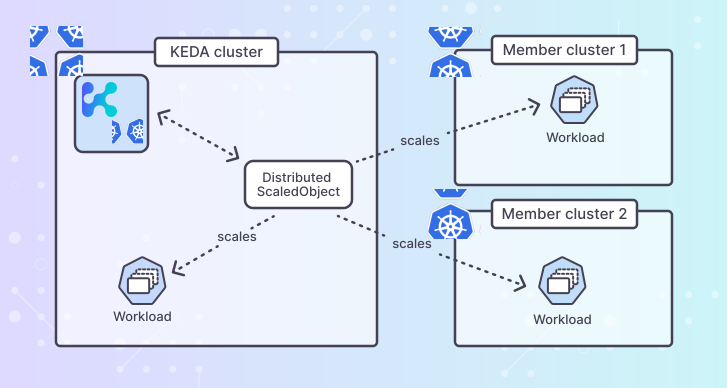
- KEDA Cluster: This cluster runs the Kedify stack and manages the scaling logic. It monitors the metrics and decides when to scale workloads up or down.
- Member Clusters: These clusters host the actual workloads that need to be scaled. They expose their kube-apiserver to the KEDA cluster for management.
The member clusters don’t need to run KEDA themselves, as scaling decisions for DistributedScaledObject or DistributedScaledJob are made by the KEDA cluster. This allows for a smaller
footprint on member clusters and enables edge scenarios where resources are limited.
Connecting Member Clusters
Section titled “Connecting Member Clusters”In order to connect a member cluster to the KEDA cluster, you need to make the kube-apiserver of the member cluster accessible from the KEDA cluster. This can be done using various methods such as VPN, VPC peering, or exposing the API server via a load balancer with proper security measures.
With the connectivity established, you can use Kedify’s kubectl plugin to register member clusters to the KEDA cluster:
kubectl kedify mc setup-member <name> --keda-kubeconfig <path> --member-kubeconfig <path>This command will use the provided kubeconfig files to set up the necessary access and permissions for the KEDA cluster to manage the member cluster.
The member-kubeconfig should have sufficient permissions to create RBAC, ServiceAccount and keda namespace in the member cluster, these resources will be
created with minimal privileges required for Kedify multi-cluster to operate. The keda-kubeconfig should have permissions to patch Secret named
kedify-agent-multicluster-kubeconfigs in keda namespace in the KEDA cluster. For connecting multiple member clusters, you can repeat the above command
with different names and kubeconfig files for each member cluster.
In case you would like the KEDA cluster to connect to the member cluster using a different address than the one specified in the member-kubeconfig, you can provide
--member-api-url <url> flag to override the API server URL.
You can also list and remove registered member clusters using the following commands:
kubectl kedify mc list-memberskubectl kedify mc delete-member <name>DistributedScaledObject
Section titled “DistributedScaledObject”A ScaledObject is a KEDA resource that defines how to scale a specific workload based on certain metrics. The DistributedScaledObject extends this concept to support
scaling across multiple clusters. It includes all the fields of a standard ScaledObject, along with additional fields to specify the member clusters and their configurations.
DistributedScaledObject Specification
Section titled “DistributedScaledObject Specification”apiVersion: keda.kedify.io/v1alpha1kind: DistributedScaledObjectmetadata: name: nginxspec: memberClusters: # optional list of member clusters to use, if omitted all registered member clusters will be used - name: member-cluster-1 weight: 4 # weight determines the proportion of replicas to be allocated to this cluster - name: member-cluster-2 weight: 6 rebalancingPolicy: # optional parameters for rebalancing replicas across member clusters in case of outage or issues gracePeriod: 1m # when a member cluster becomes unreachable, wait for this duration before rebalancing replicas to other clusters scaledObjectSpec: # standard ScaledObject spec scaleTargetRef: kind: Deployment name: nginx minReplicaCount: 1 maxReplicaCount: 10 triggers: - type: kubernetes-resource metadata: resourceKind: ConfigMap resourceName: mock-metric key: metric-value targetValue: "5"In this example, the DistributedScaledObject named nginx is configured to scale a Deployment named nginx across two member clusters. The memberClusters field
whitelists the member clusters to be used along with their respective weights, which determine how many replicas should be allocated to each cluster. This section is optional;
if omitted, all registered member clusters will be used with equal weights.
The workloads of type Deployment are expected to be present in relevant member clusters in a matching namespace as the DistributedScaledObject.
The rebalancingPolicy field allows you to specify how to handle situations where a member cluster becomes unreachable. In this case, after the specified gracePeriod,
the replicas that were allocated to the unreachable cluster will be redistributed among the remaining healthy clusters. Once the unreachable cluster becomes healthy again,
the replicas will be rebalanced back according to the defined weights.
Status of the DistributedScaledObject provides insights into the scaling state across member clusters:
status: memberClusterStatuses: member-cluster-1: currentReplicas: 2 description: Cluster is healthy desiredReplicas: 2 id: /etc/mc/kubeconfigs/member-cluster-1.kubeconfig+kedify-agent@member-cluster-1 lastStatusChangeTime: "2025-11-05T16:46:39Z" state: Ready member-cluster-2: currentReplicas: 3 description: Cluster is healthy desiredReplicas: 3 id: /etc/mc/kubeconfigs/member-cluster-2.kubeconfig+kedify-agent@member-cluster-2 lastStatusChangeTime: "2025-11-05T15:45:44Z" state: Ready membersHealthyCount: 2 membersTotalCount: 2 selector: kedify-agent-distributedscaledobject=nginx totalCurrentReplicas: 5DistributedScaledJob
Section titled “DistributedScaledJob”Similar to DistributedScaledObject, the DistributedScaledJob extends KEDA’s ScaledJob concept to support job-based workloads across multiple clusters.
It includes all the fields of a standard ScaledJob, along with additional fields to specify the member clusters and their configurations.
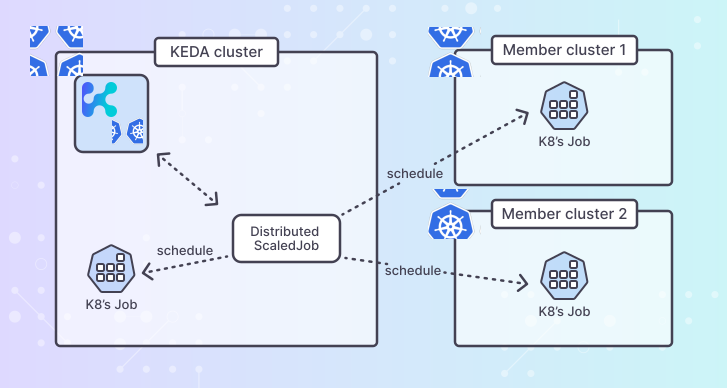
- Job-based workload: Instead of scaling Deployments, it creates and manages Jobs based on metrics
Prerequisite - Enabling KEDA raw metrics
Section titled “Prerequisite - Enabling KEDA raw metrics”Before using DistributedScaledJobs, make sure that the raw metrics endpoint in KEDA is enabled.
Use the environment variable RAW_METRICS_GRPC_PROTOCOL and set it to the value enabled.
In the values.yaml file:
keda: env: - name: RAW_METRICS_GRPC_PROTOCOL value: enabledFrom the command line - add this argument to your helm installation command:
helm install ... \ --set-json 'keda.env=[{"name":"RAW_METRICS_GRPC_PROTOCOL","value":"enabled"}]'DistributedScaledJob Specification
Section titled “DistributedScaledJob Specification”The following example of a DistributedScaledJob splits the execution of job processing from the RabbitMQ task queue between two member clusters in a 2:3 ratio.
apiVersion: keda.kedify.io/v1alpha1kind: DistributedScaledJobmetadata: name: processor-jobspec: memberClusters: # optional list of member clusters to use, if omitted all registered member clusters will be used - name: member-cluster-1 weight: 2 # weight determines the proportion of jobs to be allocated to this cluster - name: member-cluster-2 weight: 3 clusterScheduling: strategy: weightedRoundRobin failoverPolicy: gracePeriod: 1m # wait before re-creating jobs that do not progress from Pending to Running hardTaintDuration: 5m # taint a failing cluster before scheduling jobs on it again softTaintDuration: 3m # if another failure happens in this window, apply a hard taint scaledJobSpec: # standard ScaledJob spec failedJobsHistoryLimit: 2 # keep up to 2 failed jobs, delete all older successfulJobsHistoryLimit: 2 # keep up to 2 jobs that completed successfully, delete all older jobTargetRef: template: spec: containers: - name: processor image: myapp:latest command: ["process"] restartPolicy: Never pollingInterval: 30 maxReplicaCount: 20 scalingStrategy: strategy: pendingAware # pending/stuck jobs can be re-created on another cluster triggers: - type: rabbitmq name: rabbit metadata: queueName: tasks host: http://guest:password@localhost:15672/path/vhost value: "5"In this example, the DistributedScaledJob named processor-job is configured to scale Jobs across two member clusters.
clusterScheduling.failoverPolicy controls how taints are applied to failing clusters.
If omitted, defaults are applied (gracePeriod: 1m, hardTaintDuration: 5m, softTaintDuration: 3m).
See FailoverPolicy for details.
The jobTargetRef field contains the standard Kubernetes Job template specification. Jobs are created in the member clusters based on the scaling metrics and cluster weights.
Soft And Hard Taints
Section titled “Soft And Hard Taints”Soft and hard taints for failing clusters: when a call from KEDA cluster to member cluster fails, that cluster is not removed from scheduling immediately. Instead, it is soft-tainted first. After a second failure, the soft taint is escalated to a hard taint. This helps prevent unnecessary scheduling pauses due to temporary network glitches.
Cluster Scheduling Strategies
Section titled “Cluster Scheduling Strategies”WeightedRoundRobin
Section titled “WeightedRoundRobin”weightedRoundRobin is the default strategy. If spec.clusterScheduling.strategy is omitted, DistributedScaledJob uses weightedRoundRobin.
In this mode, jobs are distributed by memberClusters[].weight.
- hard-tainted clusters are excluded from scheduling for all workloads
- soft-tainted clusters remain eligible
memberClusters[].scheduling.priorityis ignored in this mode
PriorityFailover
Section titled “PriorityFailover”priorityFailover provides primary/failover behavior. The scheduler prefers the highest memberClusters[].scheduling.priority cluster, and only falls back when that cluster is excluded (for example tainted or overloaded).
Short example focused on failover configuration: Member cluster member-primary is preferred by the scheduler for new jobs until a job fails to progress from Pending to Running for longer than spec.clusterScheduling.failoverPolicy.gracePeriod.
After the grace period is reached, the cluster is tainted for this affinity tuple (class: team-a, size: 4): jobs with size 4 and higher are excluded from that tainted cluster, while smaller jobs can still be scheduled there.
apiVersion: keda.kedify.io/v1alpha1kind: DistributedScaledJobmetadata: name: processor-job-failoverspec: clusterScheduling: strategy: priorityFailover workloadAffinity: class: team-a size: 4 failoverPolicy: gracePeriod: 1m hardTaintDuration: 5m softTaintDuration: 3m memberClusters: - name: member-primary scheduling: priority: 100 - name: member-failover scheduling: priority: 0 scaledJobSpec: scalingStrategy: strategy: pendingAwareImportant differences vs weightedRoundRobin:
clusterScheduling.workloadAffinityis required inpriorityFailovermemberClusters[].scheduling.priorityis required for each member cluster inpriorityFailover- failover taints are evaluated by
(order, size, priority):- a taint recorded at size
Nexcludes workloads with size>= N - workloads with smaller size can still use the same cluster
- a taint recorded at size
- transient
create JobAPI failures are treated as transient and do not taint the cluster inpriorityFailover - dsj
priorityFailoversupportsscaledJobSpec.scalingStrategy.strategy: pendingAware(or omitted strategy, which defaults topendingAware) podOverrides.affinityis only pod-placement configuration and does not drive cluster failover selection
FailoverPolicy
Section titled “FailoverPolicy”spec.clusterScheduling.failoverPolicy controls failover timing, taint duration and duplicate-job handling.
spec: clusterScheduling: failoverPolicy: gracePeriod: 1m hardTaintDuration: 5m softTaintDuration: 3m duplicationPolicy: keepAllFields:
gracePeriod(default:1m): how long a pending job can stay pending before it is treated as stuck.hardTaintDuration(default:5m): how long a cluster remains hard-tainted after failure.softTaintDuration(default:3m): soft-taint window for escalation.- If another failure happens within this window, taint escalates to hard taint.
- Set to
0sfor immediate hard taint on first failure.
duplicationPolicy(default:keepAll): how to resolve duplicate source/failover jobs in pending-aware failover.
Duplication Policy
Section titled “Duplication Policy”-
keepAll- Behavior: keep source and failover jobs running when both exist.
- Provisioning tendency: can temporarily overprovision during failover/recovery windows (availability-first).
- Underprovisioning risk: lowest among the policies.
-
preferFailover- Behavior: prefer the failover job; source is deleted once a healthy failover replacement is confirmed.
- Provisioning tendency: short-lived overprovisioning can happen while waiting for replacement health confirmation.
- Underprovisioning risk: low to medium (mainly during failover transitions if replacement cannot be confirmed quickly).
-
preferSource- Behavior: prefer the original source job; replacement is deleted when source should resume ownership.
- Provisioning tendency: generally avoids prolonged overprovisioning.
- Underprovisioning risk: medium to high during unstable source-cluster recovery (source can be preferred before fully stable).
-
immediateSourceCleanup- Behavior: source job is deleted immediately after failover scheduling.
- Provisioning tendency: minimizes overprovisioning.
- Underprovisioning risk: highest if the replacement is delayed or fails to become healthy.
Rule of thumb:
- If you optimize for continuity/availability, use
keepAllorpreferFailover. - If you optimize for strict capacity/cost control, use
immediateSourceCleanuporpreferSource, accepting higher underprovisioning risk.
DistributedScaledJob Pod Overrides
Section titled “DistributedScaledJob Pod Overrides”DistributedScaledJob supports per-cluster overrides of selected pod/container fields. Overrides are defined on each memberClusters[] entry and are applied only when creating new Jobs.
Existing Jobs are not modified in place.
Supported overrides:
podOverrides.nodeSelector: merged into the podnodeSelectormap (override values replace existing keys)podOverrides.tolerations: merged with deterministic deduplication by identity key(key, operator, effect, value);jobTargetReftolerations are applied first andpodOverrides.tolerationsare applied on top, so when the identity key matches an entry frompodOverrides.tolerationsoverrides the one fromjobTargetRef(last-writer-wins)podOverrides.affinity: replaces base pod affinitypodOverrides.containerOverrides.<containerName>.image: replaces container imagepodOverrides.containerOverrides.<containerName>.env: merged by env var name with override taking precedencepodOverrides.containerOverrides.<containerName>.resources:requestsandlimitsare merged by resource nameclaimsare replaced when explicitly provided (including empty list to clear existing claims)
If containerOverrides references a container name that does not exist in scaledJobSpec.jobTargetRef.template.spec.containers, the override is ignored and a warning event is emitted.
Example:
apiVersion: keda.kedify.io/v1alpha1kind: DistributedScaledJobmetadata: name: processor-jobspec: memberClusters: - name: member-cluster-1 weight: 2 podOverrides: nodeSelector: nodepool: gpu tolerations: - key: "gpu" operator: "Exists" effect: "NoSchedule" affinity: nodeAffinity: requiredDuringSchedulingIgnoredDuringExecution: nodeSelectorTerms: - matchExpressions: - key: region operator: In values: ["us-east-1"] containerOverrides: processor: image: my-registry.local/processor:v2 env: - name: LOG_LEVEL value: debug resources: requests: cpu: 200m memory: 256Mi limits: cpu: "1" memory: 1Gi - name: member-cluster-2 weight: 3 clusterScheduling: strategy: weightedRoundRobin failoverPolicy: gracePeriod: 1m hardTaintDuration: 5m softTaintDuration: 3m scaledJobSpec: jobTargetRef: template: spec: containers: - name: processor image: myapp:latest restartPolicy: Never triggers: - type: rabbitmq name: rabbit metadata: queueName: tasks host: http://guest:password@localhost:15672/path/vhost value: "5"Status of the DistributedScaledJob provides insights into the job state across member clusters:
status: desiredJobs: 10 runningJobs: 8 pendingJobs: 2 memberClusterStatuses: member-cluster-1: description: Cluster is healthy id: /etc/mc/kubeconfigs/member-cluster-1.kubeconfig+kedify-agent@member-cluster-1 runningJobs: 3 pendingJobs: 1 stuckJobs: 0 softTainted: false lastStatusChangeTime: "2025-11-05T16:46:39Z" state: Ready excluded: false member-cluster-2: description: Cluster is healthy id: /etc/mc/kubeconfigs/member-cluster-2.kubeconfig+kedify-agent@member-cluster-2 runningJobs: 5 pendingJobs: 1 stuckJobs: 0 softTainted: false lastStatusChangeTime: "2025-11-05T15:45:44Z" state: Ready excluded: false selector: kedify-agent-distributedscaledjob=processor-jobFor a walkthrough example on how to set up and use multi-cluster scaling with Kedify, refer to the examples repository.
Scaling strategies
Section titled “Scaling strategies”Scaling strategies are used to compute how many new Jobs to create across clusters.
Choose one of: basic, pendingAware, custom, accurate, eager.
Inputs:
- desiredJobsCount: target number derived from metrics and DSJ min/max bounds
- runningJobsCount: number of non-terminal Jobs currently present (includes “pending”)
- pendingJobsCount: subset of running Jobs considered “pending” (not yet progressed)
- maxReplicaCount: DSJ upper bound on total concurrent non-terminal Jobs
Scale to the gap between desired and running.
- Formula:
desired - running - Behavior: simple “catch up” to desired.
Pending-Aware
Section titled “Pending-Aware”Immediately re-create pending Jobs on other clusters while honoring capacity.
- Idea: replace stuck Jobs.
- Formula:
needed = max(0, desired - running + pending)capacity = max(0, maxReplica - running)scaleTo = min(needed, capacity)
- Use when pending/stuck Jobs should be replaced/failovered elsewhere quickly.
Custom
Section titled “Custom”User-defined scaling using a percentage of running Jobs and optional queue deduction.
- Inputs:
runningJobPercentage(float),queueLengthDeduction(int) - Formula:
scaleTo = min(desired - deduction - running * percentage, maxReplica) - Notes:
- If percentage parse fails, falls back to Basic.
Accurate
Section titled “Accurate”Balance towards desired while staying within capacity; subtract pending from desired unless over max.
- Formula:
- If
desired + running > maxReplica:scaleTo = maxReplica - running - Else:
scaleTo = desired - pending
- If
- Use when pending work should defer new creations and capacity must be respected.
Fill available capacity (excluding pending) up to desired.
- Formula:
scaleTo = min(maxReplica - running - pending, desired) - Use when it’s safe to aggressively utilize capacity.
Choosing a strategy
Section titled “Choosing a strategy”- Pending-Aware (default): prioritize re-creating stuck Jobs elsewhere.
- Basic: simplest gap-based scaling.
- Accurate: conservative, subtracts pending.
- Eager: aggressive, fills capacity quickly.
- Custom: tailor behavior with percentage and deductions.
Pausing Scaling Temporarily
Section titled “Pausing Scaling Temporarily”Both DistributedScaledObject and DistributedScaledJob support pausing via annotation:
metadata: annotations: autoscaling.keda.sh/paused: "true"When this annotation is set:
DistributedScaledObjectreconciliation skips scaling actions across member clustersDistributedScaledJobreconciliation skips creating new Jobs across member clusters- status condition
Paused=Trueis set on the distributed resource
DistributedScaledObject also supports autoscaling.keda.sh/paused-replicas:
metadata: annotations: autoscaling.keda.sh/paused-replicas: "3"Behavior for DistributedScaledObject:
autoscaling.keda.sh/paused-replicaspauses scaling and sets a fixed total target replicas value- if both annotations are set,
autoscaling.keda.sh/paused-replicastakes precedence - value must be a non-negative integer
Pause existing resources:
kubectl annotate distributedscaledobject <name> autoscaling.keda.sh/paused="true"kubectl annotate distributedscaledjob <name> autoscaling.keda.sh/paused="true"kubectl annotate distributedscaledobject <name> autoscaling.keda.sh/paused-replicas="3"To resume scaling, remove the annotation:
kubectl annotate distributedscaledobject <name> autoscaling.keda.sh/paused-kubectl annotate distributedscaledjob <name> autoscaling.keda.sh/paused-kubectl annotate distributedscaledobject <name> autoscaling.keda.sh/paused-replicas-