
Pod Resource Autoscaler (PRA)
Pod Resource Autoscaler (PRA) continuously adjusts CPU and/or memory requests/limits for a single container in matching pods, based on observed utilization. Unlike horizontal autoscaling, PRA does not change replica count; it resizes container resources in place.
In-place Updates
Section titled “In-place Updates”PRA applies resource changes through the pods/resize subresource. If in-place resize is not supported by your cluster, resize attempts will fail and PRA will emit warning events.
Relevant Kubernetes docs:
- https://kubernetes.io/blog/2023/05/12/in-place-pod-resize-alpha/
- https://kubernetes.io/docs/concepts/workloads/autoscaling/#requirements-for-in-place-resizing
Prerequisites
Section titled “Prerequisites”- Kubernetes API access to
nodes/proxy(PRA calls kubelet/stats/summarythrough the apiserver node proxy). - Cluster support for in-place pod resize (required for updates to take practical effect).
Enablement and Pod Opt-in
Section titled “Enablement and Pod Opt-in”PRA is available via the Kedify Agent and can be enabled or disabled using the environment variable PRA_ENABLED (defaults to false).
By default, all pods matched by a PodResourceAutoscaler are eligible for reconciliation.
If you want explicit per-pod opt-in, set the environment variable PRA_REQUIRES_ANNOTATED_PODS on Kedify Agent to true
Both flags can be set in the Kedify Agent Helm Values file:
agent: features: podResourceAutoscalersEnabled: true praRequiresAnnotatedPods: trueWhen annotation requirement is enabled, pods must include:
pra.kedify.io/reconcile: enabledPod Resource Autoscaler (PRA) CRD
Section titled “Pod Resource Autoscaler (PRA) CRD”The custom resource uses:
apiVersion: keda.kedify.io/v1alpha1kind: PodResourceAutoscalerSpec Overview
Section titled “Spec Overview”See PodResourceAutoscaler API reference for fields and validation.
Example
Section titled “Example”apiVersion: keda.kedify.io/v1alpha1kind: PodResourceAutoscalermetadata: name: load-generatorspec: target: kind: deployment name: load-generator containerName: load-generator
policy: pollInterval: 5s consecutiveSamples: 3 cooldown: 2m after: containerReady delay: 10s
cpu: requests: scaleUpThreshold: 75 scaleDownThreshold: 60 targetUtilization: 70 limits: scaleUpThreshold: 85 scaleDownThreshold: 70 targetUtilization: 75 memory: requests: scaleUpThreshold: 75 scaleDownThreshold: 60 targetUtilization: 70 limits: scaleUpThreshold: 85 scaleDownThreshold: 70 targetUtilization: 75
bounds: cpu: requests: min: 100m max: "2" step: 100m stepPercent: 25 limits: min: 100m max: "3" step: 100m stepPercent: 25 memory: requests: min: 96Mi max: 2Gi step: 64Mi stepPercent: 25 limits: min: 300Mi max: 3Gi step: 64Mi stepPercent: 25Addressing Pods
Section titled “Addressing Pods”See PodResourceAutoscaler API reference for fields and validation.
Controller Behavior
Section titled “Controller Behavior”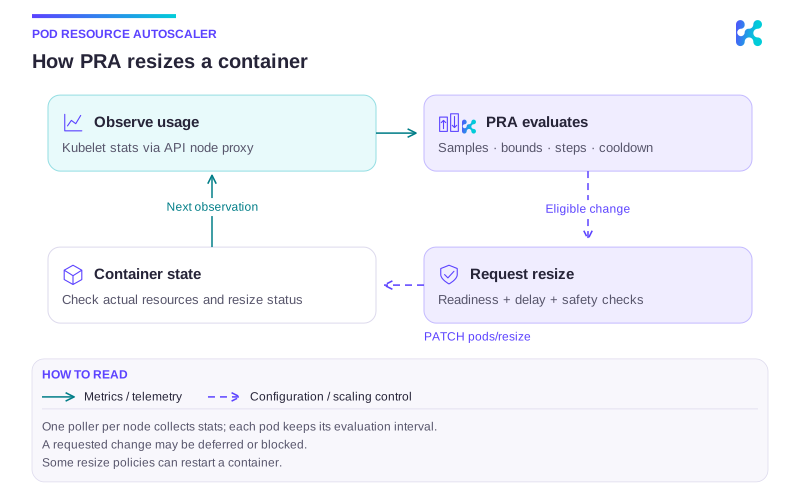
Diagram description
PRA in the Kedify Agent collects kubelet stats through the API server node proxy. It evaluates each tracked pod on its own interval, checks consecutive samples, bounds, step limits and cooldown, then applies eligible changes through pods/resize. Kubernetes applies feasible changes; inspect actual container resources and resize status. The loop observes updated utilization and keeps replica count unchanged.
- Watches
PodResourceAutoscalerandPod. - Tracks matching pods keyed by pod UID.
- Groups tracked pods by node and runs one poller per node.
- The poller fetches kubelet
/stats/summaryonce per cycle and evaluates only tracked pods on that node.
Polling Semantics
Section titled “Polling Semantics”- Node poll interval is the minimum
pollIntervalamong tracked pods on that node. - Even when node polling is more frequent, each pod is evaluated only when its own
pollIntervalhas elapsed. - Apply gating (
after/delay) controls patch application, not metric sampling.
Scaling Policy
Section titled “Scaling Policy”Consecutive samples confirm a sustained threshold breach; bounds, step limits and cooldown constrain the resulting resize. The following CPU-only example shows requests and limits responding independently to the same usage samples. It is illustrative, not measured output or the exact policy from the YAML above.
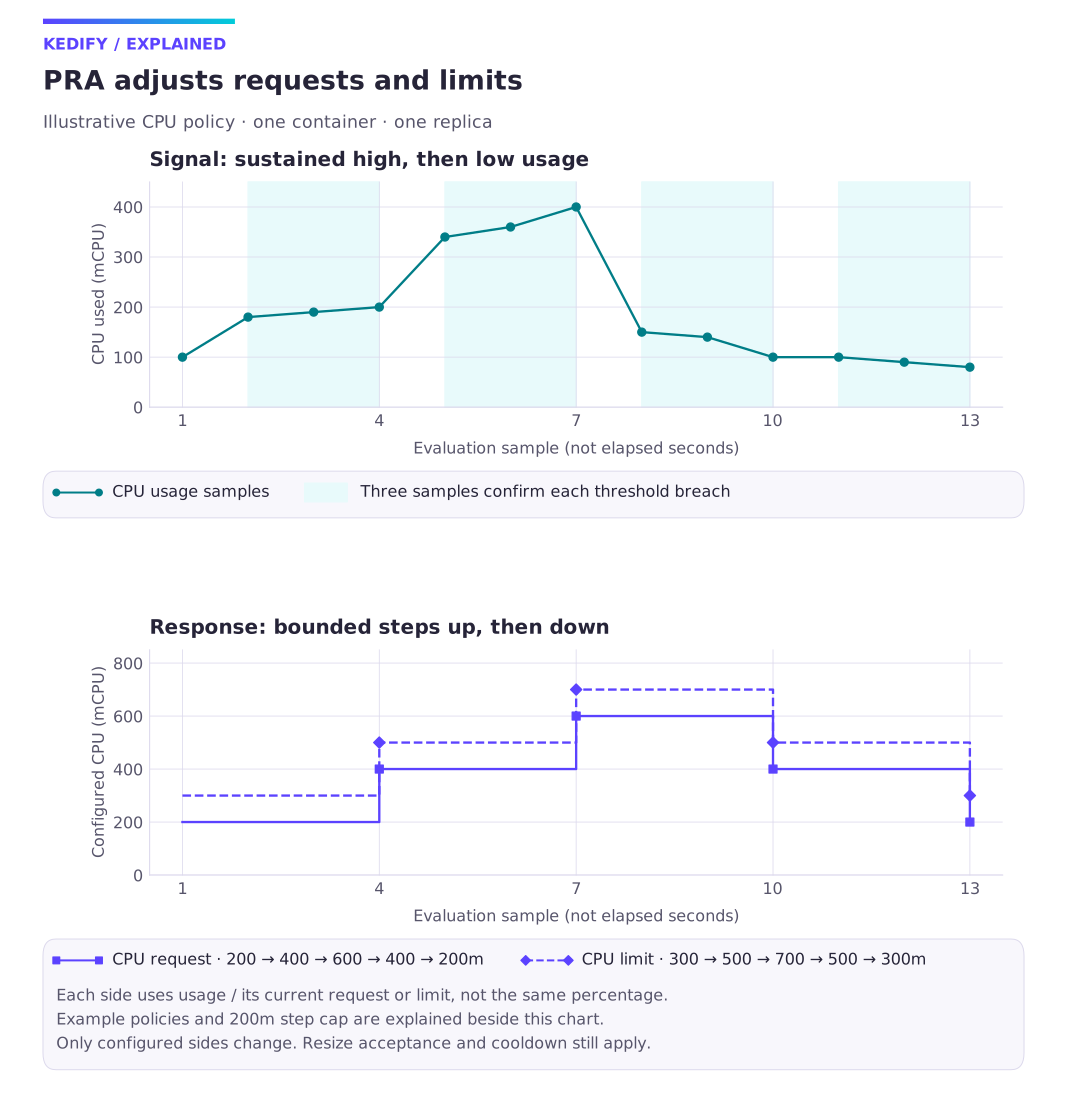
Diagram description
Illustrative CPU usage rises then falls. After three qualifying samples, CPU requests change from 200 to 400 to 600 to 400 to 200m, and limits from 300 to 500 to 700 to 500 to 300m. Each side has its own utilization policy. Changes are capped at 200m; replicas remain at one.
The chart uses three consecutive samples and a maximum change of 200m per resize. Request thresholds are 75% up / 35% down with a 50% target; limit thresholds are 60% up / 25% down with a 40% target. Each percentage uses that side’s current value as its denominator. For example, 200m usage targets a 400m request and a 500m limit. Later changes hit the 200m step cap. The example assumes cooldown expires before the next evaluation and each resize completes before the next sample.
Only sides configured in policy change. A request-only policy leaves limits unchanged; memory uses its own policy and bounds. Compare the requested configuration with actual allocated resources and resize status.
See PodResourceAutoscaler API reference for fields and validation.
Resource Bounds and Step Control
Section titled “Resource Bounds and Step Control”See PodResourceAutoscaler API reference for fields and validation.
Pause / Resume
Section titled “Pause / Resume”Set:
spec: paused: trueWhen paused, PRA stops tracking/scaling for that autoscaler and resumes on unpause.
While paused, PRA status conditions are set to:
Ready=True(reason=Paused)Active=False(reason=Paused)Scaling=False(reason=Paused)
PRP and PRA Together
Section titled “PRP and PRA Together”PRP and PRA can both write pod resources. If both target the same container/resource fields, regular patch semantics apply (last writer wins), which can cause control-loop fights.
Recommendation:
- Do not overlap ownership of the same container
requests/limitsfields between PRP and PRA. Use the field-level ownership example to review the split.
PRA patches the pods/resize subresource using a merge-style patch (not server-side apply). If another controller (or manual apply) writes the same fields, last writer wins.
Resize Safety and Application
Section titled “Resize Safety and Application”- Pod QoS class must not change during in-place resize; candidate updates that would change QoS are skipped and reported via event.
- If memory resize may restart a container (for example
resizePolicy.restartPolicy=RestartContainer), PRA emits an event to signal a restart may occur. - Scale up is skipped while resize is pending/deferred/infeasible; any scaling is skipped while resize is actively in progress.
- Apply is gated by
policy.afterandpolicy.delay:after=containerReady(default): applies only when the target container is readyafter=running: applies as soon as the pod is Runningafter=podReady: requires PodReady instead of container readiness
Events
Section titled “Events”PRA emits Kubernetes events for validation, metrics health, and scaling lifecycle. Common events include:
PodResourceAutoscalerMetricsUnavailable/PodResourceAutoscalerMetricsRecoveredPodResourceAutoscalerBaselineUnavailable/PodResourceAutoscalerBaselineAvailablePodResourceAutoscalerScaleUp/PodResourceAutoscalerScaleDownPodResourceAutoscalerResizeInProgress/PodResourceAutoscalerResizePendingPodResourceAutoscalerQoSInvariantBlockedPodResourceAutoscalerResizeMayRestartPodResourceAutoscalerScaleFailed
Validation
Section titled “Validation”See PodResourceAutoscaler API reference for fields and validation.
Quick Start
Section titled “Quick Start”1. Create a cluster with in-place resize enabled
Section titled “1. Create a cluster with in-place resize enabled”k3d cluster create dyn-resources --no-lb \ --k3s-arg "--disable=traefik,servicelb@server:*" \ --k3s-arg "--kube-apiserver-arg=feature-gates=InPlacePodVerticalScaling=true@server:*"2. Deploy an app
Section titled “2. Deploy an app”kubectl create deployment my-app --image=ghcr.io/kedify/sample-minute-metrics:latestkubectl rollout status deploy/my-appkubectl set resources deployment/my-app --requests=cpu=100m,memory=128Mi --limits=cpu=2,memory=256Mikubectl rollout status deploy/my-app3. Create PRA
Section titled “3. Create PRA”cat <<EOF | kubectl apply -f -apiVersion: keda.kedify.io/v1alpha1kind: PodResourceAutoscalermetadata: name: my-app-praspec: target: kind: deployment name: my-app containerName: my-app policy: pollInterval: 5s consecutiveSamples: 2 cooldown: 30s cpu: requests: scaleUpThreshold: 1 scaleDownThreshold: 0 targetUtilization: 50 bounds: cpu: requests: min: 100m max: "2" step: 100mEOF4. Verify
Section titled “4. Verify”kubectl get pra -o widekubectl get events --sort-by=.lastTimestamp | grep PodResourceAutoscalerkubectl get pod -l app=my-app -o jsonpath="{.items[0].spec.containers[0].resources}"Metrics
Section titled “Metrics”See Metrics, status and health signals for fields and validation.
PRA requires (at minimum):
- Pods:
get/list/watch - Pods/resize subresource:
patch - Nodes proxy:
get - PodResourceAutoscalers:
get/list/watch/update/patch+status get/update/patch - Deployments/DaemonSets/StatefulSets:
get/list/watch
Continue with this topic
Section titled “Continue with this topic”Configure and verify: Test PRA under load.
Diagnose: Pod resources do not resize as expected.
Related capabilities: Vertical scaling: PRA and PRP.