
Scaling Groups: shared replica capacity
A ScalingGroup is a CRD in Kedify KEDA allowing to set shared max capacity for multiple ScaledObjects belonging to a logical group. Group membership is defined dynamically by a label selector.
This feature must be enabled in the KEDA operator by setting env variable:
KEDIFY_SCALINGGROUPS_ENABLED=trueArchitecture
Section titled “Architecture”Any already existing or new ScaledObjects can be added to a ScalingGroup by ensuring matching labels to the group’s selector. The group’s capacity is shared among all members, each ScaledObject is guaranteed to have their
minReplicaCount and can scale up to maxReplicaCount unless the group capacity would be exceeded.
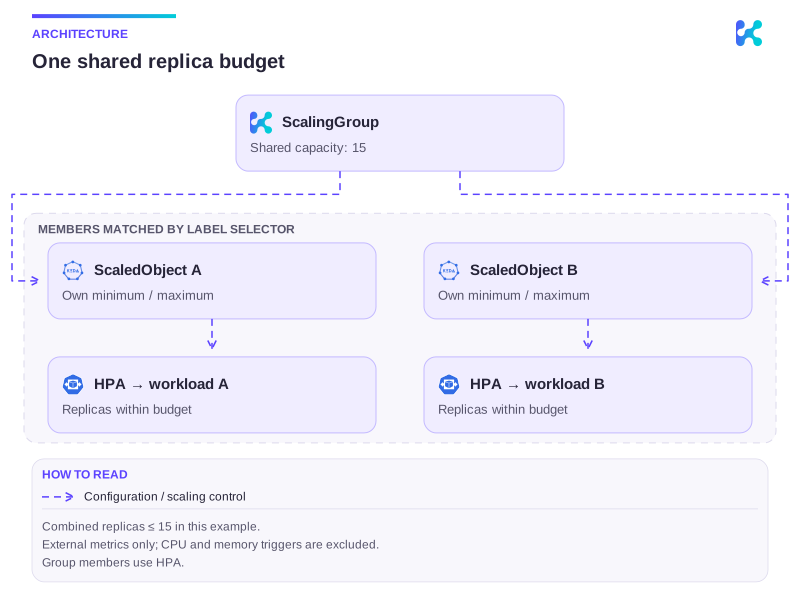
Diagram description
A ScalingGroup selects multiple ScaledObjects by labels and caps their combined replicas. Each member retains its minimum; HPA controls each workload. The shared cap protects a downstream dependency.
Only triggers with metrics from external.metrics.k8s.io are supported for ScalingGroups which means cpu and memory scalers are excluded from this functionality.
KPA compatibility
Section titled “KPA compatibility”ScalingGroup members use Kubernetes HPA in the initial Kedify Pod Autoscaler preview. When an existing ScaledObject explicitly selects KPA and begins matching a group selector, the ScalingGroup controller atomically changes autoscaling.kedify.io/class to hpa while assigning membership and emits an AutoscalingClassFallback Warning event. KEDA then replaces the generated KPA with HPA.
Removing the matching label or group does not automatically restore an explicit KPA selection. The ScaledObject remains explicitly configured for HPA so leaving the shared-capacity policy cannot silently change its autoscaling controller. After membership has been removed, select autoscaling.kedify.io/class: kpa again if the workload should return to KPA. A ScaledObject that used KPA only through the installation default is not rewritten; it uses HPA while it is a member and follows the installation default again after it leaves.
Example
Section titled “Example”Below is a simple ScalingGroup restricting the total capacity to 15 replicas. The group consists of three ScaledObjects with the label scaling-group: pear-db.
Status of the group shows members and their scaling status.
apiVersion: keda.kedify.io/v1alpha1kind: ScalingGroupmetadata: name: pear-dbspec: capacity: 15 # max capacity for the whole group selector: # label selector to match ScaledObjects matchLabels: scaling-group: pear-dbAfter applying the group and matching labels through their owner, inspect kubectl get scalinggroup pear-db -o yaml and the member ScaledObjects. Confirm membership, remaining capacity and capped desired replicas match the intended budget. The ScalingGroup API reference owns exact status fields. To undo the example, remove only its group/membership labels through the owner; verify each workload returns to its own limits and inspect any retained HPA class selection.
Continue with this topic
Section titled “Continue with this topic”Diagnose: Workload does not scale, or scales too slowly.
Related capabilities: Kedify Pod Autoscaler (KPA).