
Install with Flux
Use Flux source-controller and helm-controller to reconcile Kedify from Git. Install the Flux controllers first and choose compatible chart versions. The generated resources use source.toolkit.fluxcd.io/v1 HelmRepository and helm.toolkit.fluxcd.io/v2 HelmRelease APIs.
Export from the Dashboard
- Open Clusters → Connect cluster, or Installation on an existing cluster, and select Flux.
- Configure components, cluster name, Agent API key and any tenant or member clusters.
- In GitOps settings, set the Flux controller namespace (default
flux-system). - Select Helm Release for complete resources. Select Values only when integrating the chart values into your own HelmRelease. Keep the Secret reference described below.
- Download each selected output, supply credentials, then add the files to a Flux Kustomization in your Git repository.
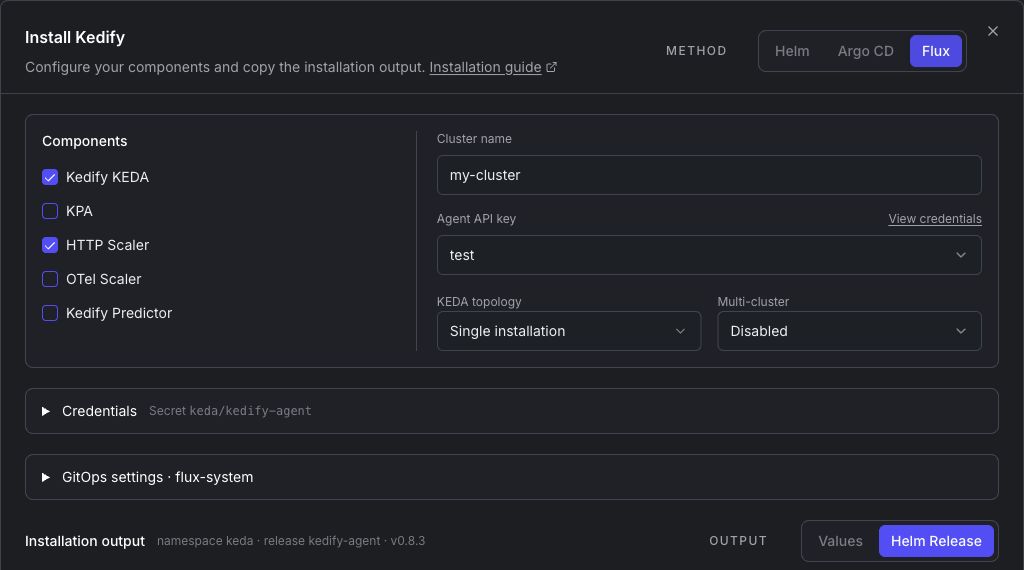
Download YAML downloads only the selected artifact. The first release using each chart source includes its shared HelmRepository; keep that file when collecting the generated releases. Additional files reuse that source without repeating it.
Provide credentials
Create namespace keda and supply Secret kedify-agent with the apikey field before reconciliation. Use your secret manager or encrypted Secret workflow. In the dashboard, View credentials opens the API key selector, organization key management link and Secret copy/preview actions. Copied Secret YAML contains credentials; keep it out of unencrypted Git.
The Agent HelmRelease lives in keda because Flux valuesFrom references a Secret in the same namespace as the HelmRelease. Its chart repository can remain in flux-system. This requires Flux cross-namespace source references to be allowed; if your controllers disable them, place the source in keda and adjust sourceRef.namespace in your maintained manifests.
Flux reads apikey into agent.apiKey through valuesFrom. The values retain agent.createApiKeySecret: true, so Helm continues to render the Agent Secret. Do not change this to false when adopting an existing chart-managed Secret: Helm can delete a resource removed from the rendered chart. Coordinate your secret manager's ownership and rotation with Helm; avoid two reconcilers continuously overwriting the same Secret fields.
Repository and Helm Release
This single-installation example enables KEDA and HTTP Scaler. Replace the organization ID and cluster name, and supply the credential Secret first. The exact chart version belongs in spec.chart.spec.version; interval controls reconciliation, not the version. Update the version through a reviewed Git change.
apiVersion: source.toolkit.fluxcd.io/v1kind: HelmRepositorymetadata: name: kedify namespace: flux-systemspec: interval: 1h url: https://kedify.github.io/charts---apiVersion: helm.toolkit.fluxcd.io/v2kind: HelmReleasemetadata: name: kedify-agent namespace: kedaspec: interval: 10m timeout: 10m releaseName: kedify-agent targetNamespace: keda storageNamespace: keda install: createNamespace: true chart: spec: chart: kedify-agent version: v0.8.3 sourceRef: kind: HelmRepository name: kedify namespace: flux-system valuesFrom: - kind: Secret name: kedify-agent valuesKey: apikey targetPath: agent.apiKey values: clusterName: my-cluster agent: orgId: REPLACE_WITH_ORGANIZATION_ID createApiKeySecret: true keda: enabled: true keda-add-ons-http: enabled: true otel-add-on: enabled: false kedify-predictor: enabled: falseThe dashboard uses stable, namespace-qualified resource names for generated HelmReleases. The Helm release identity is set separately by releaseName, targetNamespace and storageNamespace. For OCI charts, generated HelmRepositories use spec.type: oci and an oci:// registry URL.
Adopt an existing Helm release
Back up the existing credential Secret securely before adoption. Keep valuesFrom and chart-managed Secret creation enabled. Verify the Agent is still connected under the same cluster after Flux's first reconciliation. The generated example alone is not a complete migration plan for installations with custom values.
Multi-tenant and multi-cluster installations
For multi-tenant KEDA and KPA, include all generated releases and preserve their namespace-qualified dependsOn references. Exactly one KPA release installs the CRDs. When KPA is enabled only on tenants, the first tenant's CRD-owning KPA release bootstraps independently so it can establish the CRDs before the primary release waits for readiness.
For multi-cluster registration, apply member preparation in each member cluster and reconcile the member kubeconfig Secret templates in the Agent's namespace. The templates contain placeholders, not working credentials or member RBAC. Multi-tenant topology can be combined with distributed scaling; dedicated KEDA/KPA mode requires cluster-wide watches.
Verify
kubectl get helmrepositories -Akubectl get helmreleases -Akubectl get pods -n kedaCheck the source and every HelmRelease report Ready=True, then run the installation checks and confirm the Dashboard connection. For reference, see Flux's values references and Helm release placement.