
HTTP Scaling with Argo Rollouts Canary
This guide shows how to run a canary deployment with Argo Rollouts while keeping your application autoscaled by Kedify. The kedify/http Argo Rollouts traffic router plugin writes the desired traffic weights and optional session configuration to the application’s HTTPScaledObject. The Kedify interceptor converts those annotations into routing configuration for kedify-proxy, which sends requests to the stable or canary backend.
Architecture Overview
Section titled “Architecture Overview”Argo Rollouts owns the canary lifecycle (image promotion, weight progression, pause conditions). Kedify owns the autoscaling of the underlying Rollout resource and the traffic split between the stable and canary services.
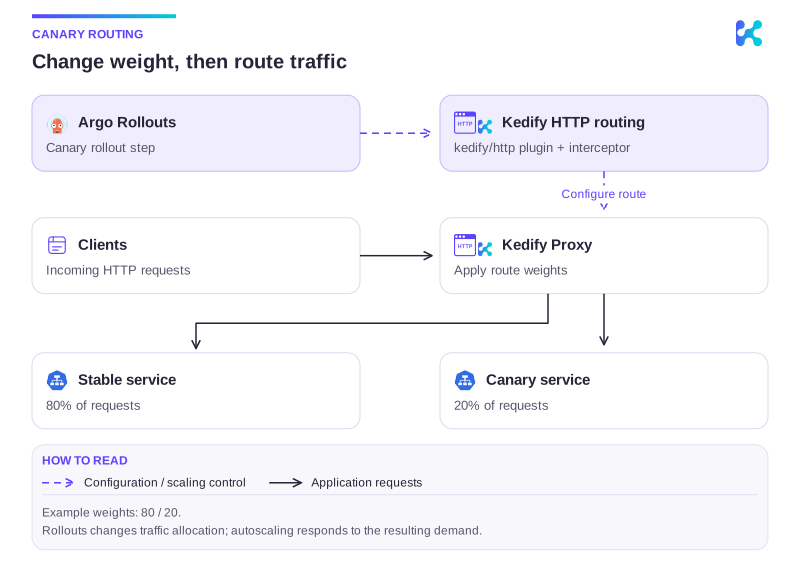
Diagram description
Argo Rollouts calls setWeight on the kedify/http plugin, which updates HTTPScaledObject route weights. The interceptor applies those weights to Kedify Proxy. In the example, 80% of requests go to the stable Service and 20% to the canary Service.
A few things worth knowing up front:
- When the
ScaledObjecttargets theRollout, thekedify-httpscaler readsspec.strategy.canary.stableServicefrom theRollout, so you shouldn’t setservicein the trigger metadata. - Ingress autowire keeps your upstream
Ingresspointing atkedify-proxy. The ingress controller sees a single, stable backend; the split is done one hop downstream, inside thekedify-proxy. - Without session persistence, the application route uses Envoy
weighted_clustersto select between stable and canary Service clusters. With persistence enabled, it uses one application cluster containing weighted stable and canary endpoints throughout the split. - When the rollout fully promotes, the plugin clears its routing annotations. Traffic goes to the now-promoted stable Service, and rollout session cookies are ignored.
Prerequisites
Section titled “Prerequisites”- A running Kubernetes cluster.
- An Ingress controller that publishes an external address on the
Ingressstatus (e.g., aLoadBalancerIP or hostname). - KEDA + Kedify (HTTP add-on) installed, with the Kedify agent running. See HTTP Scaling for Ingress-based Applications for the base install.
kubectl argo rollouts pluginfor driving promotions ergonomically.
Use these minimum component versions, which support the optional cookie session persistence described below:
| Component | Minimum version |
|---|---|
| Kedify KEDA | v2.21.0-3 |
| Kedify HTTP add-on | v0.11.1-8 |
kedify/http traffic router plugin | v0.0.2 |
Step 1: Install Argo Rollouts with RBAC and the kedify/http plugin
Section titled “Step 1: Install Argo Rollouts with RBAC and the kedify/http plugin”The Argo Rollouts controller needs two things to drive a Kedify-backed canary:
- RBAC permission to patch
HTTPScaledObjectresources. - The
kedify/httptraffic router plugin registered under that name in theargo-rollouts-configConfigMap. The plugin ships as a pre-built binary on its GitHub releases; the controller downloads it on startup, verifies its SHA-256, and caches it on the pod’s local disk.
You have two options for wiring both pieces up.
Option A (recommended): Helm chart values
Section titled “Option A (recommended): Helm chart values”If you install Argo Rollouts via the argo-helm chart, both pieces fit into one values file. The providerRBAC.additionalRules extends the controller’s ClusterRole, and controller.trafficRouterPlugins populates the argo-rollouts-config ConfigMap that the chart manages.
providerRBAC: additionalRules: - apiGroups: ["http.keda.sh"] resources: ["httpscaledobjects"] verbs: ["get", "list", "watch", "patch", "update"]controller: trafficRouterPlugins: - name: "kedify/http" location: "https://github.com/kedify/argo-rollouts-plugin/releases/download/v0.0.2/rollouts-plugin-kedify-linux-amd64" sha256: "9c34df951dbf1aa5b707f79b8641e927facac8dd8a0c20c8c8f89a440725052f"helm repo add argo https://argoproj.github.io/argo-helmhelm upgrade --install argo-rollouts argo/argo-rollouts \ --namespace argo-rollouts --create-namespace \ --values argo-rollouts-values.yamlFor non-linux-amd64 controller nodes, swap the location for the matching asset and pin its SHA-256 from v0.0.2’s checksums.txt:
| Asset | SHA-256 |
|---|---|
rollouts-plugin-kedify-linux-amd64 | 9c34df951dbf1aa5b707f79b8641e927facac8dd8a0c20c8c8f89a440725052f |
rollouts-plugin-kedify-linux-arm64 | 5112696d71377ddeda940e9e9c07edbf92d2a65a8ed361644031ffbe4696db2f |
rollouts-plugin-kedify-darwin-amd64 | 71f8f11e516e360b9f5c61743d0849994f121183069f5b5cc502ee4ea2569194 |
rollouts-plugin-kedify-darwin-arm64 | 2f896d32818b128eb89f2412cb52d5703a0a608ff376f2b95cd3c7afbbc09657 |
For newer plugin releases, browse the releases page and read the matching checksums.txt.
Option B: stand-alone ClusterRole + ConfigMap patch
Section titled “Option B: stand-alone ClusterRole + ConfigMap patch”If you can’t (or don’t want to) reinstall Argo Rollouts via the chart, apply RBAC as a separate ClusterRole and ClusterRoleBinding, and patch the existing argo-rollouts-config ConfigMap to register the plugin.
apiVersion: rbac.authorization.k8s.io/v1kind: ClusterRolemetadata: name: argo-rollouts-kedify-httprules: - apiGroups: ["http.keda.sh"] resources: ["httpscaledobjects"] verbs: ["get", "list", "watch", "patch", "update"]---apiVersion: rbac.authorization.k8s.io/v1kind: ClusterRoleBindingmetadata: name: argo-rollouts-kedify-httproleRef: apiGroup: rbac.authorization.k8s.io kind: ClusterRole name: argo-rollouts-kedify-httpsubjects: - kind: ServiceAccount name: argo-rollouts namespace: argo-rollouts---apiVersion: v1kind: ConfigMapmetadata: name: argo-rollouts-config namespace: argo-rolloutsdata: trafficRouterPlugins: | - name: "kedify/http" location: "https://github.com/kedify/argo-rollouts-plugin/releases/download/v0.0.2/rollouts-plugin-kedify-linux-amd64" sha256: "9c34df951dbf1aa5b707f79b8641e927facac8dd8a0c20c8c8f89a440725052f"Adjust the ClusterRoleBinding’s subjects: namespace and name if your Argo Rollouts install runs under a different ServiceAccount. See the platform table above for non-linux-amd64 plugin assets.
Restart the controller so it picks up the new plugin:
kubectl -n argo-rollouts rollout restart deploy/argo-rolloutsStep 2: Deploy the sample application
Section titled “Step 2: Deploy the sample application”A complete, runnable example (Rollout + Services + Ingress + ScaledObject) lives at kedify/examples/samples/argo-rollouts-canary. The minimal manifest looks like this:
apiVersion: v1kind: Servicemetadata: name: rollouts-demo-stablespec: ports: - port: 80 targetPort: 8080 selector: app: rollouts-demo---apiVersion: v1kind: Servicemetadata: name: rollouts-demo-canaryspec: ports: - port: 80 targetPort: 8080 selector: app: rollouts-demo---apiVersion: networking.k8s.io/v1kind: Ingressmetadata: name: rollouts-demospec: rules: - host: rollouts-demo.example.com http: paths: - path: / pathType: Prefix backend: service: name: rollouts-demo-stable port: number: 80---apiVersion: argoproj.io/v1alpha1kind: Rolloutmetadata: name: rollouts-demospec: replicas: 2 selector: matchLabels: app: rollouts-demo template: metadata: labels: app: rollouts-demo spec: containers: - name: rollouts-demo image: argoproj/rollouts-demo:blue ports: - name: http containerPort: 8080 strategy: canary: stableService: rollouts-demo-stable canaryService: rollouts-demo-canary trafficRouting: plugins: kedify/http: httpScaledObjectName: rollouts-demo steps: - setWeight: 20 - pause: {} - setWeight: 50 - pause: { duration: 30s } - setWeight: 80 - pause: { duration: 30s }---apiVersion: keda.sh/v1alpha1kind: ScaledObjectmetadata: name: rollouts-demospec: minReplicaCount: 2 maxReplicaCount: 10 scaleTargetRef: apiVersion: argoproj.io/v1alpha1 kind: Rollout name: rollouts-demo triggers: - type: kedify-http metricType: AverageValue metadata: hosts: rollouts-demo.example.com pathPrefixes: / port: "80" scalingMetric: requestRate targetValue: "5" trafficAutowire: ingressA few notes on the manifest:
- No
servicein the trigger metadata - the Kedify scaler resolvesstableServicefrom the Rollout spec automatically. minReplicaCount: 2matchesRollout.spec.replicas: 2. Argo Rollouts splits the desired replicas between the stable and canaryReplicaSetduring a canary; settingminReplicaCountlower can let KEDA scale the stable side to zero at higher canary weights, leaving traffic with no ready stable backend between samples.pause: {}(no duration) waits for an explicit promote (manual). Usepause: {duration: 30s}for an automatic delay between steps.- keda-operator RBAC - the keda-operator needs to read
Rolloutresources to resolve thestableServicefor the scaler. The default Helm install covers this:rbac.scaledRefKinds: [{apiGroup: "*", kind: "*"}](the chart’s default) generates a wildcard rule that grantsgeton every API group. If you’ve narrowedscaledRefKindsfor a tighter scope, add an entry for Argo Rollouts:
rbac: scaledRefKinds: - apiGroup: "argoproj.io" kind: rollouts # ...your existing entriesApply the manifest:
kubectl create ns rollouts-demokubectl -n rollouts-demo apply -f manifests.yamlOnce the rollout’s stable pods come up, the Kedify agent’s autowire rewrites the Ingress backend to kedify-proxy, and traffic flows Ingress → kedify-proxy → rollouts-demo-stable. At this point, the only cluster on the route is the stable service:
kubectl -n rollouts-demo get rollout,httpso,scaledobjectNAME DESIRED CURRENT UP-TO-DATE AVAILABLE AGErollout.argoproj.io/rollouts-demo 2 2 2 2 17s
NAME TARGETWORKLOAD TARGETSERVICE MINREPLICAS MAXREPLICAS AGE ACTIVEhttpscaledobject.http.keda.sh/rollouts-demo 2 10 17s
NAME SCALETARGETKIND SCALETARGETNAME MIN MAX READY ACTIVE FALLBACK PAUSED TRIGGERS AUTHENTICATIONS AGEscaledobject.keda.sh/rollouts-demo argoproj.io/v1alpha1.Rollout rollouts-demo 2 10 True True False False kedify-http 17sStep 3: Trigger a canary
Section titled “Step 3: Trigger a canary”Patch the rollout to a new image. Argo Rollouts moves to step 1 (setWeight: 20) and the plugin patches the HSO:
kubectl argo rollouts -n rollouts-demo set image rollouts-demo rollouts-demo=argoproj/rollouts-demo:yellowYou can watch the rollout’s status as it progresses through the steps:
kubectl argo rollouts get rollout rollouts-demo -n rollouts-demo -wName:            rollouts-demoNamespace:       rollouts-demoStatus:          ॥ PausedMessage:         CanaryPauseStepStrategy:        Canary  Step:          1/6  SetWeight:     20  ActualWeight:  20Images:          argoproj/rollouts-demo:blue (stable)                 argoproj/rollouts-demo:yellow (canary)Replicas:  Desired:       2  Current:       3  Updated:       1  Ready:         3  Available:     3
NAME                                       KIND        STATUS     AGE    INFO⟳ rollouts-demo                            Rollout     ॥ Paused   4m48s├──# revision:2│  └──⧉ rollouts-demo-85b6995845           ReplicaSet  ✔ Healthy  3m3s   canary│     └──□ rollouts-demo-85b6995845-mxgz5  Pod         ✔ Running  3m2s   ready:1/1└──# revision:1   └──⧉ rollouts-demo-759566c557           ReplicaSet  ✔ Healthy  4m48s  stable      ├──□ rollouts-demo-759566c557-c9q2x  Pod         ✔ Running  4m48s  ready:1/1      └──□ rollouts-demo-759566c557-plchs  Pod         ✔ Running  4m48s  ready:1/1
After a moment, the weighted-backends annotation appears on the HSO:
kubectl -n rollouts-demo get httpso rollouts-demo -o jsonpath='{.metadata.annotations.http\.kedify\.io/weighted-backends}'- service: rollouts-demo-stable weight: 80- service: rollouts-demo-canary weight: 20Send some traffic - roughly 20% should hit the new (yellow) version:
for i in $(seq 1 50); do curl -s -H 'host: rollouts-demo.example.com' http://<ingress-address>/color echodone | sort | uniq -c 42 "blue" 8 "yellow"Optional: Keep browser sessions on one version
Section titled “Optional: Keep browser sessions on one version”Cookie session persistence keeps requests from one browser on its assigned stable or canary backend. This is useful when an HTML response refers to assets that only exist in the same version.
Configure persistence for each application’s Rollout. Applications using the same plugin can choose different cookie prefixes and lifetimes, or omit the option to use ordinary weighted routing.
Add sessionPersistence to the Rollout’s plugin configuration:
spec: strategy: canary: trafficRouting: plugins: kedify/http: httpScaledObjectName: rollouts-demo sessionPersistence: type: Cookie absoluteTimeout: 30m cookie: name: rollout-sessionThe optional cookie.name is a prefix, defaulting to kedify-rollout. The plugin
appends an identifier specific to the application and canary revision. This name
stays the same across weight steps, and changes for a new revision so an old
canary cookie does not select a different release. absoluteTimeout defaults to
30m; use a whole number of seconds of at least 1s.
The proxy sets a cookie on the application response. Cookies use Path=/,
HttpOnly and SameSite=Lax; the browser or other client must return it on later
requests. The rollout weights govern new session assignments. Requests with a
valid cookie keep their endpoint as weights change or replicas scale out, so
existing sessions can make the total traffic ratio differ from the rollout weight.
During the canary split, the application route uses one cluster containing both versions’ weighted endpoints:
| Discovery strategy | Affinity and endpoint removal |
|---|---|
| DNS, using normal ClusterIP Services | The cookie pins the stable or canary Service IP and port. Pod replacement behind that Service retains the version choice. Pod readiness remains Kubernetes’ responsibility. |
EDS (loadbalancing: eds) | The cookie pins a ready pod. Each version’s weight is divided among its ready endpoints and recalculated when replicas change. If that pod disappears, the session is reassigned using the current weights, possibly to the other version, and receives a replacement cookie. |
Envoy’s cluster metrics aggregate both versions in this mode. For rollout analysis that compares stable and canary, use application metrics labeled by revision.
Use EDS for headless Services; they are not supported by sticky DNS routing.
Endpoint groups with no ready pods are excluded from the EDS pool. A backend at
zero weight is removed from the pool, so its pinned sessions are reassigned.
The cluster must use ROUND_ROBIN without custom or subset load-balancing
policies. Session persistence requires HTTP routing; TLS passthrough and inference
pools are unsupported.
Cold-start requests still queue at the interceptor. Once ready, the interceptor selects an application endpoint with the same weights and issues a cookie that the warm proxy can read. Waiting pages and timeout fallback responses do not establish application affinity.
Promotion, abort and managed-route cleanup remove the persistence configuration
alongside the weighted-backends annotation. The route keeps one application
cluster, containing only the primary stable Service’s endpoints, and ignores the
rollout cookie. Removing sessionPersistence during an active split switches the
route to ordinary weighted-cluster routing without affinity.
Affinity lasts while the selected endpoint remains available. It does not preserve application state when a pod disappears, or preserve the old release’s assets after promotion. Keep assets referenced by already-open pages available across the transition if those pages must survive a version change.
To check browser behavior with curl, keep a cookie jar:
curl -c cookies.txt -b cookies.txt \ -H 'host: rollouts-demo.example.com' http://<ingress-address>/colorRepeat the command during a weight step. Inspect Set-Cookie with curl -i on
the initial request; subsequent requests should retain their assignment while
the endpoint and cookie remain valid. Delete cookies.txt to start a new session.
Step 4: Promote (or abort)
Section titled “Step 4: Promote (or abort)”If you used pause: {} (manual), advance through the remaining steps with the kubectl argo rollouts plugin:
kubectl argo rollouts -n rollouts-demo promote rollouts-demorollout 'rollouts-demo' promotedYou can repeat that until the rollout completes. Each setWeight step re-patches the HSO annotation with the new split, and kedify-proxy updates its weighted routing accordingly.
When the canary fully promotes, the plugin clears the weighted-backends annotation and any session-persistence annotation. Traffic goes to the stable Service, now serving the new image, and rollout session cookies are ignored.
To roll back mid-canary:
kubectl argo rollouts -n rollouts-demo abort rollouts-demoThe plugin clears its routing annotations and traffic goes back to 100% stable while the canary ReplicaSet is scaled down.
Verification and Troubleshooting
Section titled “Verification and Troubleshooting”-
No
http.kedify.io/weighted-backendsannotation appears aftersetWeight- check theargo-rolloutscontroller logs for permission errors:Terminal window kubectl -n argo-rollouts logs deploy/argo-rollouts | grep -i "httpscaled\|forbidden"If you see
forbidden, Step 1’s RBAC is missing or pointing at the wrongServiceAccount. -
The plugin binary fails to download or load - check the controller’s startup logs:
Terminal window kubectl -n argo-rollouts logs deploy/argo-rollouts | grep -i "plugin"Common causes are a wrong
sha256(the controller refuses to run a plugin that doesn’t match the configured checksum), alocationthat points at an asset for the wrong OS/arch, or a private network that can’t reachgithub.com. Mirror the binary internally and update thelocationif needed. -
Annotation is set, but traffic isn’t splitting - verify the routing configuration in
kedify-proxy:Terminal window kubectl -n rollouts-demo port-forward svc/kedify-proxy-admin 9901:9901curl -s localhost:9901/config_dump | grep -E '"name": "[^"]*rollouts-demo'Without persistence, expect one cluster per backend, named
<namespace>/<hso>/<service>. With persistence, expect one cluster named<namespace>/<hso>containing weighted endpoints, plus a route configuration forenvoy.filters.http.stateful_session. -
Persistence is configured but no cookie appears - verify the minimum component versions, that the HSO has
http.kedify.io/session-persistence, and that the request reaches an application response rather than a waiting page or timeout fallback. Check HSO warning events forInvalidSessionPersistence. -
Canary side has zero ready endpoints - confirm the canary
ReplicaSetactually scaled up:Terminal window kubectl -n rollouts-demo get rs -l app=rollouts-demokubectl -n rollouts-demo get endpointslicesIf the canary RS is stuck at 0 replicas, it’s a Rollout-level issue (e.g.,
maxSurge: 0on a 1-replica rollout has nowhere to put the canary pod). Increasereplicasor revisit the canary strategy.
Cleanup
Section titled “Cleanup”kubectl delete ns rollouts-demoTo remove the plugin from Argo Rollouts, delete the entry from the argo-rollouts-config ConfigMap and restart the controller. If you used Option B in Step 1, also delete the ClusterRole and ClusterRoleBinding.
Next Steps
Section titled “Next Steps”- Read the HTTP Scaler documentation for more on the autoscaling side of this integration.
- Review the Argo Rollouts canary strategy reference for advanced canary topics like analysis runs, experiment templates, and traffic-management plugins beyond the simple weight-based progression shown here.
- Source for the plugin lives at
kedify/argo-rollouts-plugin; the runnable sample lives atkedify/examples/samples/argo-rollouts-canary.
Continue with this topic
Section titled “Continue with this topic”Reference: HTTP scaler and inference configuration.
Diagnose: Workload does not scale, or scales too slowly.
Related capabilities: Diagnose HTTP requests with logs and error metrics.