
Pod Resource Profiles (PRP)
Pod Resource Profiles describe a future in-place update of a pod’s resources (CPU, memory). Whether a resize needs a container restart depends on cluster support and the container resize policy. Since it doesn’t change the number of replicas of a workload, but instead works at the pod level by adjusting the resources of the container running in a pod, it functions as a vertical scaler.
In-place Updates
Section titled “In-place Updates”It supports in-place resource adjustments; whether a change needs a container restart depends on Kubernetes resize support and the container resize policy. This feature must be enabled for the
Kubernetes cluster; otherwise, the patch operation will result in an error state. For more details, consult the
InPlacePodVerticalScaling feature gate.
Pod Resource Profile (PRP) CRD
Section titled “Pod Resource Profile (PRP) CRD”The Kedify agent contains a controller that reconciles PRP (Pod Resource Profiles) and also manages pods annotated with the following:
prp.kedify.io/reconcile: enabledBased on the rules specified in the PRP custom resource, the controller either acts immediately or schedules an event for a later time.
Example PRP:
apiVersion: keda.kedify.io/v1alpha1kind: PodResourceProfilemetadata: name: podresourceprofile-samplespec: selector: # use either selector or spec.target matchLabels: app: nginx containerName: nginx # required - container name to update paused: false # optional, defaults to false priority: 0 # optional, defaults to 0 trigger: # allowed values: (de)activated, container{Ready,Started}, pod{Ready,Scheduled,Running} after: containerReady # optional, defaults to containerReady delay: 30s # required, examples: 20s, 1m, 90s, 2m30s, 2h newResources: # required - new requests and/or limits requests: memory: 50M cpu: 200m limits: memory: 100M cpu: 400mThis profile targets the nginx container in matching pods. Once the container becomes ready, the 30-second timer starts. PRP then requests CPU 200m / 400m and memory 50M / 100M (request / limit). Kubernetes must accept and complete the resize.
The chart uses illustrative initial resources—CPU 500m / 1000m and memory 200M / 400M—and readiness at 10s. The target values and 30-second delay match the YAML above. Both profiles retain requests below limits; choose feasible values and a compatible resize policy for your workload.
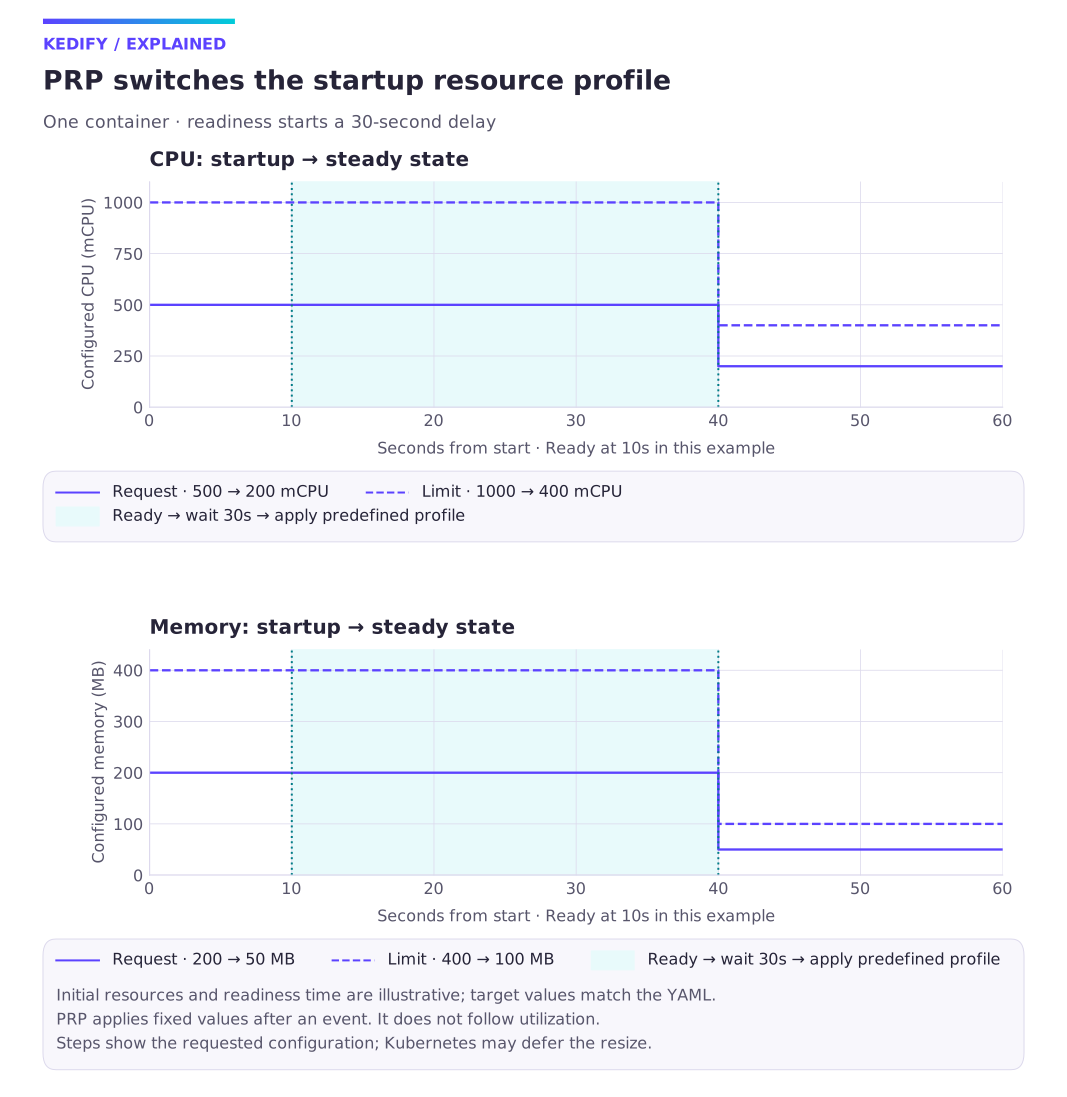
Diagram description
Illustrative initial CPU requests/limits are 500m/1000m and memory requests/limits 200M/400M. Container readiness at 10 seconds starts a 30-second delay. The documented profile sets CPU to 200m/400m and memory to 50M/100M at the next eligible resize. Replica count is unchanged.
The controller can be enabled or disabled on the Kedify Agent using the environment variable
PRP_ENABLED. By default, it is enabled. Additionally, the requirement for annotated pods can be turned off using the
PRP_REQUIRES_ANNOTATED_PODS environment variable. However, this may have performance implications since the controller
filters out pod events that do not change container or pod readiness status or are not referenced by a PRP resource.
Addressing Pods
Section titled “Addressing Pods”See PodResourceProfile API reference for fields and validation.
Triggers
Section titled “Triggers”See PodResourceProfile API reference for fields and validation.
Argo Rollout & PodResourceProfile
Section titled “Argo Rollout & PodResourceProfile”When .spec.target.kind is set to rollout, vertical scaling updates are applied to the pods managed by the referenced Argo Rollout.
Kedify Agent uses the Rollout’s .spec.selector when it is specified. Otherwise, it follows .spec.workloadRef and targets the pods
belonging to the referenced Deployment.
To use this target kind, Kedify Agent needs RBAC permission to query Rollout resources. Enable Argo Rollouts support when installing or upgrading the Kedify Agent Helm chart:
--set agent.features.argoRolloutsEnabled=trueScaledObject & PodResourceProfile
Section titled “ScaledObject & PodResourceProfile”One of the allowed values for .spec.target.kind is also scaledobject. In this case, the trigger of such PodResourceProfile must be set to either activated or deactivated.
This way we can lower the requested resources when workload is idle. It is a similar feature as scale to zero replicas, however in this setup we shrink the pod size (in terms of resources) and not the number of replicas.
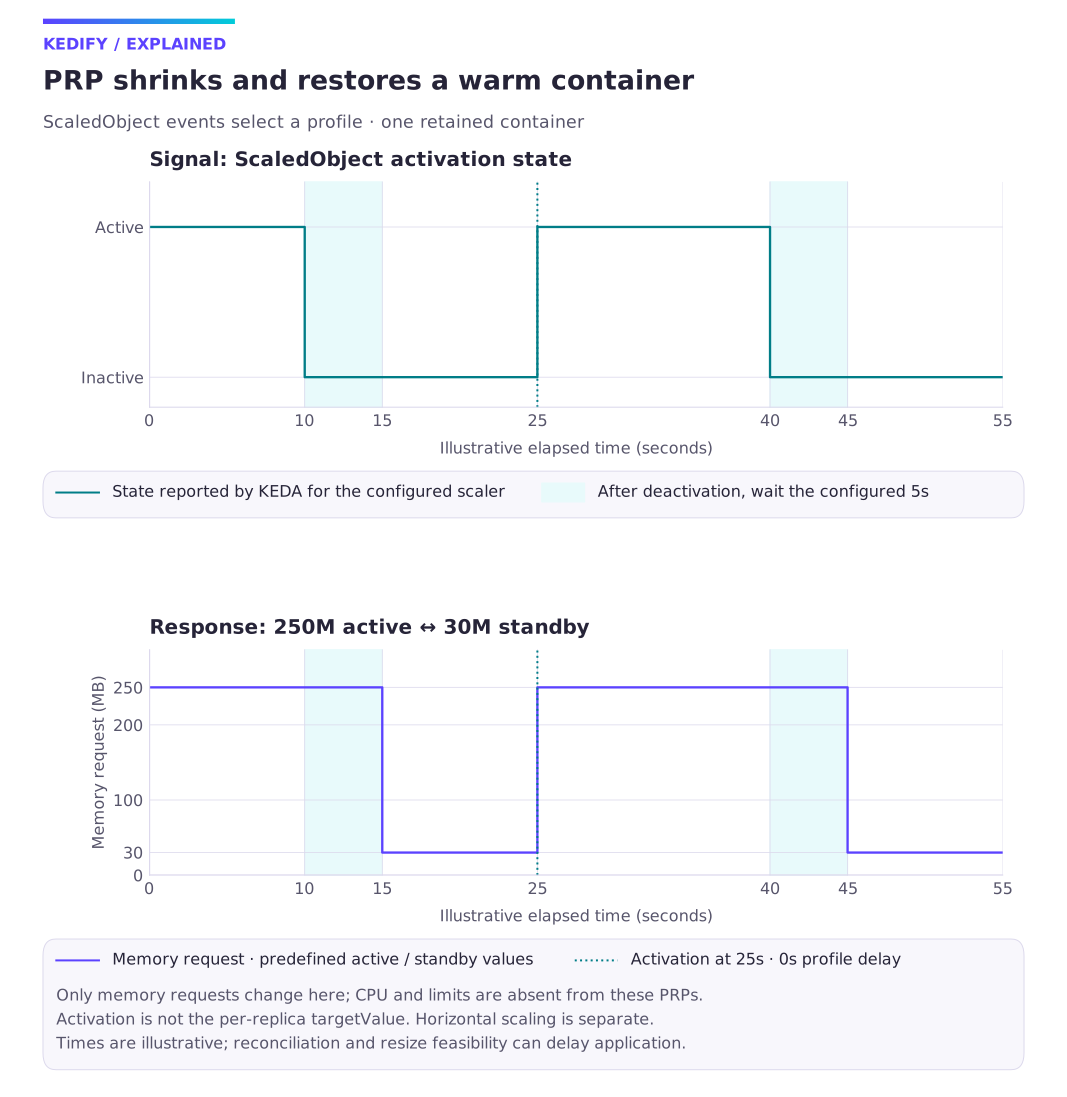
Diagram description
An illustrative ScaledObject becomes inactive at 10s, active at 25s and inactive at 40s. The documented profiles request memory 30M five seconds after deactivation, and 250M with no configured delay after activation. They do not modify limits or CPU. This tracks one retained container, not replica count.
Quick recap: When does a ScaledObject change state?
Section titled “Quick recap: When does a ScaledObject change state?”- deactivated – KEDA reports the ScaledObject inactive under the selected scaler’s activation contract.
- activated – KEDA reports activity. Activation thresholds are distinct from the per-replica scaling target; do not infer activation from
targetValuealone.
These state flips are now first‑class PRP triggers.
Example:
Section titled “Example:”apiVersion: keda.kedify.io/v1alpha1kind: PodResourceProfilemetadata: name: nginx-activespec: target: kind: scaledobject name: nginx containerName: nginx trigger: after: activated delay: 0s newResources: requests: memory: 250M---apiVersion: keda.kedify.io/v1alpha1kind: PodResourceProfilemetadata: name: nginx-standbyspec: target: kind: scaledobject name: nginx containerName: nginx trigger: after: deactivated delay: 5s newResources: requests: memory: 30M---kind: ScaledObjectapiVersion: keda.sh/v1alpha1metadata: name: nginxspec: scaleTargetRef: apiVersion: apps/v1 kind: Deployment name: nginx minReplicaCount: 1 maxReplicaCount: 8 triggers: - type: kedify-http metadata: hosts: www.my-app.com service: http-demo-service port: "8080" scalingMetric: requestRate targetValue: "10"Using nginx-standby PodResourceProfile, we will shrink the memory requests for the last replica (because minReplicaCount is set to 1) to 30 megabytes. The resources will be applied only after 5 seconds. This can help with the cold-start delays that are associated with the scale-to-zero use-case, when the application is not optimized for fast starts.
For requesting more resources for the workload in case of increased traffic, we can use the nginx-active prp. In which case, the ScaledObject nginx first needs to become active under the HTTP scaler’s activation contract, then we set its requested amount of memory to 250 megabytes. The example’s targetValue: "10" is the per-replica scaling target, not the activation threshold.
What we have effectively achieved by this setup is more effective allocation of resources in our Kubernetes cluster. When the nginx deployment is not being actively used, it can free some precious allocatable memory and let other workloads to fly. When combined with Karpenter this can boil down to savings for cloud bills.
When PRA also manages this container, assign one writer to each resource field.
Ready to Try?
Section titled “Ready to Try?”- Upgrade to the latest Kedify Agent (>= v0.2.16 for PRP‑ScaledObject support).
- Enable the InPlacePodVerticalScaling feature‑gate on your cluster if it’s not already on.
- Create your first “‑standby / ‑active” pair and watch your requested GBs plummet.
Have questions or want hands‑on help benchmarking savings? Ping us on Slack or book a 15‑minute chat. We love swapping scaling war stories.
Use-cases
Section titled “Use-cases”Pod Resource Profiles are useful in scenarios where workloads exhibit predictable resource consumption behavior. Certain application frameworks require a significant amount of memory or CPU during startup for initialization but then need less during steady operation.
Another example could be a job that runs to completion but requires different computational resources at different stages. Instead of allocating the maximum resources for all phases, the PRP can match the workload’s actual utilization profile, allowing for more efficient bin packing by the Kubernetes scheduler.
The current design allows multiple PRP resources to target the same pods. In such cases, matching PRPs are sorted first by priority
(.spec.priority), followed by the delay. The PRP with the smallest unapplied delay is selected over one with a higher delay.
If multiple PRPs still match, they are sorted alphabetically, with the “smaller” one winning. This enables multiple PRPs to be set up
for the same workload, changing resource allocations multiple times throughout the pod’s lifecycle.
Quick Start
Section titled “Quick Start”# Prepare a cluster with the feature enabledk3d cluster create dyn-resources --no-lb --k3s-arg "--disable=traefik,servicelb@server:*" \ --k3s-arg "--kube-apiserver-arg=feature-gates=InPlacePodVerticalScaling=true@server:*"# Install Kedify agent...Create a sample deployment with nginx that has one pod. It will have 45MB memory requested.
# Create a deploymentkubectl create deployment nginx --image=nginx
# Wait for it to become readykubectl rollout status deploy/nginx
# Set resource requests to observe changeskubectl set resources deployment nginx --requests=memory=40Mi
# Add the required annotation to the podskubectl patch deployments.apps nginx --type=merge -p \ '{"spec":{"template": {"metadata":{"annotations": {"prp.kedify.io/reconcile": "enabled"}}}}}'
# Verify that in-place patches on resources workkubectl patch po $(kubectl get po -lapp=nginx -ojsonpath="{.items[0].metadata.name}") --type=json \        -p '[{"op":"replace","path":"/spec/containers/0/resources/requests/memory","value":"45Mi"}]'# If the request fails, ensure the Kubernetes cluster has the InPlacePodVerticalScaling feature on
Now, let’s create a crd and after 20 seconds the resources will be changed to 30MB.
# Create a PRP CRD for the controllercat <<PRP | kubectl apply -f -apiVersion: keda.kedify.io/v1alpha1kind: PodResourceProfilemetadata: name: nginxspec: selector: matchLabels: app: nginx containerName: nginx trigger: delay: 20s newResources: requests: memory: 30MPRPFinally check if everything works as expected.
# Check the PRP resourcekubectl get prp -owide
# After some timekubectl get po -lapp=nginx -ojsonpath="{.items[*].spec.containers[?(.name=='nginx')].resources}" | jqContinue with this topic
Section titled “Continue with this topic”Reference: Annotations and controller selection.
Diagnose: Pod resources do not resize as expected.
Related capabilities: Vertical scaling: PRA and PRP.