
HTTP scaler
The kedify-http trigger scales a ScaledObject from request rate or concurrency. Kedify routes traffic through its proxy, collects metrics and holds requests during activation from zero. It does not support ScaledJob.
Configure HTTP scaling
Section titled “Configure HTTP scaling”Install the HTTP components, deploy your application and Service, and select a routing integration below. For an existing Ingress serving api.example.com through api:8080, save this as scaledobject.yaml in the application’s namespace:
apiVersion: keda.sh/v1alpha1kind: ScaledObjectmetadata: name: apispec: scaleTargetRef: name: api minReplicaCount: 1 maxReplicaCount: 10 triggers: - type: kedify-http metadata: hosts: api.example.com service: api port: "8080" trafficAutowire: ingress scalingMetric: requestRate targetValue: "10"Kedify manages the generated HTTPScaledObject and routing changes. Keep one ScaledObject responsible for the workload’s replicas. For a complete application and ingress manifest, follow the Ingress recipe.
kubectl apply -n <namespace> -f scaledobject.yamlkubectl get -n <namespace> scaledobject apikubectl get -n <namespace> deployment apiGenerate traffic through the configured hostname. Verify fresh HTTP metrics, desired versus ready replicas, and successful responses. Set minReplicaCount: 0 only after testing cold starts against client timeouts. Restore the previous ScaledObject through its configuration owner to revert a tuning change.
Choose an HTTP integration
Section titled “Choose an HTTP integration”| Existing traffic path | Canonical setup |
|---|---|
| Direct in-cluster calls | In-cluster HTTP |
| Kubernetes Ingress | Ingress applications |
| InferencePool behind Ingress | Inference routing tutorial |
| OpenShift Route | OpenShift integration |
| Gateway API HTTPRoute | Gateway API |
| Istio VirtualService | Istio |
| Gloo Gateway | Gloo |
| TLS termination | TLS Ingress |
| Argo Rollouts canary | Canary routing |
| Existing Envoy proxy and metric sink | Existing Envoy scaling; no scale-to-zero activation |
| Ingress NGINX metrics through OTel | NGINX metric integration |
Architecture
Section titled “Architecture”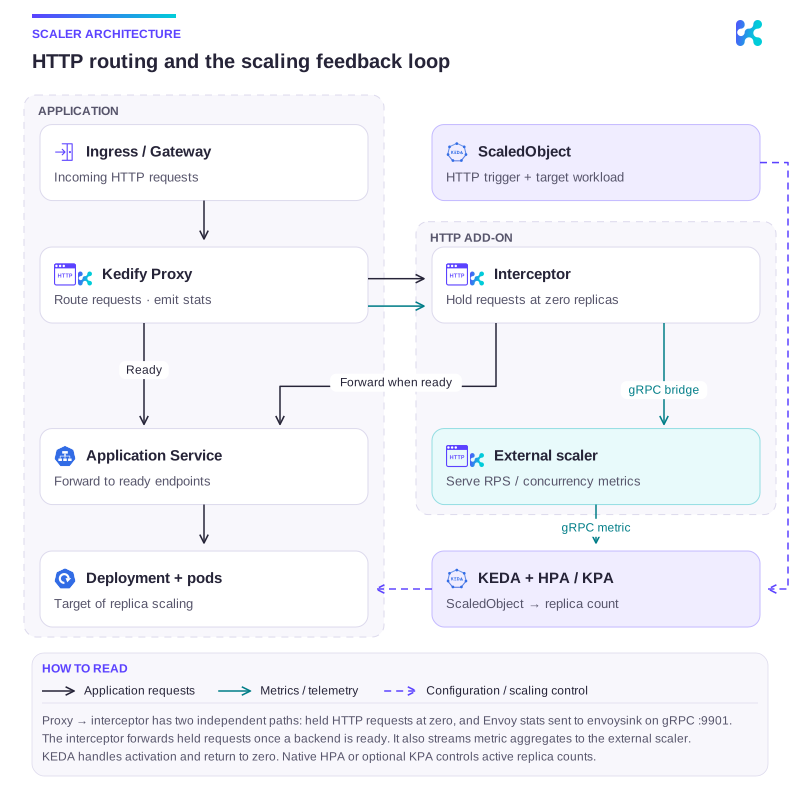
Diagram description
Ingress traffic is autowired through Kedify Proxy. Ready backends receive requests directly through the Service. At zero replicas, the interceptor holds requests and forwards them when a backend is ready. Proxy stats and interceptor metrics feed the external scaler through the gRPC bridge. KEDA reads the metric; KEDA and HPA or KPA update the target Deployment's replicas.
Traffic Autowiring:
Section titled “Traffic Autowiring:”Kedify automatically re-wires ingress resources for the following implementations:
In a typical Kubernetes setup, the networking configuration is structured as follows:
Ingress -> Service -> Deployment
To enable automatic scaling based on incoming HTTP traffic, Kedify introduces additional components:
- kedify-proxy: An Envoy-based proxy that routes traffic and collects metrics for scaling.
- HTTP Add-on Interceptor: Ensures requests are routed and cached when the app is scaled to zero.
With Kedify, the traffic flow includes these additional components:
Ingress -> kedify-proxy -> Service -> Deployment
For finer control over ingress resources autowiring, use trafficAutowire with a comma-separated list of resources to be autowired, including route for OpenShift Routes and gloo for Gloo Gateway.
triggers: - type: kedify-http metadata: trafficAutowire: "httproute,ingress,virtualservice,gloo,route"Autowiring Fallback
Section titled “Autowiring Fallback”In case of control plane issues with kedify-proxy or interceptor, Kedify rewires traffic back to the original flow:
Ingress -> Service -> Deployment
This fallback restores direct routing; application availability still requires ready backend capacity. By default, traffic is rewired if Kedify detects control plane issues for over 5 seconds. This duration can be configured using agent.autowire.healthcheckDebouncerPeriod on the Kedify Agent helm chart.
Argo CD and GitOps Considerations
Section titled “Argo CD and GitOps Considerations”When using traffic autowiring in Argo CD-managed environments, the kedify-agent modifies live routing resources (Ingress, HTTPRoute) by rewiring backends to kedify-proxy and adding annotations. This causes Argo CD to detect drift on these resources.
To prevent Argo CD from reporting these expected changes as out-of-sync, add ignoreDifferences to the Argo CD Application that manages your routing resources.
Ingress
Section titled “Ingress”apiVersion: argoproj.io/v1alpha1kind: Applicationspec: ignoreDifferences: - group: networking.k8s.io kind: Ingress jqPathExpressions: - .spec.rules[].http.paths[].backend.service.name - .spec.rules[].http.paths[].backend.service.port - .metadata.annotations["http.kedify.io/interceptor-configuration"] - .metadata.annotations["http.kedify.io/last-ingress-rewire"] syncPolicy: syncOptions: - RespectIgnoreDifferences=trueGateway API (HTTPRoute)
Section titled “Gateway API (HTTPRoute)”For HTTPRoute resources, the kedify-agent rewrites the name, namespace, and port of every matching entry in spec.rules[].backendRefs[] to point at the kedify-proxy service, and records the original backends in the http.kedify.io/interceptor-configuration annotation:
apiVersion: argoproj.io/v1alpha1kind: Applicationspec: ignoreDifferences: - group: gateway.networking.k8s.io kind: HTTPRoute jqPathExpressions: - .spec.rules[].backendRefs[].name - .spec.rules[].backendRefs[].namespace - .spec.rules[].backendRefs[].port - .metadata.annotations["http.kedify.io/interceptor-configuration"] syncPolicy: syncOptions: - RespectIgnoreDifferences=trueNote that backendRefs[].namespace is included even though Ingress backends have no namespace field: the agent sets it explicitly (to the application namespace by default, or to the KEDA namespace when kedify-proxy runs cluster-wide), so it shows up as drift even when your Git manifests omit it.
The RespectIgnoreDifferences=true sync option ensures these fields are also excluded during sync operations, not just drift detection. Without it, Argo CD would revert the autowired changes on each sync.
When Applications are generated by an ApplicationSet, place the same ignoreDifferences and syncPolicy blocks under spec.template.spec. Use jqPathExpressions rather than jsonPointers for the HTTPRoute entry: a JSON pointer such as /spec/rules/0/backendRefs/0/name matches only one array index, while the jq expressions above cover every rule and backend.
Disabling Traffic Autowiring
Section titled “Disabling Traffic Autowiring”To disable traffic autowiring, specify:
triggers: - type: kedify-http metadata: trafficAutowire: "false"In this case, users must manually wire the networking traffic. Note that Autowiring Fallback does not apply here.
Service Autowiring
Section titled “Service Autowiring”For applications that are used only within the cluster and exposed only as a Service but would like to benefit from HTTP traffic autoscaling along with fallback, there is also service level autowiring. Configuring service as the trafficAutowire option excludes setting any other trafficAutowire options because it effectively replaces all of them. Kedify Agent will wire the traffic by managing Kubernetes Endpoints belonging to the Services defined in service and fallbackService in the trigger metadata.
This type of traffic autowiring brings two more requirements on the application and autoscaling manifests:
- ScaledObject must define
fallbackService: because the Kedify Agent uses it for injecting Endpoints to theservicedefined in the trigger metadata andkedify-proxyfor routing. - Application service must NOT have selector defined: the Kubernetes control plane manages Endpoints for Services with selectors, which would collide with autowire feature. The
servicedefined in the trigger metadata must be without selector while thefallbackServiceshould carry the original selector you’d define on theserviceif it wasn’t autowired.
There is a redundancy periodic sync for service autowiring to ensure the Endpoints are always up to date. The sync interval defaults to 500ms and is configurable through kedifyProxy.autowire.serviceSyncPeriod on the Kedify Agent helm chart and can be further fine tuned by providing http.kedify.io/service-resync-period annotation on the ScaledObject resource.
Kedify Proxy
Section titled “Kedify Proxy”Kedify Proxy uses Envoy to route requests and collect metrics. See proxy configuration and performance tuning.
Deployment Options for Kedify Proxy
Section titled “Deployment Options for Kedify Proxy”There are two main deployment configurations for kedify-proxy: Namespace-Level and Cluster-Wide.
-
Namespace-Level Deployment (Default): By default,
kedify-proxyis deployed in each namespace that contains at least oneScaledObjectusing thekedify-httptrigger. This approach ensures that traffic routing and metric collection are confined within the namespace where theScaledObjectis defined, providing isolation and control. -
Cluster-Wide Deployment (Optional): For environments where Istio’s VirtualService is used (currently the only supported configuration),
kedify-proxycan be deployed cluster-wide. In this setup,kedify-proxyis deployed in the KEDA installation namespace and shared among allScaledObjectsacross namespaces. This configuration allows centralized traffic routing and scaling across all namespaces in the cluster.- To enable cluster-wide deployment, set the Kedify Agent helm chart option
agent.kedifyProxy.clusterWidetotrueon the Kedify Agent. This will configure the Kedify Agent to deploy a single instance ofkedify-proxyfor the entire cluster, located in the KEDA installation namespace. For more details, refer to the Kedify Agent documentation.
- To enable cluster-wide deployment, set the Kedify Agent helm chart option
Note: The cluster-wide setup for
kedify-proxyis only compatible with Istio’s VirtualService. Other types of ingress configurations are not supported in this setup.
Kedify Proxy Traffic Flow
Section titled “Kedify Proxy Traffic Flow”Original traffic path:
Ingress -> Service -> Deployment
With Kedify, the traffic flow includes kedify-proxy as an intermediary to monitor and intercept traffic before it reaches the service:
Ingress -> kedify-proxy -> Service -> Deployment
The proxy forwards requests to ready backends; activation holds requests while capacity starts. Verify the request path and timeout behavior under load.
Metrics Collection from Kedify Proxy
Section titled “Metrics Collection from Kedify Proxy”The kedify-proxy (Envoy) collects traffic metrics and pushes them to the HTTP Add-on interceptor via gRPC. The interceptor then forwards these metrics to the scaler using a gRPC bridge (enabled by default). KEDA reads the resulting scaling metrics from the scaler.
For debugging, you can query the /queue endpoint which exposes the same metrics:
kubectl get --raw /api/v1/namespaces/keda/services/keda-add-ons-http-interceptor-admin:9090/proxy/queueFor a detailed explanation of the metrics architecture, see HTTP Scaler Metrics Architecture.
Kedify Proxy Helm Chart
Section titled “Kedify Proxy Helm Chart”The Kedify Proxy is configured through the Kedify Agent helm chart, for example:
agent: kedifyProxy: globalValues: # see kedify-proxy for all options autoscaling: enabled: true namespacedValues: dev: # for namespace 'dev' disable kedify-proxy autoscaling autoscaling: enabled: false prod: # for namespace 'prod' set higher min and max replica count for autoscaling autoscaling: minReplicaCount: 3 maxReplicaCount: 10For complete list of options see Kedify Proxy helm chart.
Configuration reference
Section titled “Configuration reference”| Configure | Documentation |
|---|---|
| Trigger fields, headers, multiple triggers and load balancing | HTTP configuration reference |
| Health probes | Healthcheck configuration |
| Waiting and maintenance responses | Waiting/maintenance pages |
| Canary routing | Argo Rollouts |
| Request failures and scaling delay | Logs and error metrics · Tracing · Troubleshooting |