
HTTP scaler and inference configuration
Configure HTTP trigger and routing fields below. Author a ScaledObject; the Agent manages the corresponding HTTPScaledObject and proxy wiring. Do not create competing generated objects.
These fields configure Kedify HTTP scalers in a ScaledObject, not the upstream KEDA HTTP add-on API. Trigger metadata values must be strings.
kedify-http
Section titled “kedify-http”Use for the Kedify proxy/interceptor path. Choose an HTTP integration before applying routing metadata. Trigger metadata values are strings. KEDA owns the ScaledObject’s activation and desired scaling configuration; the HTTP path supplies demand and request handling.
Inference
Section titled “Inference”Use the inference-specific metadata with the documented InferencePool and endpoint-picker integration. See inference explanation and setup; the HTTP contract does not imply every runtime or streaming combination is supported.
kedify-envoy-http
Section titled “kedify-envoy-http”Use when an existing Envoy proxy sends metrics to Kedify. This path does not supply scale-to-zero activation. The existing Envoy task covers sink setup and verification.
Related configuration
Section titled “Related configuration”Kedify Proxy Envoy configuration describes Kedify-managed proxy settings, distinct from an existing proxy’s metrics-sink contract. Use HTTP logs and error metrics for diagnosis.
Load Balancing Strategy
Section titled “Load Balancing Strategy”Kedify HTTP Scaler supports two load balancing strategies for routing traffic through the kedify-proxy:
- DNS Load Balancing (default): In the trigger metadata in
loadbalancingfield configuredns(or “ or omit the field entirely). This strategy uses DNS to resolve the service’s endpoints and balances traffic across them. It is the default behavior and does not require any additional configuration. - Envoy Endpoint Discovery Service (EDS): In the trigger metadata in
loadbalancingfield configureeds. This strategy uses Envoy’s EDS to dynamically discover and balance traffic across service endpoints fromEndpointSlicesKubernetes API. This setup results in more frequent envoy configuration updates but can improve routing for applications without readiness probes or graceful terminations.
Snippet of a trigger with eds Load Balancing Strategy:
triggers: - type: kedify-http metadata: loadbalancing: eds ...Routing Traffic with HTTP Headers
Section titled “Routing Traffic with HTTP Headers”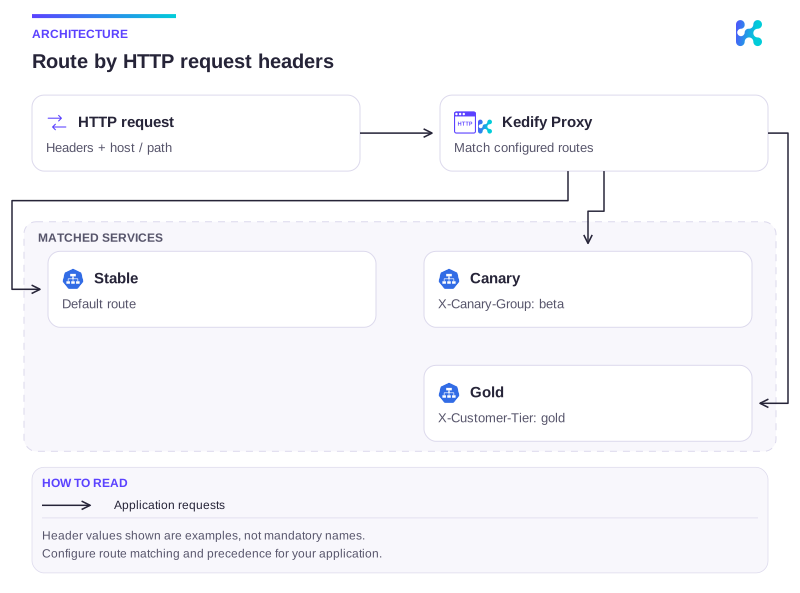
Diagram description
Kedify Proxy matches request headers to configured routes, directing stable, canary, and premium requests to their selected Services.
On top of the default routing based on hosts and pathPrefixes, Kedify allows routing traffic based on HTTP headers. This feature is useful for applications that require specific routing logic where multiple autoscaled services serve the same host and path but differ in HTTP headers, for example for A/B testing or canary deployments.
To configure this, you can use the headers parameter in the trigger metadata:
triggers: - type: kedify-http metadata: hosts: www.my-app.com pathPrefixes: "/" service: http-demo-service headers: | - name: X-My-Header value: header-valueFor hosts and pathPrefixes routing, the algorithm doesn’t support multiple ScaledObjects with the same hosts and pathPrefixes parameters. This is because the routing algorithm uses the longest path prefix substring to match the pathPrefixes parameter, and if there are multiple ScaledObjects with the same hosts and pathPrefixes, it would be impossible to determine which one to route to.
However, with the header-based routing it’s possible to configure multiple ScaledObjects with triggers that match the same hosts and pathPrefixes but differ in the headers parameter. This allows for more granular control over routing and scaling based on specific HTTP headers.
- The
Hostheader for plaintext HTTP, SNI for TLS and:authoritypseudo-header for HTTP/2 is used to match thehostsparameter. - When there are multiple
HTTPScaledObjects, the longest path prefix substring is used to match thepathPrefixesparameter. - If there are still multiple
HTTPScaledObjectsmatching, select the one with the mostheadersmatching.
Maintenance Page and Cold-Start Waiting Page Configuration
Section titled “Maintenance Page and Cold-Start Waiting Page Configuration”-
Maintenance page: For planned downtime or scheduled maintenance, Kedify provides the option to display a custom static page (up to 256 KiB) that notifies users of the service interruption and offers an estimated return time.
-
Cold-Start Waiting page: When the application needs extra time to scale out, Kedify can immediately serve a custom waiting page (up to 256 KiB) that delivers clear information to users while the service is booting up.
The HTTP scaler supports serving a static maintenance page / cold-start waiting page directly from the interceptor. When enabled, incoming requests receive a preconfigured response. For maintenance page, scaling metrics are disregarded although the interceptor endpoint /queue continues displaying actual request metrics, but these metrics are ignored by the scaler (replaces the value with 0 and sets active status to false), effectively disabling scaling actions during maintenance mode.
Maintenance Page Parameters:
Section titled “Maintenance Page Parameters:”maintenancePageEnabled: Toggle to enable or disable the maintenance page. Accepts boolean values (trueorfalse). (Default:false, Optional)maintenancePageBody: Inline HTML content for a custom maintenance page. Overrides defaults or global configurations. Maximum size is 256 KiB. (Optional)maintenancePageStatusCode: Custom HTTP status code returned during maintenance mode. Overrides default or global configuration. (Default:503, Optional)maintenancePageConfigMapRef: Reference to aConfigMapin the same namespace as theScaledObjectcontainingmaintenancePageBodyandmaintenancePageStatusCode. (Optional)
Cold-Start Waiting Page Parameters:
Section titled “Cold-Start Waiting Page Parameters:”coldStartWaitingPageEnabled: Toggle to enable or disable the cold-start waiting page. Accepts boolean values (trueorfalse). (Default:false, Optional)coldStartWaitingPageBody: Inline HTML content for a custom cold-start waiting page. Overrides defaults or global configurations. Maximum size is 256 KiB. (Optional)coldStartWaitingPageStatusCode: Custom HTTP status code returned during cold-start waiting mode. Overrides default or global configuration. (Default:503, Optional)coldStartWaitingPageConfigMapRef: Reference to aConfigMapin the same namespace as theScaledObjectcontainingcoldStartWaitingPageBody,coldStartWaitingPageStatusCode, andcoldStartWaitingPageRetryAfter. (Optional)coldStartWaitingPageRetryAfter: TheRetry-Afterheader value to be returned in the cold-start waiting page response. This can be configured globally on the http-add-on level or throughConfigMapor omitted which will use the default. (Default:10s, Optional)
For more details, see Configure Waiting and Maintenance Pages for HTTP Scaler how-to page.
Scaled Application Healthcheck Configuration
Section titled “Scaled Application Healthcheck Configuration”Configuring healthchecks for applications typically excludes unhealthy replicas from load balancing. However, this conflicts with scaling to zero, as healthchecks generate HTTP traffic, triggering scale-up actions.
Kedify’s interceptor can respond to healthchecks on behalf of the scaled application instead of proxying the check to the application and causing a scale-out. Healthcheck path and response mode (default passthrough, or static) can be defined for the scaled application. Passthrough mode allows the interceptor to respond only if the application is scaled to zero; otherwise, it proxies the request.
triggers: - type: kedify-http metadata: healthcheckPath: "/healthz" healthcheckResponse: "passthrough" # or 'static'Preconfigured healthcheck paths are excluded from metric counting.
Example ScaledObject with Healthcheck Configuration
Section titled “Example ScaledObject with Healthcheck Configuration”The following configuration instructs the interceptor to respond to requests for www.my-app.com/healthz when scaled to 0:
apiVersion: keda.sh/v1alpha1kind: ScaledObjectmetadata: name: http-demo-scaledobjectspec: scaleTargetRef: apiVersion: apps/v1 kind: Deployment name: http-demo-deployment cooldownPeriod: 5 minReplicaCount: 0 maxReplicaCount: 10 triggers: - type: kedify-http metadata: hosts: www.my-app.com pathPrefixes: "/" service: http-demo-service port: "8080" scalingMetric: requestRate targetValue: "10" healthcheckPath: "/healthz" healthcheckResponse: "passthrough"Healthchecks for AWS Probes
Section titled “Healthchecks for AWS Probes”Because AWS Load Balancer healthcheck probes set the IP address of a particular kedify-proxy pod as a value for the Host header, there is additional requirement to uniquely identify the proxied application through their healthcheck paths. This can be done by setting the healthcheckResponse: pathEmbeddedHost and healthcheckPathPrefix parameter in the trigger metadata.
The interceptor will strip this prefix from the proxied request before sending it to the application as the prefix is only used for routing purposes. This means each healthcheckPathPrefix should be unique across all ScaledObjects in the cluster.
Example:
apiVersion: keda.sh/v1alpha1kind: ScaledObjectmetadata: name: http-demo-scaledobjectspec: scaleTargetRef: apiVersion: apps/v1 kind: Deployment name: http-demo-deployment cooldownPeriod: 5 minReplicaCount: 0 maxReplicaCount: 10 triggers: - type: kedify-http metadata: hosts: www.my-app.com pathPrefixes: "/" service: http-demo-service port: "8080" scalingMetric: requestRate targetValue: "10" healthcheckPathPrefix: "/kedify-proxy/www.my-app.com" healthcheckResponse: "pathEmbeddedHost"Then in the AWS loadbalancing target groups, the healthcheck path can be set as for example /kedify-proxy/www.my-app.com/health, and the application will receive the request on the /health endpoint. Because each probe is forwarded to the application, it is not well-suited for scale-to-zero scenarios. It can still be used, but each probe request will result in a scale out action.
Tweaking Healthchecks in Envoy
Section titled “Tweaking Healthchecks in Envoy”These settings are applicable only when loadbalancing is set to eds.
The following ScaledObject uses TCP health checks, which are compatible with SSL setups. For more details, refer to the HTTP scaling with TLS for ingress-based applications guide.
Additionally, you can configure passive health checks, known as outlier_detection, in the Envoy configuration. This feature marks an endpoint as unhealthy if multiple (e.g., 3) HTTP calls fail to meet the expected criteria.
We allow to configure the Envoy cluster also via configuration snippets for Agent’s helm chart values (global or namespaced).
Then the precedence is as follows: global level < namespaced level < trigger level.
Example:
apiVersion: keda.sh/v1alpha1kind: ScaledObjectmetadata: name: http-demo-scaledobjectspec: scaleTargetRef: apiVersion: apps/v1 kind: Deployment name: http-demo-deployment cooldownPeriod: 5 minReplicaCount: 0 maxReplicaCount: 10 triggers: - type: kedify-http metadata: hosts: www.my-app.com pathPrefixes: "/" service: http-demo-service port: "8080" scalingMetric: requestRate targetValue: "10" envoyClusterConfig: | health_checks: - timeout: 1s interval: 2s unhealthy_interval: 10s unhealthy_threshold: 3 healthy_threshold: 2 tcp_health_check: {} outlier_detection: consecutive_5xx: 3 base_ejection_time: 60sMultiple HTTP Triggers Per ScaledObject
Section titled “Multiple HTTP Triggers Per ScaledObject”Starting with Kedify version 2.17.1-1, the HTTP scaler now supports defining multiple kedify-http triggers within a single ScaledObject. This enhancement allows a single autoscaled workload to respond to multiple independent HTTP traffic patterns, each defined by its own trigger.
When configuring multiple HTTP triggers in a single ScaledObject, the following constraints must be observed:
- Unique
trigger.namerequired: Eachkedify-httptrigger must specify a uniquetrigger.nameto differentiate metrics and routing behavior. - Distinct routing configurations: Each trigger must define either:
- Different
hosts, or - If the
hostsare the same, differentpathPrefixesor differentpathRegex, or - If both
hostsand the path matchers are the same, then differentheaders.
- Different
This ensures unambiguous routing and avoids conflicts in traffic interception logic.
Differentiating same-host triggers by pathRegex requires Kedify 2.20.1-1 or newer. Earlier versions only distinguished same-host triggers by pathPrefixes or headers, and two same-host triggers that differed only in pathRegex were rejected as a routing conflict.
Example: Multiple HTTP Triggers
Section titled “Example: Multiple HTTP Triggers”apiVersion: keda.sh/v1alpha1kind: ScaledObjectmetadata: name: multi-trigger-demospec: scaleTargetRef: apiVersion: apps/v1 kind: Deployment name: http-demo-deployment cooldownPeriod: 5 minReplicaCount: 0 maxReplicaCount: 10 triggers: - type: kedify-http name: primary metadata: hosts: www.my-app.com pathPrefixes: "/primary" service: http-demo-service port: "8080" scalingMetric: requestRate targetValue: "10" - type: kedify-http name: secondary metadata: hosts: www.my-app.com pathPrefixes: "/secondary" service: http-demo-service port: "8080" scalingMetric: requestRate targetValue: "5"This configuration routes and scales independently for /primary and /secondary traffic paths on the same host, reusing the same application service but with isolated triggers.
Refer to the Trigger Specification section for full details on configuring each kedify-http trigger.
HTTP trigger fields
Section titled “HTTP trigger fields”This specification describes the kedify-http trigger, which scales workloads based on incoming HTTP traffic.
Here is an example of trigger configuration using the HTTP scaler:
triggers: - type: kedify-http metadata: hosts: www.my-app.com service: http-demo-service port: "8080" scalingMetric: requestRate targetValue: "10"Complete parameter list:
Section titled “Complete parameter list:”Following is a complete list of metadata parameters available for the kedify-http trigger. For better readability, the parameters are grouped into sections:
Routing configuration:
hosts: Comma-separated list of hosts to monitor (e.g.,www.my-app.com,www.foo.bar). This is used for routing the traffic to correct application and uses theHostheader for plaintext HTTP, SNI for TLS, and:authoritypseudo-header for HTTP/2. (Required)pathPrefixes: Comma-separated list of path prefixes to monitor, (e.g.,/foo,/bar, Optional, Default:/). EitherpathPrefixesorpathRegexcan be set, not both.pathRegex: Single regular expression to match request paths, (e.g.,/foo.*, Optional). The regular expression is anchored, meaning it is treated as^<your-regex>$. EitherpathPrefixesorpathRegexcan be set, not both.headers: Structured list of HTTP headers to match for routing traffic. See more in dedicated section. (Optional)
Backend serving:
service: Name of the Kubernetes service for the workload specified inScaledObject.spec.scaleTargetRef, where traffic should be routed. Optional whenscaleTargetRefpoints at an Argo RolloutsRollout- the scaler resolves the service fromspec.strategy.canary.stableService(orspec.strategy.blueGreen.activeService) on the Rollout. See HTTP Scaling with Argo Rollouts Canary.fallbackService: Name of the Kubernetes service used as a fallback along withserviceautowiring.port: Port on which the Kubernetes Service is listening. Only one ofportorportNamecan be set.portName: Reference to theportby its name. Only one ofportorportNamecan be set.tlsSecretName: Reference to aSecretcontaining the TLS certificate and key undercert.tls,key.tlsfor TLS reencrypt. Not necessary if using TLS termination at ingress and cluster internal traffic is plaintext or TLS passthrough (Optional).tlsMode: TLS mode for the traffic to the application, eitherplaintext,reencrypt,passthrough. If set toreencrypt, the TLS certificate and key must be provided in thetlsSecretNamefield. Thepassthroughmode is not compatible with any L7 routing options - path prefix or headers. (Optional)loadbalancing: Load balancing strategy used when proxying, supportsdns(default behavior, same as empty “or not defining any), oreds(envoy endpoint discovery service). See also dedicated section for more details. (Optional)
Scaling metrics:
scalingMetric: Metric used for scaling, eitherrequestRateorconcurrency.targetValue: Target value for the scaling metric; KEDA scales out when traffic meets or exceeds this value. (Default:100)granularity: Granularity at which the request rate is measured (e.g., “1s” for one second). (Only forrequestRate, Default:1s)window: Window over which the request rate is averaged (e.g., “1m0s” for one minute). (Only forrequestRate, Default:1m)externalProxyMetricKey: Metric name used for aggregating external source metrics (e.g.,cluster_namefor Envoy, Optional).
Traffic autowiring and healthcheck configuration:
trafficAutowire: Configures traffic autowiring of ingress resources. Settingfalsedisables autowiring; to enable only specific ingress classes, use a comma-separated list (e.g.,httproute,ingress,virtualservice,routeorservice). (See Traffic Autowiring for more details, Optional)healthcheckPath: Healthcheck path on the scaled application for responses when scaled to zero. (See Scaled Application Healthcheck Configuration for more details, Optional)healthcheckPathPrefix: Healthcheck path prefix is only required ifpathEmbeddedHostvalue is set underhealthcheckResponsefield. This path prefix will be stripped from the proxied request as it’s only used for routing to the application (Optional)healthcheckResponse: Response mode for healthchecks, allowed values arepassthrough,static, orpathEmbeddedHost. Only setpassthroughorstaticifhealthcheckPathis specified. ForpathEmbeddedHost, ensure thathealthcheckPathPrefixis also set. (Default:passthrough, Optional)
Static pages configuration:
maintenancePageEnabled: Toggle to enable/disable the maintenance page. Expects a boolean value (trueorfalse). (Default:false, Optional)maintenancePageBody: Inlined HTML body for the maintenance page to override defaults and global configs. This can be configured globally on the http-add-on level or throughConfigMapor omitted which will use the default maintenance page. Limit 256 KiB. (Optional)maintenancePageStatusCode: Inlined HTTP status code for the maintenance page. This too can be configured globally like the body. (Default:503, Optional)maintenancePageConfigMapRef: Reference to aConfigMapcontaining the maintenance page body. TheConfigMapmust be in the same namespace as theScaledObject. (Optional)coldStartWaitingPageEnabled: Toggle to enable/disable the cold-start waiting page. Expects a boolean value (trueorfalse). (Default:false, Optional)coldStartWaitingPageBody: Inlined HTML body for the cold-start waiting page to override defaults and global configs. This can be configured globally on the http-add-on level or throughConfigMapor omitted which will use the default waiting page. Limit 256 KiB. (Optional)coldStartWaitingPageStatusCode: Inlined HTTP status code for the cold-start waiting page. This too can be configured globally like the body. (Default:503, Optional)coldStartWaitingPageConfigMapRef: Reference to aConfigMapcontaining the cold-start waiting page body. TheConfigMapmust be in the same namespace as theScaledObject. (Optional)coldStartWaitingPageRetryAfter: TheRetry-Afterheader value to be returned in the cold-start waiting page response. This can be configured globally on the http-add-on level or throughConfigMapor omitted which will use the default. (Default:10s, Optional)
Envoy Cluster Configuration
envoyClusterConfig: Inlined JSON or YAML configuration for corresponding Envoy cluster that will be created for this trigger. Any configuration from this spec can appear here, although not all the possible combinations have been tested. (Optional)
Example ScaledObject with HTTP trigger
Section titled “Example ScaledObject with HTTP trigger”Here is a full example of a scaled object definition using the HTTP trigger:
apiVersion: keda.sh/v1alpha1kind: ScaledObjectmetadata: name: http-demo-scaledobjectspec: scaleTargetRef: apiVersion: apps/v1 kind: Deployment name: http-demo-deployment cooldownPeriod: 5 minReplicaCount: 0 maxReplicaCount: 10 triggers: - type: kedify-http metadata: hosts: www.my-app.com pathPrefixes: "/" service: http-demo-service port: "8080" scalingMetric: requestRate targetValue: "10" granularity: "1s" window: "1m0s"Note: Ensure that
hosts,pathPrefixes,service, andportparameters match the application’s routing requirements.
Inference trigger fields
Section titled “Inference trigger fields”This specification describes the kedify-http trigger, which scales inference workloads based on incoming HTTP traffic.
Here is an example of a trigger configuration using the HTTP scaler with an inferencepool:
triggers: - type: kedify-http metadata: hosts: application.keda pathPrefixes: /v1 service: vllm-llm-d-modelservice-inference-svc port: "9002" scalingMetric: requestRate targetValue: "5" granularity: 1s window: 1m trafficAutowire: ingress inferencePool: inferencepoolComplete parameter list:
Section titled “Complete parameter list:”The shared fields are listed in HTTP trigger fields. The additions below connect an existing inference serving topology.
Routing configuration:
hosts: Comma-separated list of hosts to monitor (e.g.,www.my-app.com,www.foo.bar). This is used for routing the traffic to correct application and uses theHostheader for plaintext HTTP, SNI for TLS, and:authoritypseudo-header for HTTP/2. (Required)pathPrefixes: Comma-separated list of path prefixes to monitor, (e.g.,/foo,/bar, Optional, Default:/).headers: Structured list of HTTP headers to match for routing traffic. See more in dedicated section. (Optional)
Backend serving:
service: Name of the Kubernetes service for the workload specified inScaledObject.spec.scaleTargetRef, where traffic should be routed. Should be present for inference workloads to behave as expected.fallbackService: Name of the Kubernetes service used as a fallback along withserviceautowiring.port: Port on which the Kubernetes Service is listening. Only one ofportorportNamecan be set. For inference workloads the kedify-proxy listens on port 9002.portName: Reference to theportby its name. Only one ofportorportNamecan be set.tlsSecretName: Reference to aSecretcontaining the TLS certificate and key undercert.tls,key.tlsfor TLS reencrypt. Not necessary if using TLS termination at ingress and cluster internal traffic is plaintext or TLS passthrough (Optional).tlsMode: TLS mode for the traffic to the application, eitherplaintext,reencrypt,passthrough. If set toreencrypt, the TLS certificate and key must be provided in thetlsSecretNamefield. Thepassthroughmode is not compatible with any L7 routing options - path prefix or headers. (Optional)loadbalancing: Load balancing strategy used when proxying, supportsdns(default behavior, same as empty “or not defining any), oreds(envoy endpoint discovery service). See also dedicated section for more details. (Optional)
Inference Serving:
inferencePool: Name of the inferencepool containing a reference to an Endpoint Picker. The labels for the inferencepool should match the selectors from theservicedefined
Example ScaledObject with HTTP trigger and inferencePool
Section titled “Example ScaledObject with HTTP trigger and inferencePool”Here is a full example of a scaled object definition using the HTTP trigger:
kind: ScaledObjectapiVersion: keda.sh/v1alpha1metadata: name: inferencepool namespace: inferencepoolspec: scaleTargetRef: apiVersion: apps/v1 kind: Deployment name: vllm-llm-d-modelservice-decode cooldownPeriod: 600 minReplicaCount: 1 maxReplicaCount: 2 fallback: failureThreshold: 2 replicas: 1 advanced: restoreToOriginalReplicaCount: true horizontalPodAutoscalerConfig: behavior: scaleDown: stabilizationWindowSeconds: 600 triggers: - type: kedify-http metadata: hosts: application.keda pathPrefixes: /v1 service: vllm-llm-d-modelservice-inference-svc port: "9002" scalingMetric: requestRate targetValue: "5" granularity: 1s window: 1m trafficAutowire: ingress inferencePool: inferencepoolNote: Ensure that
hosts,pathPrefixes,service, andportparameters match the application’s routing requirements. Note: Ensure thatinferencePoolandserviceparameters use the same selectors.
Existing Envoy trigger fields
Section titled “Existing Envoy trigger fields”This specification describes the kedify-envoy-http trigger, which scales workloads based on incoming HTTP traffic using a custom Envoy proxy.
Here is an example of trigger configuration using the Kedify Envoy HTTP scaler:
triggers: - type: kedify-envoy-http metadata: scalingMetric: requestRate # or concurrency targetValue: "10" granularity: "1s" window: "1m0s" externalProxyMetricKey: "my_app_com" # <-- this should match an [envoy_cluster_name]Parameter list:
Section titled “Parameter list:”scalingMetric: Metric used for scaling, which can be eitherrequestRateorconcurrency.targetValue: Target value for the scaling metric. When incoming traffic meets or exceeds this value, KEDA will scale out the deployment. (Default:100)granularity: The granularity at which the request rate is measured. For example, “1s” means one second. (Only forrequestRate, Default:1s)window: The window over which the request rate is averaged. For example, “1m0s” means one minute. (Only forrequestRate, Default:1m)externalProxyMetricKey: Matching external metric name, used for aggregating metrics from the Envoy proxy (e.g., specificcluster_namefor Envoy).