
Distribute jobs across clusters
This guide shows how to use DistributedScaledJob (DSJ) to process queue-based workloads across multiple member clusters.
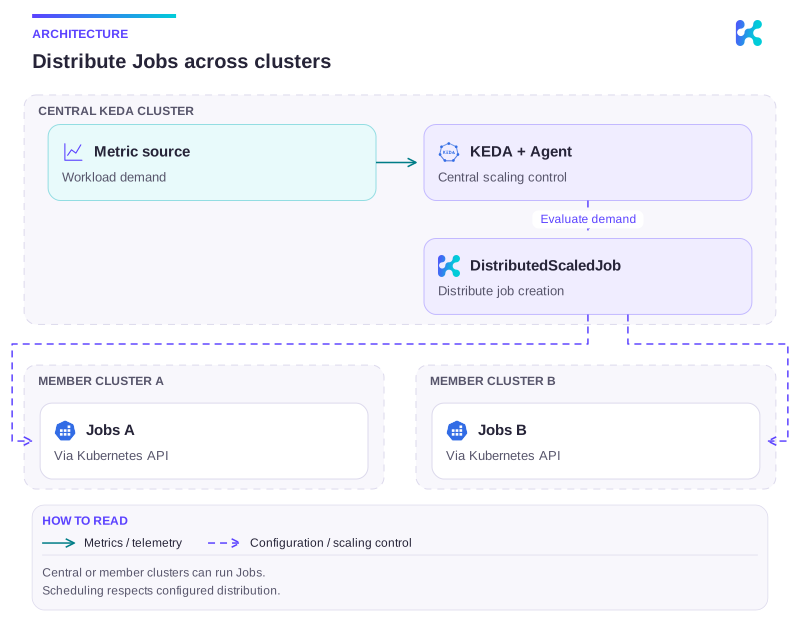
Diagram description
A central KEDA installation evaluates demand and uses DistributedScaledJob to update member Kubernetes APIs. Member clusters do not require another KEDA installation.
Prerequisites
Section titled “Prerequisites”- Kedify Agent is installed in your KEDA cluster.
- Member clusters are registered through one of the distributed registration providers.
kubectlinstalled and access to:- KEDA cluster context
- each member cluster context
1. Enable DSJ and raw metrics
Section titled “1. Enable DSJ and raw metrics”DistributedScaledJob requires:
DSJ_ENABLED="true"inkedify-agent- KEDA raw metrics gRPC protocol enabled
For an Agent chart with bundled KEDA, select distributed mode in your maintained Helm/GitOps values. The chart enables both requirements:
global: features: multicluster: enabled: true type: distributedIf KEDA is installed separately, enable its raw metrics gRPC explicitly (values for the standalone KEDA chart):
env: - name: RAW_METRICS_GRPC_PROTOCOL value: enabledDedicated mode instead reconciles ordinary ScaledJobs in each member and does not use the Agent DSJ controller.
2. Prepare ConfigMap trigger
Section titled “2. Prepare ConfigMap trigger”Create this ConfigMap in the KEDA cluster (default namespace in this example):
apiVersion: v1kind: ConfigMapmetadata: name: dsj-mock-metric namespace: defaultdata: metric-value: "0"kubectl --context keda-cluster -n default apply -f dsj-mock-metric.yaml3. Create DistributedScaledJob
Section titled “3. Create DistributedScaledJob”Apply this DistributedScaledJob in the KEDA cluster:
apiVersion: keda.kedify.io/v1alpha1kind: DistributedScaledJobmetadata: name: dsj-processor namespace: defaultspec: memberClusters: - name: member-1 weight: 2 - name: member-2 weight: 3 clusterScheduling: strategy: weightedRoundRobin failoverPolicy: gracePeriod: 1m hardTaintDuration: 5m softTaintDuration: 3m scaledJobSpec: pollingInterval: 30 maxReplicaCount: 20 successfulJobsHistoryLimit: 2 failedJobsHistoryLimit: 2 scalingStrategy: strategy: pendingAware jobTargetRef: template: spec: restartPolicy: Never containers: - name: processor image: busybox:1.36 command: - /bin/sh - -c - | echo "processing message"; sleep 10 triggers: - type: kubernetes-resource name: cfg metadata: resourceKind: ConfigMap resourceName: dsj-mock-metric key: metric-value targetValue: "5"kubectl --context keda-cluster -n default apply -f distributedscaledjob.yamlUse cluster-specific environment values
Section titled “Use cluster-specific environment values”Jobs may need cluster-specific information, such as the cluster identity, region, or a local service endpoint. Store these values in a ConfigMap on each execution cluster, using the same name and keys but different data.
For example, to pass the execution cluster’s ID to a worker, create the following ConfigMap in the worker namespace on each cluster:
kubectl --context member-1 -n default create configmap worker-cluster-identity \ --from-literal=clusterId=member-1kubectl --context member-2 -n default create configmap worker-cluster-identity \ --from-literal=clusterId=member-2Add this environment entry to the worker container under spec.scaledJobSpec.jobTargetRef.template.spec.containers[].env, replacing any literal K8S_CLUSTERID entry:
env: - name: K8S_CLUSTERID valueFrom: configMapKeyRef: name: worker-cluster-identity key: clusterIdKubernetes resolves the reference in the cluster and namespace where the Pod runs, so the DSJ template can stay identical across clusters. Keep this ConfigMap separate from shared worker configuration that should have identical contents everywhere.
Create the ConfigMap and key before scheduling workers; a missing ConfigMap or key prevents the container from starting. Changes to the ConfigMap do not update environment values in existing Pods. See ConfigMaps in Kubernetes.
4. Trigger scaling
Section titled “4. Trigger scaling”Increase the ConfigMap value above target (5):
kubectl --context keda-cluster -n default patch configmap dsj-mock-metric \ --type merge \ -p '{"data":{"metric-value":"20"}}'Set it back below target:
kubectl --context keda-cluster -n default patch configmap dsj-mock-metric \ --type merge \ -p '{"data":{"metric-value":"0"}}'When the value is above target, DSJ creates Jobs and distributes them across member clusters according to weights.
5. Verify status and distribution
Section titled “5. Verify status and distribution”Check DSJ status in the KEDA cluster:
kubectl --context keda-cluster -n default get distributedscaledjob dsj-processor -o yamlCheck created Jobs in each member cluster:
kubectl --context member-1 -n default get jobskubectl --context member-2 -n default get jobsYou should observe approximately weighted distribution (member-1:2, member-2:3) over time.
Troubleshooting
Section titled “Troubleshooting”- No Jobs are created:
- Verify
DSJ_ENABLED="true"onkedify-agent. - Verify KEDA has
RAW_METRICS_GRPC_PROTOCOL=enabled. - Verify
memberClusters[].namematches registered member names exactly.
- Verify
- Trigger does not fire:
- Verify ConfigMap exists in the same namespace as DSJ.
- Verify
metric-valueis numeric and abovetargetValue.
- Jobs stuck in Pending:
- Check member cluster resources and scheduling constraints.
- Review DSJ status and
clusterScheduling.failoverPolicybehavior.
Continue with this topic
Section titled “Continue with this topic”Configure and verify: Register member clusters with GitOps.
Reference: DistributedScaledJob API reference.
Diagnose: Diagnose multi-cluster and tenant controllers.
Related capabilities: Distributed multi-cluster scaling.