
Kedify Pod Autoscaler (KPA)
Kedify Pod Autoscaler (KPA) is a tenant-scoped horizontal autoscaler for the Kedify build of KEDA. KEDA continues to activate workloads and handle the 0 ↔ 1 boundary. KPA controls scaling between 1 ↔ N replicas.
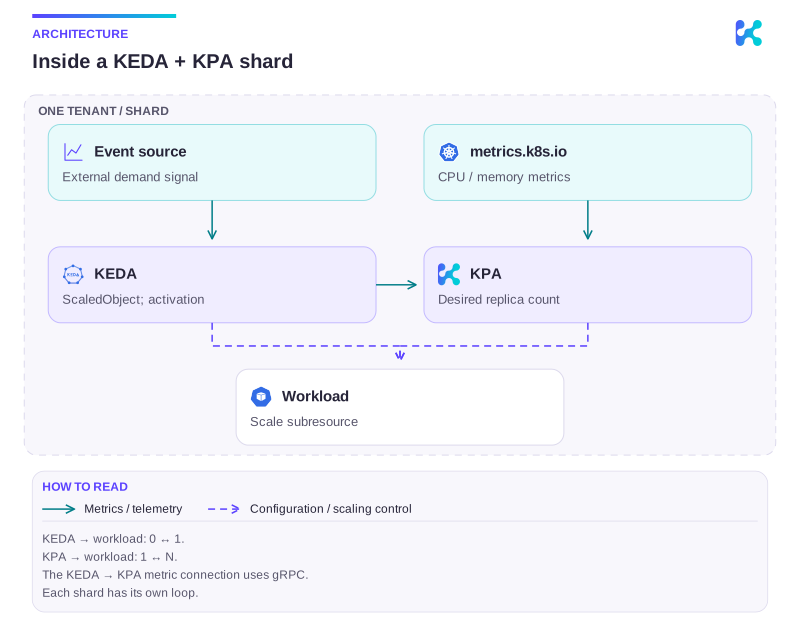
Diagram description
A ScaledObject configures KEDA. KEDA reads the event source, handles activation and provides an external metric over gRPC to its paired KPA. KPA can also read CPU and memory from metrics.k8s.io and updates the workload scale subresource.
Why use KPA
Section titled “Why use KPA”Native KEDA creates Kubernetes HorizontalPodAutoscalers (HPAs), which share the cluster’s HPA controller and external-metrics API path. KPA lets each tenant operate its own autoscaling control loop beside its KEDA operator. This is useful when a large cluster needs stronger autoscaling isolation, separate tenant ownership, or independent control-plane capacity.
KPA reads external metrics from its paired KEDA operator. CPU and memory metrics continue to use Kubernetes metrics.k8s.io.
See KPA networking requirements for ports, mTLS pairing and NetworkPolicy settings.
This page explains KPA behavior and workload-level controls. For the tenant topology, see Multi-tenant scaling. For Helm installation, chart options, verification, and rollback, follow Install and Configure Multi-tenant Scaling.
ScaledObject compatibility
Section titled “ScaledObject compatibility”The ScaledObject remains the source of truth. Existing settings stay in the same fields, including:
minReplicaCountandmaxReplicaCount;- trigger metric targets and fallback configuration; and
advanced.horizontalPodAutoscalerConfig, including scaling policies and stabilization windows.
KPA uses the Kubernetes autoscaling/v2 HPA spec and status shape. Do not create KPA resources manually; user-authored KPAs are not supported.
Set up KPA
Section titled “Set up KPA”For local or multi-tenant scaling, KPA is deployed as one controller per KEDA operator. The paired releases must watch the same, non-overlapping namespace set, and exactly one KPA release installs the cluster-scoped CRD.
For dedicated multi-cluster scaling, one central KEDA/KPA pair reconciles ordinary ScaledObjects and generated KPAs in registered members. The bundled chart selects KPA as the default and requires unrestricted namespace watch settings on that pair. Automatic vCluster discovery installs the matching CRDs and connects through the exported tenant-admin credentials; CPU/memory metrics are read from the member API. See dedicated setup and verification.
Follow Install and Configure Multi-tenant Scaling for the complete rollout sequence, including Agent flags, default and tenant KEDA/KPA pairs, Helm values, health checks, and rollback.
Select KPA for a ScaledObject
Section titled “Select KPA for a ScaledObject”Select KPA without changing the ScaledObject spec:
metadata: annotations: autoscaling.kedify.io/class: kpaThe annotation overrides the installation default. Remove it to follow kedify.kpa.defaultClass, or set it to hpa to select native HPA explicitly. KEDA manages the transition and prevents HPA and KPA from controlling the workload at the same time.
ScalingGroup fallback
Section titled “ScalingGroup fallback”ScalingGroup members use native HPA. If an explicitly KPA-selected ScaledObject joins a group, Kedify changes its class to hpa and emits an AutoscalingClassFallback event. That HPA selection remains after it leaves the group; select kpa again to opt back in. A ScaledObject that used KPA only through the installation default returns to that default after leaving the group.
Configure the KPA evaluation interval
Section titled “Configure the KPA evaluation interval”Override the controller-wide interval for one ScaledObject:
metadata: annotations: autoscaling.kedify.io/class: kpa autoscaling.kedify.io/sync-period-seconds: "15"The allowed range, minimum and controller default are in the annotation reference. Check them against your installed KPA configuration before selecting an interval.
This setting controls how often KPA evaluates the autoscaler. It is separate from ScaledObject pollingInterval, which controls KEDA trigger polling and affects activation from zero.
Use KPA in the Dashboard
Section titled “Use KPA in the Dashboard”The Dashboard exposes Pod autoscaler class and KPA evaluation interval under Advanced configuration. A compact KPA badge identifies KPA-backed ScaledObjects in the list, and the ScaledObject Summary includes a KPA-enabled tile next to replica configuration. View pod autoscaler opens the generated HPA or KPA.
For multi-tenant installations, the cluster Components view shows KPA readiness, pairing, version, ownership, resource usage, and logs for each tenant. The Dashboard uses the Agent’s per-tenant status to verify that KPA is available in the selected namespace before accepting a new KPA selection; the presence of the cluster-wide KPA CRD alone is not treated as tenant capability. KEDA admission performs the final validation. Existing KPA selections are preserved during a temporary availability or permission failure.
Supported metrics
Section titled “Supported metrics”See KedifyPodAutoscaler API reference for fields and validation.
Observe and troubleshoot KPA
Section titled “Observe and troubleshoot KPA”The KPA controller exposes /healthz, /readyz, and /metrics. The Helm chart enables scrape annotations by default. Set both serviceMonitor.enabled=true and prometheusRule.enabled=true to install the supplied ServiceMonitor and alerts.
Start troubleshooting with the ScaledObject, generated autoscaler, target, and events:
kubectl get scaledobject,hpa,kpa -n tenant-akubectl get scaledobject orders -n tenant-a -o jsonpath='{.status.hpaName}{"\n"}'kubectl describe kpa keda-hpa-orders -n tenant-akubectl get events -n tenant-a --sort-by=.lastTimestampIf external metrics fail, check the paired KEDA operator, its MetricsService and TLS Secret, and the namespace watch configuration. For CPU or memory failures, verify metrics.k8s.io with kubectl top pods -n tenant-a.
Roll back to HPA
Section titled “Roll back to HPA”Keep KPA enabled while moving workloads back:
- Set
kedify.kpa.defaultClass=hpaon the designated webhook release and every tenant release. - Set
autoscaling.kedify.io/class: hpaon every ScaledObject that explicitly selects KPA. - Wait for KEDA to remove all KPAs, create replacement HPAs, and confirm those HPAs are healthy.
- Set
kedify.kpa.enabled=false, then remove the tenant KPA controller releases. - Remove the cluster-scoped KPA CRD last, only after no KPA objects or tenant installations remain. Helm retains the CRD on uninstall by default.
Current limitations
Section titled “Current limitations”- KPA is generated only from ScaledObjects; manually managed KPAs are unsupported.
- ScalingGroup members use native HPA.
- Tenant namespace ownership cannot overlap between KPA installations.
- Moving a live namespace between tenant controllers requires a controlled rollout.
- KPA supports Kubernetes 1.33 through 1.35.
Continue with this topic
Section titled “Continue with this topic”Diagnose: Workload does not scale, or scales too slowly.
Related capabilities: Autoscaling health checks.