
Predictive scaler
The Predictive scaler uses historical metrics to forecast demand before it arrives. Keep a live demand signal and validate prediction quality before relying on forecast-driven capacity.
Enable and supply history
Section titled “Enable and supply history”- Install Kedify Predictor, selecting shared-volume or external database storage.
- Supply representative history from an existing KEDA trigger, OTLP or CSV. Configure the source and model in a MetricPredictor.
- Follow the sample workload to add a predictive trigger, then compare forecast values, live demand and ready replicas.
Use a schedule when the traffic window is already known: Cron versus ScalingPolicy. A forecast needs history that predicts demand early enough for pods and nodes to become ready.
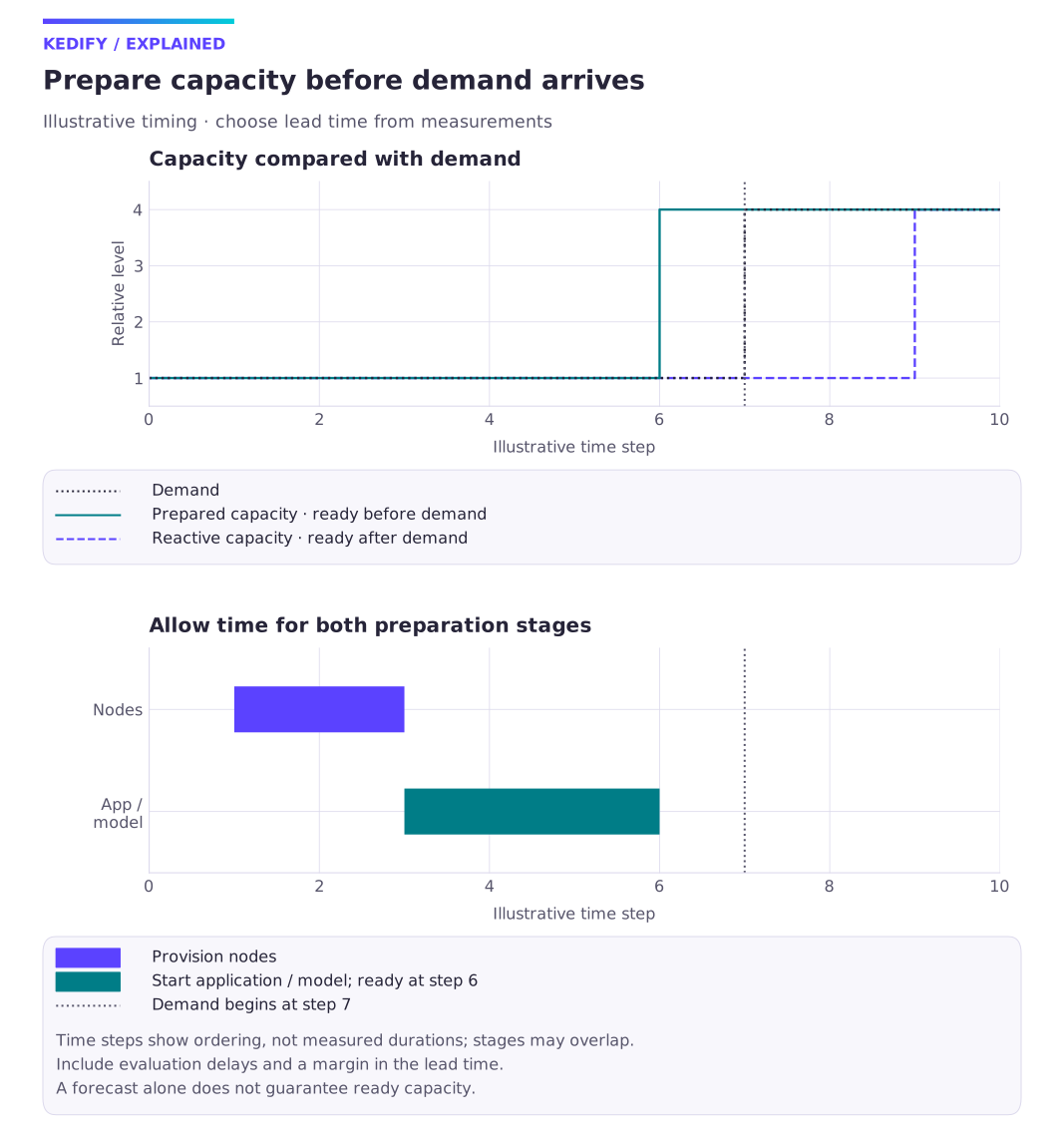
Diagram description
Illustrative demand increases after node provisioning and application startup. Prepared capacity is ready before demand, while reactive capacity arrives later. Use measured delays to choose the lead time.
Architecture
Section titled “Architecture”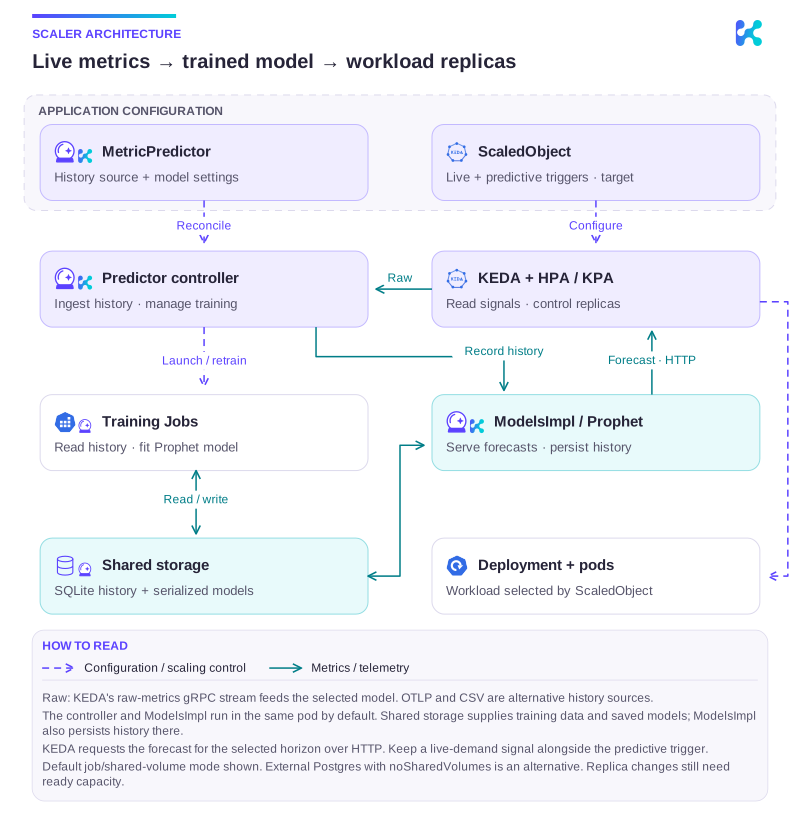
Diagram description
A MetricPredictor selects a historical metric source and model settings. The controller ingests live values from KEDA's raw-metrics gRPC stream and records history through ModelsImpl, its Prophet sidecar. It launches training Jobs that read SQLite history and write serialized models on shared volumes. ModelsImpl loads these models and returns forecasts to KEDA over HTTP. The ScaledObject selects a predictive trigger and target workload, which KEDA and HPA or KPA scale. OTLP or CSV are alternative history inputs; external Postgres/noSharedVolumes is an alternative to the default shared-volume mode.
Microservice that can host multiple Prophet models (on the diagram called ModelsImpl) is by default delivered together with the controller as a side-car container.
Installation
Section titled “Installation”Kedify Predictor can be installed using a publicly available Helm Chart. Please consult the installation page for more details. By default, for training the models the predictor spawns Kubernetes jobs that can write to a common persistent volume. There is one volume for serialized models and one for SQLite (file-based) DB where metrics and model configuration parameters are stored.
However, if your cloud provider platform doesn’t allow for shared PVs where multiple pods can read and write, you may want to configure the Predictor to run with an external database (Postgres instead of SQLite) and avoid the shared PVs altogether.
Metric Predictor Specification
Section titled “Metric Predictor Specification”See MetricPredictor API reference for the MetricPredictor fields.
Trigger Specification
Section titled “Trigger Specification”See Predictive scaler trigger configuration for the trigger fields.
Example ScaledObject with Predictive & HTTP triggers
Section titled “Example ScaledObject with Predictive & HTTP triggers”This example selects the greater of live and predicted request rates, using the same units and target. Validate forecast availability and failure behavior separately; a composite formula is not a fallback policy.
apiVersion: keda.sh/v1alpha1kind: ScaledObjectmetadata:  name: e-shop  namespace: appspec:  scaleTargetRef:    name: e-shop
  triggers:    - name: predictedRequestsInTwoMins      type: kedify-predictive      metadata:        modelName: app*e-shop        targetValue: "10"    - name: requests      type: kedify-http      metadata:        hosts: www.example.com        service: e-shop-service        port: "8080"        scalingMetric: requestRate        targetValue: "10"
  advanced:    scalingModifiers:      formula: max(requests, predictedRequestsInTwoMins)      metricType: AverageValue      target: "10"
Model Retraining
Section titled “Model Retraining”Retraining the model for each new datapoint would be way too expensive, especially in KEDA ecosystem, where we get the value, each 30s. Instead, we expose a configurable period under mp.spec.model.retrainInterval denoting how often the model should be fully retrained.
The time of the last retrain action is then captured under mp.status.conditions. It is also possible to trigger the retraining explicitly by annotating the MetricPredictor resource:
kubectl annotate mp e-shop -n app --overwrite kedify.io/retrain="true"To check the status of the MetricPredictor one can inspect the resource by:
kubectl get mp e-shop -owideNAMESPACE NAME LASTRETRAIN MODELNAME READY SOURCE SOURCEKIND SOURCEDETAIL AGE STATE RETRAININTERVAL CSVapp. e-shop 12m app*e-shop True KEDA,CSV scaledobject:e-shop trigger: mm 30m Subscribed 8760h0m0s IngestionOkModel Explainability
Section titled “Model Explainability”In the current implementation of Kedify predictor uses Prophet as the ML technique. It has a built-in feature for visualizing the model prediction that is also exposed to Kedify users.
Kedify Dashboard
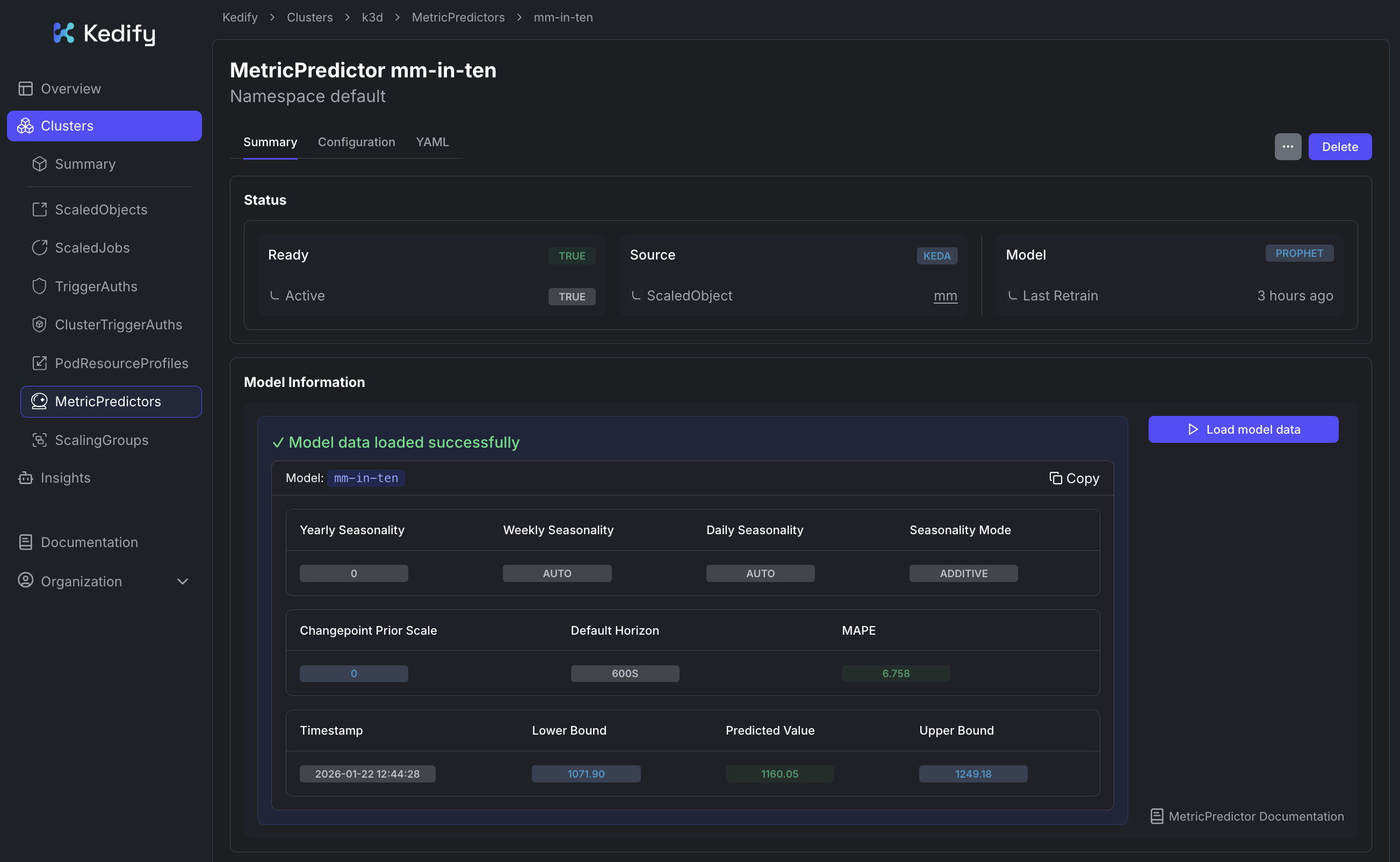
Section titled “Kedify Dashboard”Information about the model can be inspected in the Kedify Dashboard for the respective MetricPredictor resource:
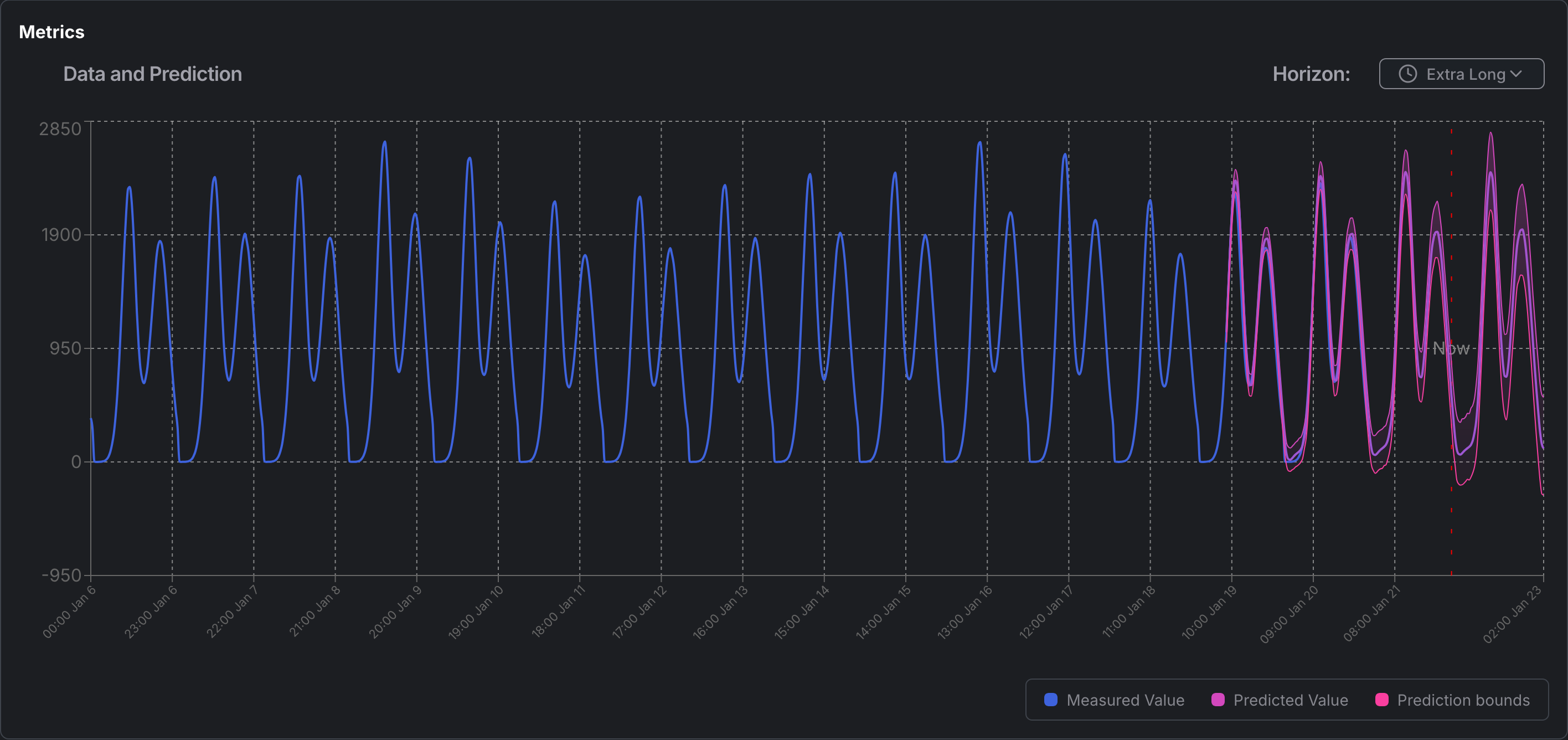
To see the historical data and predictive values side-by-side, you can view the graph in the dashboard:
REST API
Section titled “REST API”Alternatively, users can use the REST API directly. The REST API may also come handy when debugging the models or feeding the metrics from somewhere else.
In order to expose the REST API, run:
kubectl port-forward -n keda svc/kedify-predictor 8000open http://localhost:8000 # explore the Swagger API# or docs:open http://localhost:8000/redoc# to check a model and its future prediction (how it thinks that future will look like)open http://localhost:8000/models/app*e-shop/graph# to check the individual components of the predictionopen http://localhost:8000/models/app*e-shop/graphComponentsFor a deeper look at the stored metric history, alternative forecasting techniques, and Prophet parameter tuning, follow the Model Exploration tutorial.
Enable, validate and diagnose
Section titled “Enable, validate and diagnose”Follow Enable predictive scaling → Forecast and scale a sample workload; use Send metric history to the predictor with OTLP for OTLP history and Explore and tune forecast models for optional model exploration. Compare predictions with actual demand and ready capacity before relying on a forecast. Forecasts are missing or inaccurate separates missing history, model failures and inaccurate results.