
Vertical scaling: PRA and PRP
Vertical scaling changes CPU or memory resources per pod. Choose between explicit lifecycle profiles and continuous utilization-based resizing.
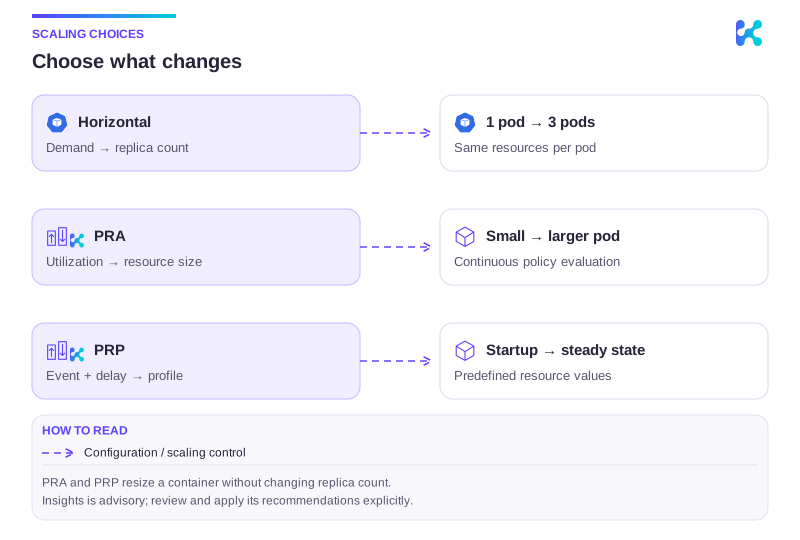
Diagram description
Horizontal autoscaling changes the number of pods. PRA continuously changes container resources using measured utilization. PRP applies predefined resources after a lifecycle event and delay. PRA and PRP leave replica count unchanged; Insights provides recommendations for explicit review.
Vertical Scaling vs Horizontal Scaling
Section titled “Vertical Scaling vs Horizontal Scaling”Horizontal scaling changes replica count; vertical scaling changes resources within a pod. A memory-heavy process may need more per-pod capacity even when adding replicas does not help. Both require node capacity and workload readiness. Insights is advisory rather than a vertical controller.
When to use Pod Resource Profile (PRP)
Section titled “When to use Pod Resource Profile (PRP)”Use PRP for explicit resource transitions at startup, container readiness or ScaledObject activation/deactivation. Choose it when you know the desired resource profile for a lifecycle state. Try keeping a small warm pod when retaining a process avoids expensive cold starts.
When to use Pod Resource Autoscaler (PRA)
Section titled “When to use Pod Resource Autoscaler (PRA)”Use PRA for continuous adjustment based on CPU/memory utilization, with bounds, sampling and cooldown. Try the load-generator walkthrough to inspect decisions and resize events before wider rollout.
PRP and PRA Together
Section titled “PRP and PRA Together”Assign one writer to each container resource field. PRP and PRA must not repeatedly write the same requests/limits fields; last-writer patch behavior causes conflicting control loops. Include GitOps, dashboard actions and other vertical controllers in the ownership map. When combining vertical scaling with a CPU-utilization HPA, changing requests also changes the utilization percentage at unchanged CPU usage.
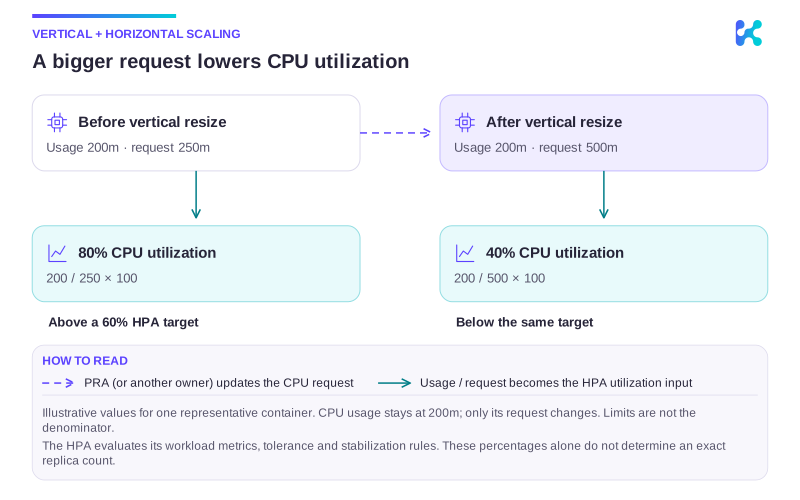
Diagram description
For one representative container using a steady 200m CPU, raising the CPU request from 250m to 500m changes utilization from 80 percent to 40 percent. A CPU-utilization HPA therefore receives a different percentage even though application usage is unchanged. With a 60 percent target, the values are above then below target; replica decisions still depend on the complete HPA configuration and metrics.
Use a field-level ownership map before combining controllers. For example, one container could use this split:
| Container field | Runtime owner | Configuration rule |
|---|---|---|
requests.cpu | PRA | Configure only policy.cpu.requests for PRA. |
requests.memory | PRP | Include only requests.memory in PRP newResources. |
limits.cpu | Fixed workload configuration | Neither PRA nor PRP changes this field. |
limits.memory | Fixed workload configuration | Neither PRA nor PRP changes this field. |
This is an ownership example, not a ready-to-apply policy. Keep requests within limits, preserve the Pod’s QoS class, and verify resize feasibility. Check dashboard actions, GitOps and any other vertical controller for writes to these same live fields; a different timer does not resolve conflicting ownership.
Vertical Scaling How-To
Section titled “Vertical Scaling How-To”Both controllers need supported Kubernetes in-place resize behavior, permissions and feasible resources. QoS constraints, container resize policy and node capacity can defer or prevent a change; some changes can restart a container. Use the PRP warm-pod guide or PRA load test to inspect resource changes, then diagnose failed resizes.
For reviewed changes to Helm or GitOps resource settings, use Insights recommendations and apply them through source.