
Prewarm node capacity on GKE
The GKE cluster autoscaler provisions nodes when pods are pending, which means the first pod of a scale-up wave still waits for an instance to boot. Capacity buffers (CapacityBuffer, autoscaling.x-k8s.io/v1beta1) close that gap: a buffer describes spare capacity as a number of chunks of a pod shape, and the autoscaler treats those chunks as pending demand, holding warm nodes for them at all times, reducing node-provisioning delay when workloads fit the ready buffer.
The buffer API has one practical limitation: spec.replicas exists, but the CRD exposes no /scale subresource. The HPA, KEDA, and kubectl scale cannot target it, so out of the box the buffer size is a static number you edit by hand.
Scale Adapter removes that limitation. Its replica field-path mode bridges the missing /scale contract, so any KEDA or Kedify trigger can drive the buffer size: a cron schedule for known peaks, a queue depth or request rate for demand-driven warm pools, or the Predictive Scaler for forecasted load.
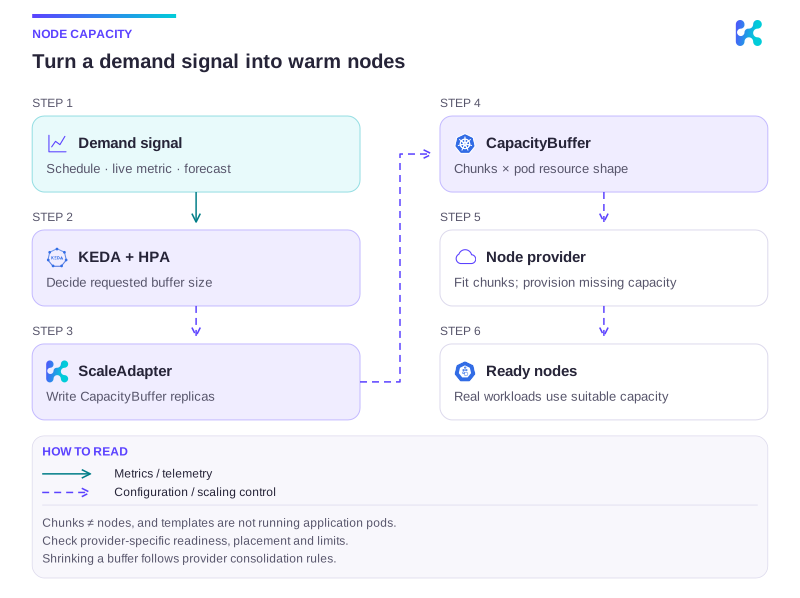
Diagram description
A KEDA ScaledObject drives a ScaleAdapter. The adapter writes CapacityBuffer replicas, representing chunks of a pod resource shape. The provider evaluates placement and provisions missing node capacity. Real application pods can then use suitable Ready nodes. Buffer chunks are capacity requests, not running application pods, and chunk count is not node count.
CapacityBuffer is a Kubernetes sig-autoscaling API that GKE supports as a managed feature. This guide covers GKE; see the Karpenter and Cluster Autoscaler guides for the same setup on those autoscalers.
Prerequisites
Section titled “Prerequisites”-
GKE 1.35.2-gke.1842000 or newer on a Standard cluster; check the available release channels for your region. The
CapacityBufferCRD and the controller are managed by GKE, so there is nothing to install or flag on. -
Node auto-provisioning is recommended so the autoscaler can create node pools matching the buffer’s pod shape; without it, buffers can only fill existing node pools. Its resource ceilings also serve as the node-level cap on buffer capacity:
Terminal window gcloud container clusters update CLUSTER_NAME \--enable-autoprovisioning \--min-cpu 0 --max-cpu 64 --min-memory 0 --max-memory 256 -
Kedify Agent v0.6.8 or newer with the Scale Adapter controller enabled and RBAC for buffers. Field-path targets are read through an informer cache and updated as whole resources, so the grant covers the full resource:
agent:features:scaleAdaptersEnabled: trueextraRbacRules:- apiGroups: ["autoscaling.x-k8s.io"]resources: ["capacitybuffers"]verbs: ["get", "list", "watch", "update"]
Create the Buffer
Section titled “Create the Buffer”A buffer references a PodTemplate describing one chunk of capacity and a replicas count of how many such chunks to keep warm. Chunks are bin-packed like real pods, so N chunks does not mean N nodes; the autoscaler provisions new nodes only when the chunks no longer fit the existing capacity.
apiVersion: v1kind: PodTemplatemetadata: name: standard-workload-shape namespace: defaulttemplate: metadata: labels: app: warm-pool spec: containers: - name: placeholder image: registry.k8s.io/pause:3.9 resources: requests: cpu: "1" memory: 1Gi---apiVersion: autoscaling.x-k8s.io/v1beta1kind: CapacityBuffermetadata: name: warm-pool namespace: defaultspec: podTemplateRef: name: standard-workload-shape replicas: 1The template’s containers never run. The autoscaler turns the buffer into in-memory virtual pods that participate in scheduling simulation only, so the image is never pulled and nothing is written to the cluster beyond the buffer itself.
Adapt and Scale
Section titled “Adapt and Scale”Create the adapter in the buffer’s namespace, pointing the field paths at the buffer’s replica fields. Leave the adapter’s spec.replicas unset; the controller initializes it from the buffer, so creating the adapter never changes the buffer size:
apiVersion: autoscaling.kedify.io/v1alpha1kind: ScaleAdaptermetadata: name: warm-pool namespace: defaultspec: targetRef: apiVersion: autoscaling.x-k8s.io/v1beta1 kind: CapacityBuffer name: warm-pool selector: matchLabels: app: warm-pool desiredReplicasPath: ".spec.replicas" currentReplicasPath: ".status.replicas"The selector is nominal: buffer chunks are virtual and never exist as Pods, so nothing will ever match it. It only satisfies the HPA’s requirement for a non-empty scale selector, see the selector caveat.
Then point a regular ScaledObject at the adapter. A cron trigger that pre-provisions ten chunks of capacity ahead of the morning ramp-up and releases them at night looks like this:
apiVersion: keda.sh/v1alpha1kind: ScaledObjectmetadata: name: warm-pool namespace: defaultspec: scaleTargetRef: apiVersion: autoscaling.kedify.io/v1alpha1 kind: ScaleAdapter name: warm-pool minReplicaCount: 0 maxReplicaCount: 20 triggers: - type: cron metadata: timezone: Europe/Prague start: 30 7 * * 1-5 end: 0 20 * * 1-5 desiredReplicas: "10"With minReplicaCount: 0 the buffer drops to zero chunks outside the window, and the autoscaler removes the now-empty nodes. Any other trigger works the same way, including combining several triggers so the buffer follows whichever demand signal is highest.
Verify
Section titled “Verify”kubectl get scaleadapter,capacitybufferkubectl get events --field-selector involvedObject.kind=CapacityBufferkubectl get nodesInside the cron window the adapter forwards the desired count to the buffer, the buffer emits cluster autoscaler events, and the warm nodes appear in the node list:
NAME                                           TARGET      KIND             DESIRED   CURRENT   READYscaleadapter.autoscaling.kedify.io/warm-pool   warm-pool   CapacityBuffer   10        10        True
LAST SEEN   TYPE     REASON             OBJECT                     MESSAGE2m          Normal   TriggeredScaleUp   capacitybuffer/warm-pool   capacity buffer 2 fake pods triggered scale-up: ...
The buffer’s Provisioning condition reports FitsExistingCapacity when the chunks fit the cluster’s spare room without any new node; headroom you already have is free. When the trigger deactivates, the buffer reports 0 replicas and the empty nodes are removed.
Behavior Notes
Section titled “Behavior Notes”- Reaction time. The buffer controller re-resolves templates and counts on a polling loop of roughly 30 seconds, on top of the usual KEDA and HPA intervals. Expect up to a minute between a trigger change and the node request. That envelope is fine for the use case, since the buffer exists to absorb instance boot time on behalf of the real workload.
- Scale-down pace. After the buffer drops to zero, the emptied nodes are removed by the GKE cluster autoscaler’s regular scale-down evaluation, which typically takes ten minutes or more. Budget for that tail when estimating the cost of short buffer windows.
- Single writer. The adapter is authoritative over
spec.replicas. Do not edit the buffer size by hand or from another controller while the adapter manages it; the adapter overwrites external changes and raises theConflictingReplicaWritercondition. Note that the autoscaler reacts to buffer writes within seconds, so even a short-lived external write can trigger real node provisioning before the adapter’s overwrite lands. - Bound the blast radius. The
ScaledObject’smaxReplicaCountcaps what KEDA requests, the buffer’sspec.limitscaps the buffer regardless of the writer, and the node auto-provisioning ceilings cap the nodes. Chunks blocked by quota or ceilings surface through theLimitedByQuotascondition andNotTriggerScaleUpevents. - Reactivation and stabilization. After a scale to zero, the HPA’s downscale stabilization window can briefly restore the last recommendation from before the idle period. If the overshoot matters, tune
spec.advanced.horizontalPodAutoscalerConfig.behavioron theScaledObject. - Unsupported combinations. Standby buffers exclude some node configurations (GPUs and TPUs, local SSDs, Confidential Nodes, and others); see the GKE documentation for the current list.
Continue with this topic
Section titled “Continue with this topic”Reference: ScaleAdapter API reference.
Diagnose: Workload does not scale, or scales too slowly.
Related capabilities: Scale custom targets and prewarm node capacity.