
Multi-cluster scaling
Kedify supports two scaling models across a fleet of Kubernetes clusters. Select the model with global.features.multicluster.type in the Agent chart. The default is distributed.
| Model | Scaling resources | How demand is handled |
|---|---|---|
distributed | Central DistributedScaledObject / DistributedScaledJob | Spread a workload’s demand across selected members, or pin a distributed resource to one member. Metrics are evaluated centrally. |
dedicated | Ordinary ScaledObject / ScaledJob in each registered member | Central KEDA/KPA controllers reconcile each member’s resources independently. Targets, authentication resources, generated KPAs and Jobs belong to that member. |
Dedicated mode is available in the Kedify 0.8.1 release bundle. It uses multicluster-runtime in KEDA and KPA. Neither model requires running KEDA/KPA controllers in each member. Choose one model per installation; dedicated mode disables the Agent DSO/DSJ controllers.
Distributed mode extends the standard KEDA resources with:
DistributedScaledObject- extendsScaledObjectfor workloads like DeploymentsDistributedScaledJob- extendsScaledJobfor long running job-based workloads
Enable a scaling model
Section titled “Enable a scaling model”Distributed mode
Section titled “Distributed mode”Add this to your Agent release’s maintained Helm values, then apply it through your existing Helm/GitOps workflow using your selected compatible chart version:
global: features: multicluster: enabled: true type: distributedThe same setting under agent.features.multicluster.enabled enables both Agent controllers, but the global form is recommended because it also enables the raw metrics gRPC service in a bundled Kedify KEDA installation.
Dedicated mode
Section titled “Dedicated mode”Use the global settings and enable both bundled dependencies:
global: features: multicluster: enabled: true type: dedicatedkeda: enabled: truekpa: enabled: trueThe chart enables multicluster reconciliation in KEDA and KPA, selects KPA as the default autoscaler, and leaves DistributedScaledObjects and DistributedScaledJobs disabled.
Native vCluster discovery can be enabled through global.features.multicluster.vClusterDiscoveryEnabled and will install the matching KEDA/KPA CRDs and create a managed kubeconfig Secret and ClusterRegistration for each member, simplifying cluster registration. Central controllers use the exported tenant-admin credentials to reconcile its resources. See the dedicated setup procedure.
For CPU/memory scaling, KPA reads the member’s metrics.k8s.io API and pods. External metrics come from its paired central KEDA operator with the member identity attached. Shared-node vClusters should enable integrations.metricsServer.enabled=true; the host must already provide resource metrics. This differs from a central DSO, whose generated ScaledObject targets the DSO rather than member pods.
Review multi-cluster networking requirements for member API access, central metric sources and vCluster ports.
Distributed architecture
Section titled “Distributed architecture”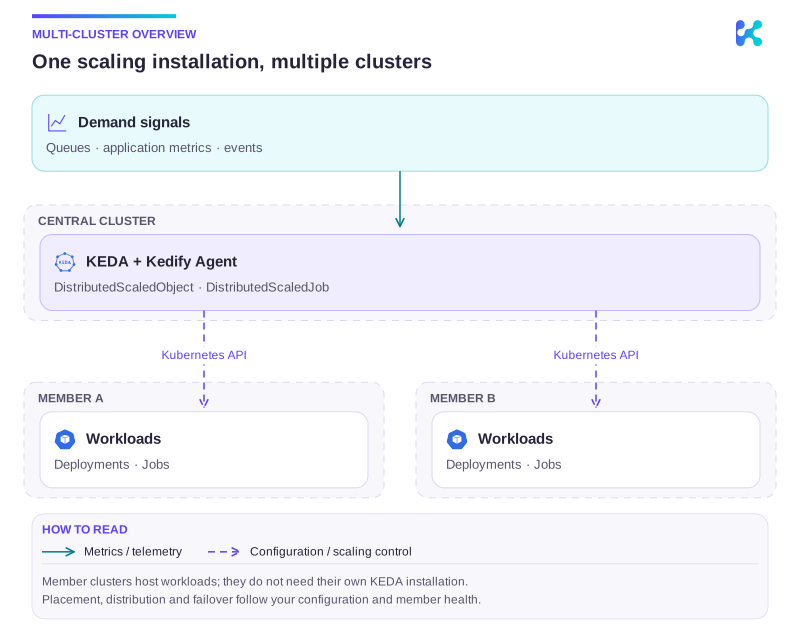
Diagram description
Demand feeds KEDA and Kedify Agent in the central cluster. DistributedScaledObjects and DistributedScaledJobs update workloads through member Kubernetes APIs. Member clusters host Deployments or Jobs without requiring their own KEDA installation.
There are two main types of clusters involved in multi-cluster scaling:
- KEDA Cluster: This cluster runs the Kedify stack and manages the scaling logic. It monitors the metrics and decides when to scale workloads up or down.
- Member Clusters: These clusters host the actual workloads that need to be scaled. They expose their kube-apiserver to the KEDA cluster for management.
The member clusters don’t need to run KEDA themselves, as scaling decisions for DistributedScaledObject or DistributedScaledJob are made by the KEDA cluster. This allows for a smaller
footprint on member clusters and enables edge scenarios where resources are limited.
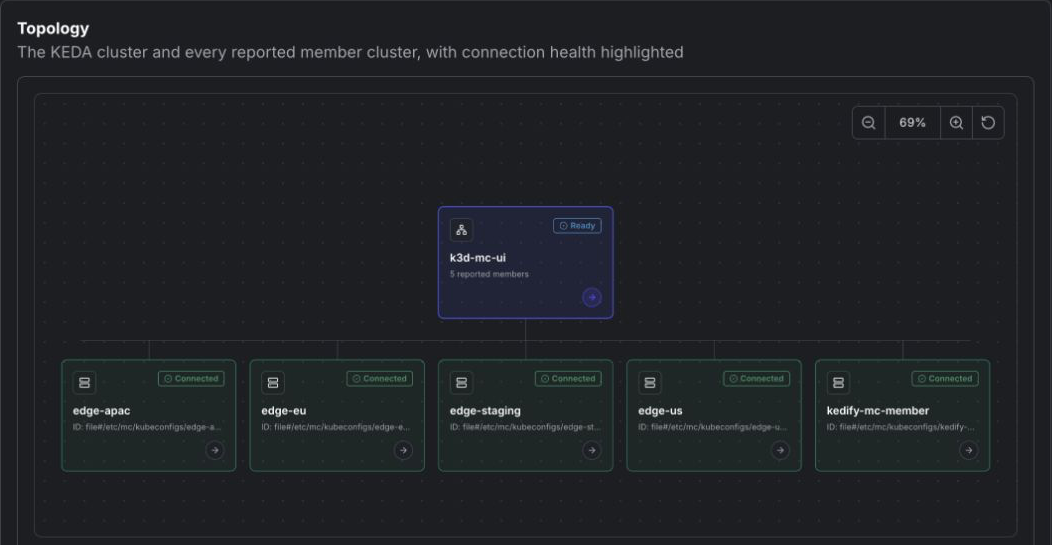
The Multi-Cluster tab in the Kedify Dashboard provides an interactive topology of the KEDA cluster and every reported member cluster. Connection health is highlighted on each node; select a member to inspect its provider identity, connection state, and diagnostic details.
Connecting Member Clusters
Section titled “Connecting Member Clusters”The plugin commands below configure the distributed file provider. For dedicated mode, use automatic vCluster discovery.
In order to connect a member cluster to the KEDA cluster, you need to make the kube-apiserver of the member cluster accessible from the KEDA cluster. This can be done using various methods such as VPN, VPC peering, or exposing the API server via a load balancer with proper security measures.
With the connectivity established, you can use Kedify’s kubectl plugin to register member clusters to the KEDA cluster:
kubectl kedify mc setup-member <name> --keda-kubeconfig <path> --member-kubeconfig <path>This command will use the provided kubeconfig files to set up the necessary access and permissions for the KEDA cluster to manage the member cluster.
The member-kubeconfig should have sufficient permissions to create RBAC, ServiceAccount and keda namespace in the member cluster, these resources will be
created with minimal privileges required for Kedify multi-cluster to operate. The keda-kubeconfig should have permissions to patch Secret named
kedify-agent-multicluster-kubeconfigs in keda namespace in the KEDA cluster. For connecting multiple member clusters, you can repeat the above command
with different names and kubeconfig files for each member cluster.
In case you would like the KEDA cluster to connect to the member cluster using a different address than the one specified in the member-kubeconfig, you can provide
--member-api-url <url> flag to override the API server URL.
You can also list and remove registered member clusters using the following commands:
kubectl kedify mc list-memberskubectl kedify mc delete-member <name>Monitoring
Section titled “Monitoring”The agent exposes one Prometheus gauge for every CA certificate in a member cluster’s configured kubeconfig bundle:
kedify_agent_kedifyconfiguration_multicluster_ca_expiration_timestamp_secondsIts value is the certificate’s NotAfter time as Unix seconds. The metric has the standard kedify_organization_id, kedify_agent_id, namespace, and name labels, plus:
cluster: the member-cluster name shown inKedifyConfiguration.status.multiClusterStatus.clusters.fingerprint: the SHA-256 fingerprint of the DER-encoded CA certificate. A bundle with multiple CA certificates produces one series per fingerprint.
The metric exposes expiry metadata only; it does not expose the CA certificate contents. It is emitted only for CA certificates that the agent can parse from the configured bundle. The same certificate metadata, including any parsing error, is available in status.multiClusterStatus.clusters.<cluster>.certificateAuthority.
For example, show days remaining for each member CA:
(kedify_agent_kedifyconfiguration_multicluster_ca_expiration_timestamp_seconds - time()) / 86400Use an alerting rule to detect certificates approaching expiry. The following example alerts 30 days before expiry and separately reports certificates that have already expired:
groups: - name: kedify-multicluster-ca rules: - alert: KedifyMemberClusterCAExpiringSoon expr: | (kedify_agent_kedifyconfiguration_multicluster_ca_expiration_timestamp_seconds - time() < 30 * 24 * 60 * 60) and (kedify_agent_kedifyconfiguration_multicluster_ca_expiration_timestamp_seconds > time()) for: 1h labels: severity: warning annotations: summary: Member-cluster CA expires soon description: CA {{ $labels.fingerprint }} for member cluster {{ $labels.cluster }} expires within 30 days. - alert: KedifyMemberClusterCAExpired expr: kedify_agent_kedifyconfiguration_multicluster_ca_expiration_timestamp_seconds <= time() for: 5m labels: severity: critical annotations: summary: Member-cluster CA has expired description: CA {{ $labels.fingerprint }} for member cluster {{ $labels.cluster }} has expired.DistributedScaledObject
Section titled “DistributedScaledObject”A ScaledObject is a KEDA resource that defines how to scale a specific workload based on certain metrics. The DistributedScaledObject extends this concept to support
scaling across multiple clusters. It includes all the fields of a standard ScaledObject, along with additional fields to specify the member clusters and their configurations.
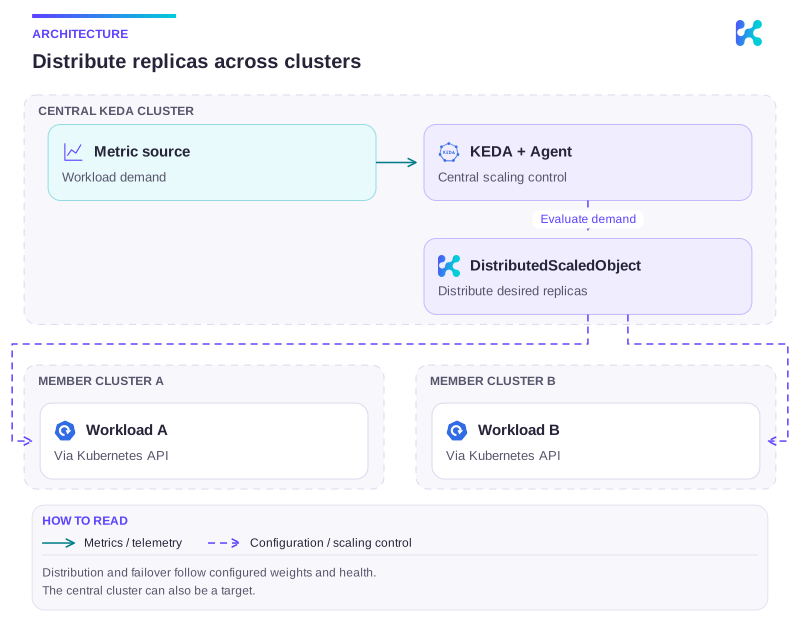
Diagram description
A central KEDA installation evaluates demand and uses DistributedScaledObject to update member Kubernetes APIs. Member clusters do not require another KEDA installation.
DistributedScaledObject Specification
Section titled “DistributedScaledObject Specification”See DistributedScaledObject API reference for fields and validation.
DistributedScaledJob
Section titled “DistributedScaledJob”Similar to DistributedScaledObject, the DistributedScaledJob extends KEDA’s ScaledJob concept to support job-based workloads across multiple clusters.
It includes all the fields of a standard ScaledJob, along with additional fields to specify the member clusters and their configurations.
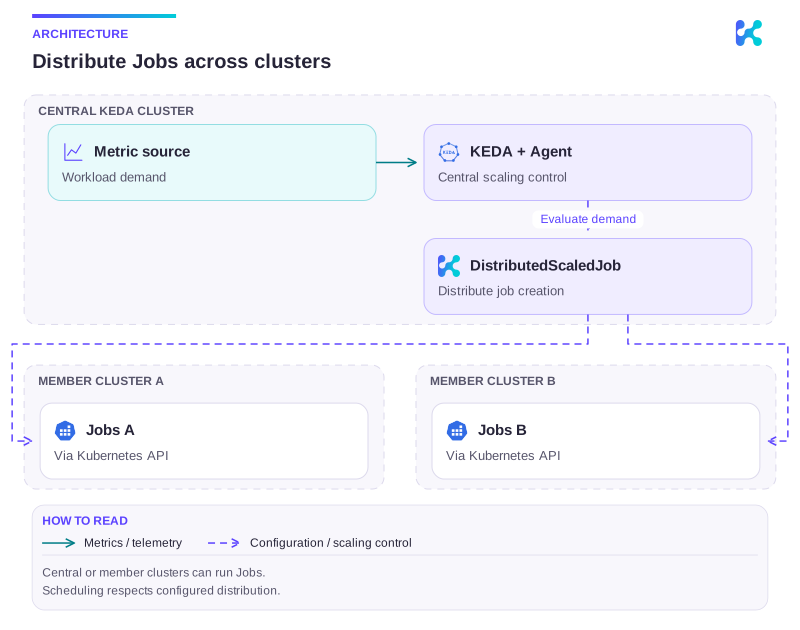
Diagram description
A central KEDA installation evaluates demand and uses DistributedScaledJob to update member Kubernetes APIs. Member clusters do not require another KEDA installation.
- Job-based workload: Instead of scaling Deployments, it creates and manages Jobs based on metrics
Prerequisite - Enabling KEDA raw metrics
Section titled “Prerequisite - Enabling KEDA raw metrics”Before using DistributedScaledJobs, make sure that the raw metrics endpoint in KEDA is enabled.
Use the environment variable RAW_METRICS_GRPC_PROTOCOL and set it to the value enabled.
In the values.yaml file:
keda: env: - name: RAW_METRICS_GRPC_PROTOCOL value: enabledFrom the command line - add this argument to your helm installation command:
helm install ... \ --set-json 'keda.env=[{"name":"RAW_METRICS_GRPC_PROTOCOL","value":"enabled"}]'DistributedScaledJob Specification
Section titled “DistributedScaledJob Specification”See DistributedScaledJob API reference for fields and validation.
Cluster Scheduling Strategies
Section titled “Cluster Scheduling Strategies”See DistributedScaledJob API reference for fields and validation.
FailoverPolicy
Section titled “FailoverPolicy”See DistributedScaledJob API reference for fields and validation.
DistributedScaledJob Pod Overrides
Section titled “DistributedScaledJob Pod Overrides”See DistributedScaledJob API reference for fields and validation.
Scaling strategies
Section titled “Scaling strategies”See DistributedScaledJob API reference for fields and validation.
Pausing Scaling Temporarily
Section titled “Pausing Scaling Temporarily”Both DistributedScaledObject and DistributedScaledJob support pausing via annotation:
metadata: annotations: autoscaling.keda.sh/paused: "true"When this annotation is set:
DistributedScaledObjectreconciliation skips scaling actions across member clustersDistributedScaledJobreconciliation skips creating new Jobs across member clusters- status condition
Paused=Trueis set on the distributed resource
DistributedScaledObject also supports autoscaling.keda.sh/paused-replicas:
metadata: annotations: autoscaling.keda.sh/paused-replicas: "3"Behavior for DistributedScaledObject:
autoscaling.keda.sh/paused-replicaspauses scaling and sets a fixed total target replicas value- if both annotations are set,
autoscaling.keda.sh/paused-replicastakes precedence - value must be a non-negative integer
Pause existing resources:
kubectl annotate distributedscaledobject <name> autoscaling.keda.sh/paused="true"kubectl annotate distributedscaledjob <name> autoscaling.keda.sh/paused="true"kubectl annotate distributedscaledobject <name> autoscaling.keda.sh/paused-replicas="3"To resume scaling, remove the annotation:
kubectl annotate distributedscaledobject <name> autoscaling.keda.sh/paused-kubectl annotate distributedscaledjob <name> autoscaling.keda.sh/paused-kubectl annotate distributedscaledobject <name> autoscaling.keda.sh/paused-replicas-