
Scale vCluster workloads centrally
Configure Kedify Agent once to discover vClusters hosted in the central cluster automatically. Run KEDA alongside it, and use a separate DistributedScaledObject (DSO) for each workload in each member vCluster. Each DSO explicitly selects one member cluster.
This walkthrough selects distributed mode. To place ordinary ScaledObjects or ScaledJobs in the vClusters and scale each independently through central KEDA/KPA, use dedicated mode.
This walkthrough uses two shared-node vClusters hosted in the central cluster. The application Deployments belong to the vClusters. Their pods run on shared host nodes through vCluster’s normal synchronization. Automatic discovery also works with private-node vClusters hosted in the central cluster because both modes expose the same Service and kubeconfig Secret.
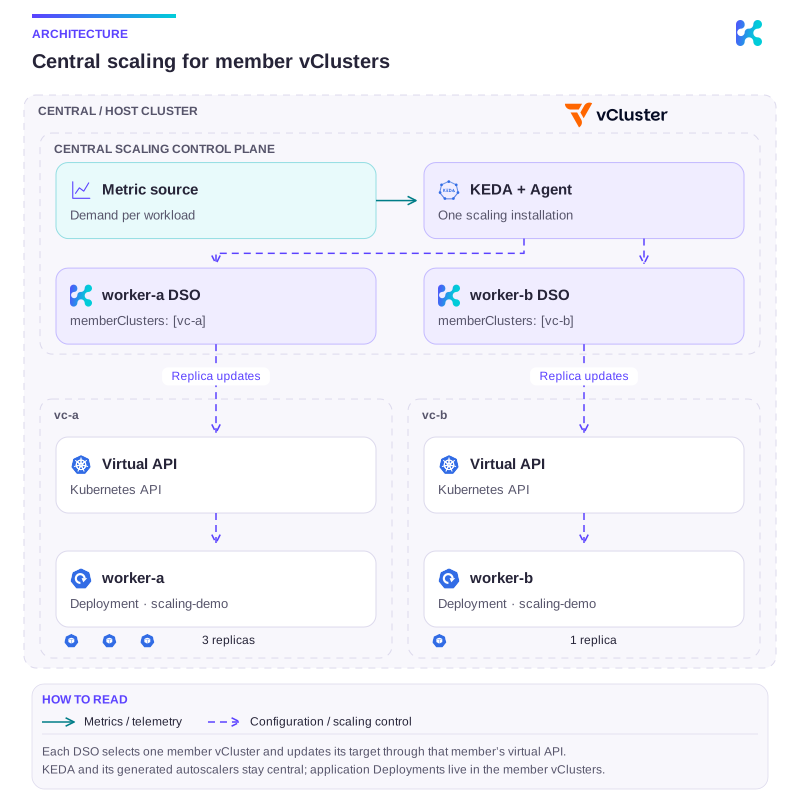
Diagram description
One host cluster contains the central KEDA and Kedify Agent installation and two member vClusters. The worker-a DSO selects vc-a and the worker-b DSO selects vc-b. Each DSO updates a Deployment through the selected virtual Kubernetes API; the example shows three worker-a replicas and one worker-b replica.
There are no application Deployment targets in the central Kubernetes API. KEDA’s generated ScaledObjects and HPAs stay central and target the DSOs. The central cluster also holds a ConfigMap with one metric value per workload for this exercise.
Watch two vClusters join a central Kedify installation automatically, scale their workloads independently, and return to zero.
Use the chapter buttons to jump between steps.
Open the player, download the recording, or read the transcript.
Prerequisites
Section titled “Prerequisites”- A central cluster with a compatible Kedify
0.8.1release bundle or later installed inkeda. The registration and CRD bootstrap behavior described here requires that bundle’s Agent and chart. - The four KEDA CRDs and
kedifypodautoscalers.autoscaling.kedify.ioinstalled centrally for automatic bootstrap. Enabling the chart’skpa.enableddependency installs the KPA CRD. If you do not run the optional KPA controller in distributed mode, install the matching KPA CRD from your release bundle separately. - A working host
metrics.k8s.ioAPI for the recommended metrics-server integration. Checkkubectl top pods -Ain the host context before creating members. - A default StorageClass that can provision persistent volumes for the vCluster control planes, or the name of another StorageClass to configure below.
The commands below use vCluster’s version defaults. Keep the CLI current to use the current stable release. For a reproducible deployment, add --version <version> to Helm or --chart-version <version> to the CLI. Review vCluster’s shared-node prerequisites for your host cluster and selected release.
1. Enable automatic discovery
Section titled “1. Enable automatic discovery”Merge these values into your central Agent’s existing Helm configuration and apply your usual Helm or GitOps upgrade:
global: features: multicluster: enabled: true type: distributed vClusterDiscoveryEnabled: trueThe chart grants the Agent cluster-wide get, list, and watch access to host Secrets and Services, read access to the five source CRDs, and permission to manage registration resources in its installation namespace. The Agent discovers existing and new vClusters through their native Secrets and labels.
With vCluster discovery enabled, Kedify also copies the live central KEDA/KPA CRDs into each vCluster: scaledobjects.keda.sh, scaledjobs.keda.sh, triggerauthentications.keda.sh, clustertriggerauthentications.keda.sh, and kedifypodautoscalers.autoscaling.kedify.io. After all five are established, it creates a managed kubeconfig Secret and ClusterRegistration in keda. It periodically reconciles the CRDs, refreshes credentials when the native export changes, and removes the managed registration when its source disappears. The original vCluster Secret remains unchanged.
The distributed provider also maintains direct connections to the native exports. Its Connected status does not by itself prove the registration/bootstrap path succeeded. A missing central KPA CRD can leave distributed scaling connected while automatic registration reports VClusterBootstrapFailed.
2. Create the member vClusters
Section titled “2. Create the member vClusters”We recommend integrations.metricsServer.enabled=true by default for shared-node vClusters used with Kedify. It forwards host CPU/memory metrics into the member and supports dedicated KPA scaling and tenant telemetry. The central ConfigMap/DSO exercise does not consume these metrics, but both commands below enable the integration so members are ready for those uses. This is the guide’s recommended setting; vCluster’s chart default is false.
See the vCluster configuration guide for available options. Both installation methods below produce the native Service and kubeconfig Secret used by automatic discovery.
If the host cluster has no default StorageClass, save this as vcluster.yaml and replace my-storage-class with an available class:
controlPlane: statefulSet: persistence: volumeClaim: storageClass: my-storage-classAdd --values vcluster.yaml to either command below only when you create this optional values file.
for member in a b; do helm upgrade --install "vc-$member" vcluster \ --repo https://charts.loft.sh \ --namespace "vcluster-$member" --create-namespace \ --set integrations.metricsServer.enabled=true \ --wait --timeout 5mdonefor member in a b; do vcluster create "vc-$member" \ --driver helm \ --namespace "vcluster-$member" \ --set integrations.metricsServer.enabled=true \ --connect=falsedone--connect=false keeps the current kubectl context unchanged; the commands later in this guide connect explicitly. The Agent reads each vCluster’s default kubeconfig export and connects through its internal Service with TLS verification enabled. It leaves the native export unchanged, so vcluster connect continues to work.
Verify the recommended CPU and memory metrics integration
Section titled “Verify the recommended CPU and memory metrics integration”The commands above enable vCluster’s host metrics-server integration. The host must already expose a working metrics.k8s.io API; this setting does not install a host metrics-server. For existing members, apply it through their maintained Helm values or vCluster configuration.
Pass the Helm value through the vCluster CLI’s --set flag:
vcluster create my-vcluster \ --driver helm \ --namespace my-vcluster \ --connect=false \ --set integrations.metricsServer.enabled=trueThe same --set integrations.metricsServer.enabled=true option works with helm upgrade --install. For a values file, add:
integrations: metricsServer: enabled: trueAfter connecting and deploying pods, check kubectl top pods -A in each member. A missing metrics API or a NotFound response prevents CPU and memory evaluation. Utilization targets also require the corresponding container resource requests; the percentage is calculated against those requests. Private-node vClusters need a working metrics API for their own nodes; host shared-node metrics forwarding is not a substitute.
These tenant metrics do not enable CPU or memory triggers on the central DSO. A DSO’s generated ScaledObject targets the DSO in the central API, rather than the member Deployment.
3. Verify automatic discovery
Section titled “3. Verify automatic discovery”Check member status in the central cluster:
kubectl -n keda get kedifyconfiguration -o json | jq -r '["MEMBER", "PROVIDER", "STATE"], (.items[].status.multiClusterStatus.clusters // {} | to_entries[] | [.key, .value.provider, .value.state]) | @tsv'Repeat the status command until both vc-a.vcluster-a and vc-b.vcluster-b report Connected through the vcluster provider before continuing. Each alias combines the vCluster name and its host namespace, keeping identically named vClusters in different namespaces distinct.
The Agent reuses vCluster’s default tenant-admin credentials. It manages registration, credential updates when vCluster rotates its export, and removal when a vCluster is deleted.
Also verify automatic registration and CRD bootstrap:
kubectl -n keda get clusterregistrationskubectl -n keda wait --for=condition=Ready clusterregistration --all --timeout=120sfor member in a b; do vcluster connect "vc-$member" -n "vcluster-$member" -- kubectl get crd \ scaledobjects.keda.sh scaledjobs.keda.sh \ triggerauthentications.keda.sh clustertriggerauthentications.keda.sh \ kedifypodautoscalers.autoscaling.kedify.iodoneConfirm a registration exists for each expected member before using the readiness command. For dedicated scaling, central KEDA and KPA must also connect to those ready registrations; see dedicated verification.
For distributed scaling with a separate identity and narrower permissions, see the GitOps setup guide.
4. Deploy one workload per vCluster
Section titled “4. Deploy one workload per vCluster”Use the vCluster CLI’s command mode for tenant operations. It handles the temporary connection and kubeconfig for each command without changing your current central context:
for member in a b; do vcluster connect "vc-$member" -n "vcluster-$member" -- kubectl create namespace scaling-demo vcluster connect "vc-$member" -n "vcluster-$member" -- kubectl apply -f - <<EOF_WORKERapiVersion: apps/v1kind: Deploymentmetadata: name: worker-$member namespace: scaling-demospec: replicas: 0 selector: matchLabels: app: worker-$member template: metadata: labels: app: worker-$member spec: containers: - name: worker image: registry.k8s.io/pause:3.10 resources: requests: cpu: 1m memory: 4Mi limits: memory: 16MiEOF_WORKERdoneThese pods only demonstrate replica changes. Replace them with your workers for a real metric source.
5. Create DistributedScaledObject
Section titled “5. Create DistributedScaledObject”Most KEDA scalers can provide metrics for a DSO, including queues, Prometheus, and cloud event sources. Configure the metric endpoint and authentication for access from central KEDA. CPU and memory triggers require pod metrics from the cluster running the workload, so they cannot measure these tenant pods through the central DSO. The HTTP add-on also needs separate traffic-routing integration and is outside this walkthrough.
For a self-contained example, use Kedify’s kubernetes-resource scaler to read one ConfigMap value per workload.
Save as metrics.yaml and apply it to the central cluster:
apiVersion: v1kind: Namespacemetadata: name: scaling-demo---apiVersion: v1kind: ConfigMapmetadata: name: demo-metrics namespace: scaling-demodata: a: "0" b: "0"kubectl apply -f metrics.yaml
for member in a b; do kubectl apply -f - <<EOF_DSOapiVersion: keda.kedify.io/v1alpha1kind: DistributedScaledObjectmetadata: name: worker-$member namespace: scaling-demospec: memberClusters: - name: vc-$member.vcluster-$member scaledObjectSpec: scaleTargetRef: kind: Deployment name: worker-$member minReplicaCount: 0 maxReplicaCount: 5 pollingInterval: 5 cooldownPeriod: 15 advanced: horizontalPodAutoscalerConfig: behavior: scaleDown: stabilizationWindowSeconds: 0 triggers: - type: kubernetes-resource metadata: resourceKind: ConfigMap resourceName: demo-metrics key: $member targetValue: "1"EOF_DSOdoneSelecting memberClusters restricts scaling to a subset of registered tenant clusters. Omitting the list selects all registered members and distributes the workload according to the configured strategy. Repeat this single-member pattern for additional workloads. By default, each target Deployment must exist in the same namespace as its DSO.
6. Verify independent scaling
Section titled “6. Verify independent scaling”Set different metric values:
kubectl -n scaling-demo patch configmap demo-metrics \ --type merge -p '{"data":{"a":"3","b":"1"}}'Wait for A to reach three available replicas and B to reach one:
vcluster connect vc-a -n vcluster-a -- kubectl -n scaling-demo wait deployment/worker-a \ --for=jsonpath='{.status.availableReplicas}'=3 --timeout=180svcluster connect vc-b -n vcluster-b -- kubectl -n scaling-demo wait deployment/worker-b \ --for=jsonpath='{.status.availableReplicas}'=1 --timeout=180sThen bring A to zero while increasing B:
kubectl -n scaling-demo patch configmap demo-metrics \  --type merge -p '{"data":{"a":"0","b":"2"}}'
vcluster connect vc-a -n vcluster-a -- kubectl -n scaling-demo wait deployment/worker-a \  --for=jsonpath='{.spec.replicas}'=0 --timeout=180svcluster connect vc-b -n vcluster-b -- kubectl -n scaling-demo wait deployment/worker-b \  --for=jsonpath='{.status.availableReplicas}'=2 --timeout=180svcluster connect vc-a -n vcluster-a -- kubectl -n scaling-demo get podskubectl -n scaling-demo get dso,scaledobject,hpa
Allow for polling, HPA reconciliation, pod startup, and termination. A’s pods should disappear while B remains scaled. The short cooldown and stabilization settings are for this exercise; choose suitable values for real workloads.
Finally, return both workloads to zero:
kubectl -n scaling-demo patch configmap demo-metrics \ --type merge -p '{"data":{"a":"0","b":"0"}}'for member in a b; do vcluster connect "vc-$member" -n "vcluster-$member" -- kubectl -n scaling-demo wait "deployment/worker-$member" \ --for=jsonpath='{.spec.replicas}'=0 --timeout=180s vcluster connect "vc-$member" -n "vcluster-$member" -- kubectl -n scaling-demo wait pod \ -l "app=worker-$member" --for=delete --timeout=120sdoneVerify that each member has only its own application Deployment and no KEDA installation:
vcluster connect vc-a -n vcluster-a -- kubectl get deployments -Avcluster connect vc-b -n vcluster-b -- kubectl get deployments -Avcluster connect vc-a -n vcluster-a -- kubectl get crdsvcluster connect vc-b -n vcluster-b -- kubectl get crdsTroubleshooting and scope
Section titled “Troubleshooting and scope”- Member does not appear: check that the Agent image and chart support discovery, both feature values from step 1 are enabled, and the chart’s RBAC is installed. Automatic discovery supports shared-node and private-node vClusters hosted in the central cluster. It expects the standard Helm export
vc-<name>and Service<name>in the vCluster’s host namespace, with their native vCluster labels. Custom export names and externally hosted vClusters are outside this walkthrough. - Member does not connect: check the API endpoint from the Agent pod’s network, TLS SANs, the CA, and the permissions of the exported credentials. vCluster’s built-in network policy allows the virtual API port, but custom host policies must also permit the Agent to reach TCP port
8443on the vCluster control-plane pods. A successfulvcluster connectcommand does not establish Agent connectivity. - Connected, but no ClusterRegistration: inspect Agent logs and
VClusterBootstrapFailedevents. All five central source CRDs must exist, and the exported credentials must permit CRD installation in the member. Distributed connectivity and registration/bootstrap are separate checks. - DSO reports a missing Deployment: inspect
status.memberClusterStatusesand check the target name and namespace in the member API. Do not target the host’s synchronized pod names. - Metrics fail: check that the central
scaling-demo/demo-metricsConfigMap exists and itsaandbvalues are numeric. Thekubernetes-resourcescaler requires Kedify KEDA. For other metric sources, ensure the endpoint and authentication work from central KEDA. - Member API is unavailable: its workloads cannot receive replica updates. A DSO pinned to that member has no other scaling destination. Check per-member status before relying on the aggregate replica count.
- Jobs: similar configuration is available for
DistributedScaledJob. The global multi-cluster switch enables Kedify KEDA’s required raw metrics service; see the DSJ guide.
Shared-node vClusters share host capacity and infrastructure failures. This walkthrough demonstrates scaling integration. For hard tenant isolation and production control-plane availability, see vCluster tenancy models.
Cleanup
Section titled “Cleanup”Use these commands only for the disposable resources created by this walkthrough:
kubectl delete -f metrics.yamlfor member in a b; do helm uninstall "vc-$member" -n "vcluster-$member" kubectl delete namespace "vcluster-$member"doneDeleting the disposable central scaling-demo namespace removes its DSOs, generated scaling resources, and metric ConfigMap. Deleting the host vCluster namespaces also deletes their persistent volume claims. The Agent removes the discovered members automatically.
Continue with this topic
Section titled “Continue with this topic”Reference: Capability availability and enablement · DistributedScaledObject API reference.