
Scaling Policy: scheduled configuration
A scaling policy is a set of rules that allows you to perform scaling actions on targets based on triggers.
For example cron based trigger supports dynamic configuration of ScaledObjects and ScaledJobs based on the time and day.
The Scaling Policy controller is enabled by default, but you can disable it with SCALING_POLICY_ENABLED="false" or Helm option --set agent.features.scalingPoliciesEnabled=false.
Pausing a Scaling Policy
Section titled “Pausing a Scaling Policy”You can pause a ScalingPolicy itself by annotating it with autoscaling.keda.sh/paused: "true".
While paused, the policy is disabled: it stops applying scheduled actions and restores previously managed
targets to their original configuration while keeping ownership annotations.
apiVersion: keda.kedify.io/v1alpha1kind: ScalingPolicymetadata: name: scalingpolicy-sample annotations: autoscaling.keda.sh/paused: "true"spec: # ...Remove the annotation, or set it to "false", to enable the policy again. You can also combine this with the
Resume Scaling Controller annotations, such as keda.kedify.io/pause-resume-after.
This is separate from action-level pauseConfig, which pauses or unpauses target ScaledObjects and ScaledJobs
when a scheduled action is active.
Targets
Section titled “Targets”See ScalingPolicy API reference for fields and validation.
Actions
Section titled “Actions”See ScalingPolicy API reference for fields and validation.
Creating a Scaling Policy
Section titled “Creating a Scaling Policy”Example Scaling Policy where the target is a ScaledObject named sample-so and a ScaledJob sample-sj and it has three actions:
day: Scale the target between 06:30 AM and 02:00 PM to a minimum of 5 replicas and a maximum of 10 replicas.night: Scale the target between 06:00 PM and 06:00 AM to a minimum of 0 replicas and a maximum of 2 replicas.peak: Scale the target between 09:00 AM and 11:00 AM to a minimum of 10 replicas and a maximum of 15 replicas. This action has a higher priority than the other two actions.
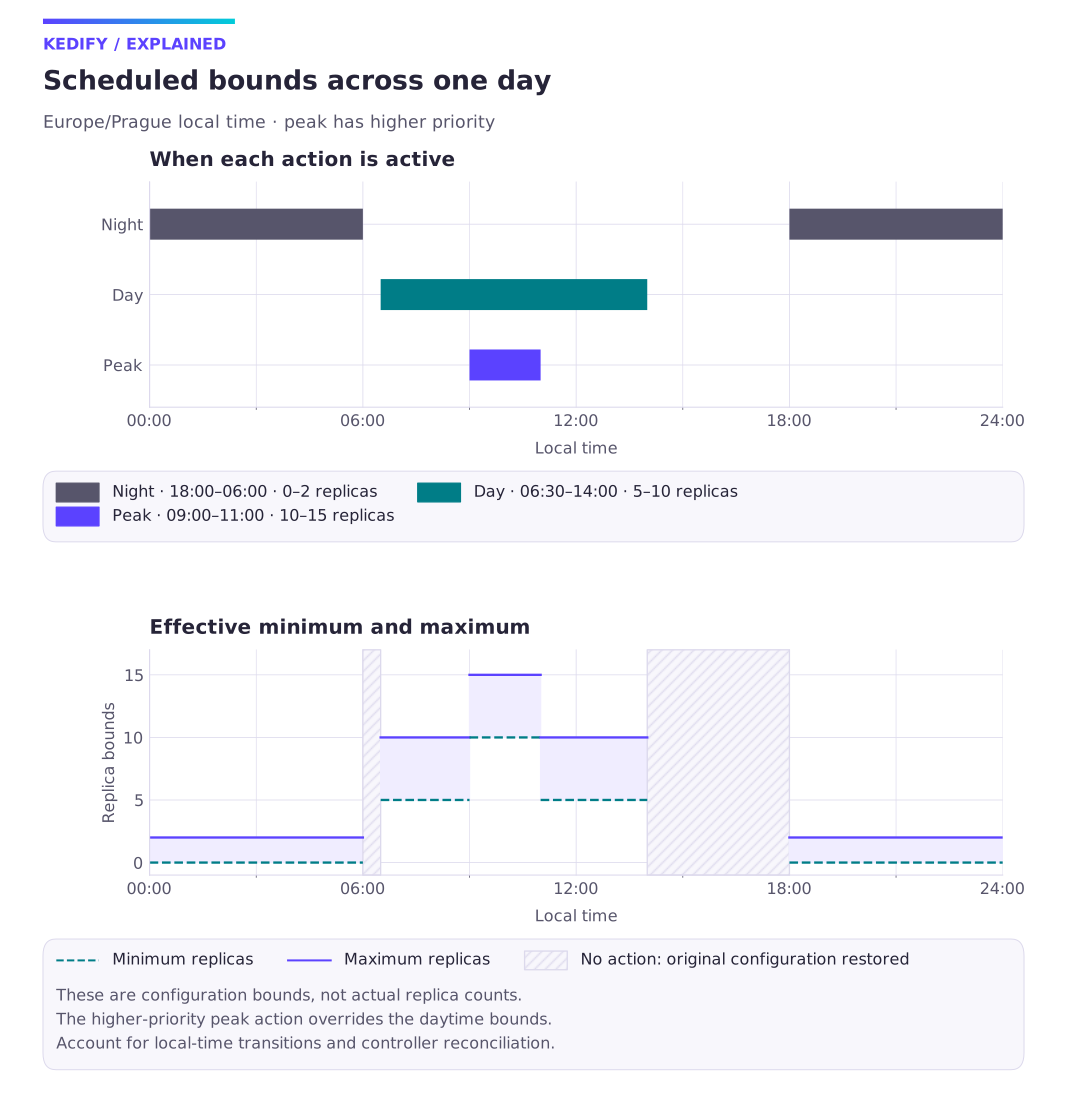
Diagram description
Night sets bounds 0–2 from 18:00 to 06:00. Day sets 5–10 from 06:30 to 14:00. Higher-priority peak sets 10–15 from 09:00 to 11:00. Uncovered windows restore original configuration.
These are min/max configuration settings, not a prediction of actual replicas. The shaded gaps restore the original configuration when no action is active.
apiVersion: keda.kedify.io/v1alpha1kind: ScalingPolicymetadata: name: scalingpolicy-samplespec: targets: - apiVersion: "keda.sh/v1alpha1" kind: ScaledObject name: sample-so - apiVersion: "keda.sh/v1alpha1" kind: ScaledJob name: sample-sj actions: - name: day priority: 1 trigger: schedule: start: "30 6 * * *" end: "0 14 * * *" timezone: "Europe/Prague" adjustment: minReplicaCount: 5 maxReplicaCount: 10 - name: night priority: 1 trigger: schedule: start: "0 18 * * *" end: "0 6 * * *" timezone: "Europe/Prague" adjustment: minReplicaCount: 0 maxReplicaCount: 2 - name: peak priority: 2 trigger: schedule: start: "0 9 * * *" end: "0 11 * * *" timezone: "Europe/Prague" adjustment: minReplicaCount: 10 maxReplicaCount: 15Verify and reverse a policy
Section titled “Verify and reverse a policy”Before creating the example, record the target fields and ensure the named targets exist in the same namespace. Apply through the policy owner and inspect kubectl get scalingpolicy scalingpolicy-sample -o yaml, target configuration and events during an action window. Confirm timezone and priority produce the intended min/max settings, then verify replicas independently under demand.
To stop applying policy actions, use the pause task and inspect restoration of the managed target fields. Remove the example through its owner only after confirming target configuration and capacity. Exact target/action/priority/status definitions are in the ScalingPolicy reference; timed resume is a separate maintenance operation.
Continue with this topic
Section titled “Continue with this topic”Choose: Prepare for predictable demand.
Reference: Annotations and controller selection.