
Scale Ingress NGINX Workloads with OTel
This guide shows how to autoscale Kubernetes workloads from metrics emitted by ingress-nginx and scraped by OpenTelemetry Collector. It is useful when ingress-nginx already observes the traffic you want to scale on, and you want KEDA to react to that signal without routing traffic through the Kedify HTTP proxy.
The complete runnable sample is available in the Kedify examples repository: samples/otel-ingress-nginx-poc.
Architecture
Section titled “Architecture”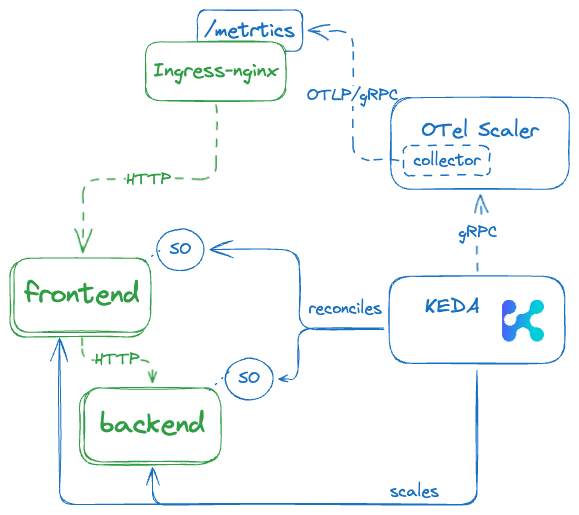
The sample uses this flow:
- traffic reaches the
frontendthrough ingress-nginx - ingress-nginx exposes Prometheus-style controller metrics
- OpenTelemetry Collector scrapes
ingress-nginx-controller-metrics.ingress-nginx.svc:10254 - the collector filters the metric stream down to the ingress-nginx metric used for scaling
- Kedify OTel Scaler receives that metric over OTLP/gRPC
- KEDA reconciles the
ScaledObjectresources and scales the frontend and backend workloads
The frontend ScaledObject scales from an ingress-nginx metric. The backend ScaledObject uses the kubernetes-workload scaler so the backend can follow frontend demand.
Prerequisites
Section titled “Prerequisites”- A Kubernetes cluster with KEDA and Kedify installed.
kubectl,helm, andheyinstalled locally.- ingress-nginx installed or installable in the cluster.
- ingress-nginx controller metrics enabled.
Step 1: Run the Sample
Section titled “Step 1: Run the Sample”Clone the examples repository and run the setup script:
git clone https://github.com/kedify/examples.gitcd examples/samples/otel-ingress-nginx-poc./setup.shThe setup script installs the sample Apollo Router backend, enables ingress-nginx metrics, installs the OTel add-on, and applies the frontend and ScaledObject manifests.
Relevant files:
Step 2: Enable and Scrape ingress-nginx Metrics
Section titled “Step 2: Enable and Scrape ingress-nginx Metrics”The sample enables the ingress-nginx controller metrics endpoint:
helm repo add ingress-nginx https://kubernetes.github.io/ingress-nginxhelm repo update ingress-nginxhelm upgrade -i ingress-nginx ingress-nginx/ingress-nginx \ --namespace ingress-nginx \ --create-namespace \ --set controller.metrics.enabled=trueIf ingress-nginx is already installed with custom values, include those values or --reuse-values when enabling metrics.
The OTel add-on values then configure OpenTelemetry Collector to scrape that endpoint:
otelCollector: enabled: true alternateConfig: receivers: prometheus: config: scrape_configs: - job_name: "otelcol" scrape_interval: 5s static_configs: - targets: ["ingress-nginx-controller-metrics.ingress-nginx.svc:10254"]The sample filters the metric stream before sending it to Kedify OTel Scaler:
processors: filter/ottl: error_mode: ignore metrics: metric: - | name != "nginx_ingress_controller_connect_duration_seconds"The exporter sends metrics to the OTel scaler OTLP endpoint:
exporters: otlp/keda: endpoint: keda-otel-scaler.keda.svc:4317 compression: "none" tls: insecure: trueSee the complete otel-scaler-values.yaml file for the full collector configuration.
Step 3: Scale the Frontend from ingress-nginx Metrics
Section titled “Step 3: Scale the Frontend from ingress-nginx Metrics”The frontend ScaledObject uses the kedify-otel trigger and queries the metric for the frontend service in the app namespace:
apiVersion: keda.sh/v1alpha1kind: ScaledObjectmetadata: name: my-app-fe-so namespace: appspec: scaleTargetRef: name: my-app-fe triggers: - type: kedify-otel metadata: scalerAddress: "keda-otel-scaler.keda.svc:4318" metricQuery: "nginx_ingress_controller_connect_duration_seconds_count{service=my-app-fe,namespace=app}" operationOverTime: "rate" targetValue: "1000" minReplicaCount: 1 maxReplicaCount: 4operationOverTime: "rate" turns the ingress-nginx counter into a rate-like signal for autoscaling. The sample target is intentionally simple; tune targetValue, stabilization windows, and replica limits for your own traffic pattern.
See the complete fe-so.yaml file.
Step 4: Keep Backend Capacity Aligned
Section titled “Step 4: Keep Backend Capacity Aligned”The backend ScaledObject in the sample uses kubernetes-workload to scale the Apollo Router backend from the number of frontend pods:
apiVersion: keda.sh/v1alpha1kind: ScaledObjectmetadata: name: my-app-be namespace: appspec: scaleTargetRef: name: my-app-be triggers: - type: kubernetes-workload metadata: podSelector: "app=my-app-fe" value: "1" minReplicaCount: 1 maxReplicaCount: 4This keeps backend capacity coupled to the frontend instead of duplicating the ingress-nginx metric query. See the complete be-so.yaml file.
Step 5: Generate Load
Section titled “Step 5: Generate Load”Forward ingress-nginx locally:
kubectl port-forward -n ingress-nginx service/ingress-nginx-controller 8080:80In another terminal, send traffic using the host configured in the sample Ingress:
hey -c 100 -z 60s -t 90 -host my-app-fe.local http://localhost:8080Watch the ScaledObject, HPA, and pods:
kubectl get scaledobject,hpa -n appkubectl get pods -n app -wYou can also inspect the raw ingress-nginx metric:
kubectl port-forward -n ingress-nginx svc/ingress-nginx-controller-metrics 10254:10254curl -s http://localhost:10254/metrics | grep nginx_ingress_controller_connect_duration_seconds_countNext Steps
Section titled “Next Steps”- Review the Kedify OTel Scaler reference for trigger parameters and query syntax.
- Compare this pattern with other OTel Scaler integration options.
- Use the full otel-ingress-nginx-poc sample as a starting point for adapting the collector scrape target, metric query, and thresholds.